Section 4: Two Planes, Two Contracts - API Design (with pushback)
Executive Summary: This section designs the platform's two contracts. The control plane manages functions: create, update code, publish an immutable version, point an alias at it (optionally split 90/10 for a canary), and set concurrency and async behaviour. The data plane is one verb, Invoke, with three invocation types. Two choices carry the design. A function's own failure travels as 200 plus an X-Function-Error header, so it never looks like a platform failure. And sync callers get a 429 they must handle, while async events are queued and retried for them. Four pushback rounds test those choices.
The interviewer caps the marker: "Section 3 gave you about a million invokes a second and about 600 config writes a second. What do customers actually call?"
That ratio is the first thing to say out loud. At peak, invokes outnumber config writes by more than 1,000 to 1. Those are two different APIs with two different promises: the data plane is held to 99.95% and the control plane to 99.9%. The data plane must keep working on last-known config when the control plane is down. Reads of config never sit on the invoke path, so the contract can't need them there either.
The Control Plane: Functions, Versions, Aliases
POST   /v1/functions                                  CreateFunction
PUT    /v1/functions/{name}/code                      UpdateFunctionCode   (zip or image digest)
POST   /v1/functions/{name}/versions                  PublishVersion       -> immutable N
PUT    /v1/functions/{name}/aliases/{alias}           CreateAlias / UpdateAlias (weighted)
PUT    /v1/functions/{name}/concurrency               PutFunctionConcurrency (reserved)
PUT    /v1/functions/{name}:{qualifier}/provisioned   PutProvisionedConcurrency
PUT    /v1/functions/{name}:{qualifier}/event-config  PutFunctionEventInvokeConfig
POST   /v1/event-source-mappings                      CreateEventSourceMapping
CreateFunction takes a runtime, handler, memory (128 MB to 10 GB, CPU scaled at 1 vCPU per 1,769 MB), a timeout of up to 15 minutes, and a code reference. The code reference is either an uploaded zip or a container image digest, never a mutable tag. The function's mutable head, $LATEST, is a draft for iteration. PublishVersion freezes code and config together, stamps them with the code's content hash, and returns the next number. Tidewater shipping a fix looks like this:
POST /v1/functions/checkout-api/versions
{ "description": "fix tax rounding", "expectedCodeHash": "sha256:9c1e…" }
-> 201 { "version": "43", "codeHash": "sha256:9c1e…", "memoryMb": 1024, "runtime": "nodejs22" }

PUT /v1/functions/checkout-api/aliases/live
{ "version": "42", "routing": { "43": 0.10 } }
-> 200 { "alias": "live", "weights": { "42": 0.90, "43": 0.10 } }
expectedCodeHash makes the publish safe to retry and stops anyone from publishing code they didn't test. The alias update is what moves traffic.
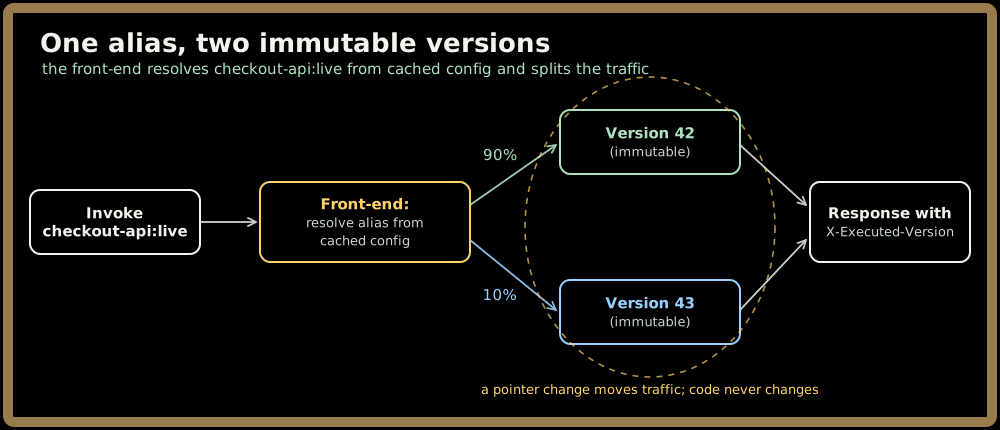
The front-end resolves the alias on every invoke from its in-memory config (the whole active set is ~2 GB). It returns X-Executed-Version, so Tidewater's dashboards can compare the 10% canary's error rate against version 42's. Rolling back means changing a pointer, which propagates in p99 ≤ 5 s.
The concurrency and async settings complete the control plane. For the 09:00 flash sale, Tidewater raises its account limit from the default 1,000 to 5,000. It then calls PutProvisionedConcurrency on checkout-api:live with 3,000, timed for 08:55. For thumbnail-maker, it sets the async behaviour once:
PUT /v1/functions/thumbnail-maker:live/event-config
{ "maximumRetryAttempts": 2, "maximumEventAgeSeconds": 21600,
  "destinations": { "onFailure": "queue://tidewater/thumbnail-dlq" } }
Quick check before moving on:
Sign in to continue reading
The rest of this lesson is available with a free account. Signing in with Google or Microsoft is free.
Sign in to read the full lesson