Section 1: The Meeting That Moves Every Monday - Problem Understanding & Clarifications
Executive Summary: This section covers the opening minutes of a prompt that sounds like CRUD and turns out to be four hard problems wearing one product. We decompose "design Google Calendar" into what, who, why and how; name the trap (an "event" is a rule, not a row); and run a clarifying exchange in which each answer kills or creates a class of work — recurrence, external guests, meeting rooms, reminders, global users, offline phones. We close with the assumptions written down, the cast who will carry the design through every section, and a teaser: a weekly meeting that, correctly, shows up at three different times in Lisbon on three consecutive Mondays.
The interviewer turns the laptop around so you can read it:
"Design Google Calendar. People create events, invite others, and see their schedule on the web and on their phones. They get a reminder before each meeting, and they can ask the system to find a time when everyone is free. Assume Google scale."
Your first instinct is a table: events(id, owner, title, start, end), an index on (owner, start), a REST API, done by minute fifteen. That instinct is the trap. Everyone has used a calendar, and familiarity invites you to skip the thinking. The opposite failure hears "Google scale" and draws Kafka before knowing what an event is.
The honest read is that this prompt is four hard problems in disguise:
- Time. "Every Monday at 9" is a rule that runs forever, across daylight-saving changes, with exceptions carved out of it. You cannot store forever as rows.
- Sharing. One meeting lives on many people's calendars. Every edit the organizer makes is a fan-out to every guest and every one of their devices.
- The clock as a workload. Reminders are a scheduled-job system, and the clock is cruel: meetings start on the hour and half hour, so reminders pile up at :50 and :20.
- Correctness islands. An attendee's copy of a meeting may lag a few seconds. A meeting room must never be booked twice. Most of the system can be relaxed; a few corners cannot.
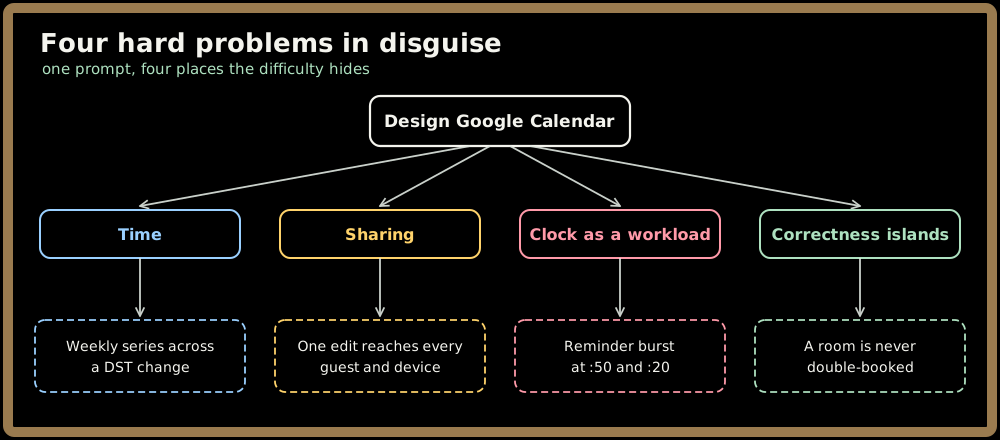
Key Insight: The word that hides the difficulty is event. In a to-do app an item is a row. In a calendar, a recurring event is a rule plus a list of exceptions, it belongs to many people at once, and it schedules future work for the system itself. Say that early and the interviewer knows you've seen past the table.
Decomposing the Prompt
Before asking anything, map the territory along four axes:
- What it does: create, edit and delete events (single, recurring, all-day); invite guests and collect their responses; show a schedule; fire reminders; find a common free slot.
- Who uses it: individual consumers, and enterprise tenants (think Workspace customers) who add shared team calendars and bookable resources like meeting rooms. Through three kinds of client: the web, Android and iOS apps that must work offline, and third parties syncing over standard protocols (CalDAV-style sync and a public API).
- Why it exists: coordinating people's time. Its value is that everyone's view of a meeting agrees and nobody misses it.
- How it's used: read-heavy and bursty. People glance at "what's next" constantly and edit occasionally, hardest on Monday morning.
Quick check before moving on:
Sign in to continue reading
The rest of this lesson is available with a free account. Signing in with Google or Microsoft is free.
Sign in to read the full lesson