Section 12: The Answer Nobody Can Recite - Final Summary & Candidate Scorecard
Executive Summary: This closing section turns the whole module into a scoring instrument. We replay the interview arc and name the signal each phase was really recording, then lay out the 100-point scorecard: five dimensions, each with what a top score sounds like on this problem and where points leak away. Score bands map to readiness levels with a remedy for each, and a final catalog shows where the URL shortener hides inside other interview questions.
Here is the uncomfortable part. Almost every candidate who walks into this question has seen a TinyURL design before. The boxes are not a secret: a service, a cache, a database, some way to make codes. The interviewer knows you know them. So the boxes are not where the points are. The points sit in a quieter place: whether you can derive the design instead of reciting it. Can you produce 116 K redirects per second from two given numbers? Can you explain why 6 characters dies in under two years? Can you defend a 302 against the 301 that sounds cheaper? And can you keep your footing when the interviewer starts breaking things? You cannot reliably earn points you cannot name, so this section names them.
The Arc, Replayed as Signal
Every phase of the interview was a test of a different habit. The diagram pairs each phase with the signal it was quietly recording.
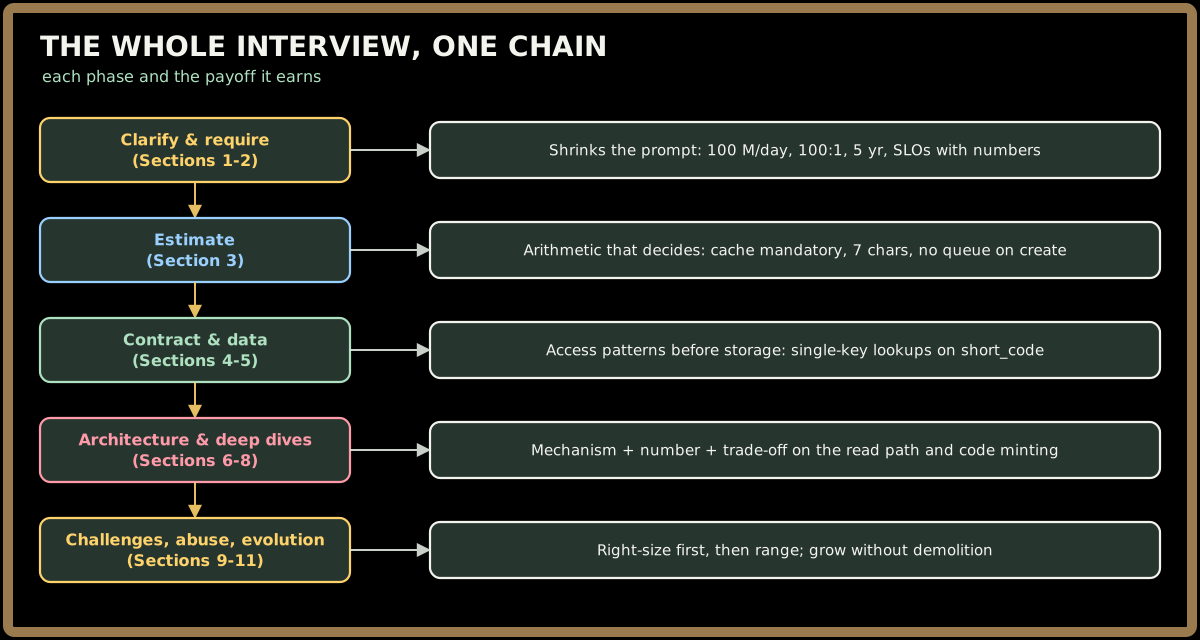
Key Insight: Read the right-hand column and notice that none of the signals is "knows Redis" or "has heard of Feistel networks." Every one is about using familiar parts in proportion to a measured problem. The 100:1 ratio is the spine of the whole interview: it is why the cache is mandatory, why read and write become separate services, why the create path stays plain, and why the redirect path gets most of the deep-dive time. A candidate who lets that one ratio drive the design scores well almost by accident.
Quick check before moving on:
Sign in to continue reading
The rest of this lesson is available with a free account. Signing in with Google or Microsoft is free.
Sign in to read the full lesson