WebSockets — Part 1: Foundations and Protocol Internals
What is this?
Think about how a normal web request works. Your browser walks up to the server, asks one question ("give me this page"), gets one answer, and the conversation is over. To ask again, it has to walk up and start a whole new conversation. It's like mailing a letter: one letter, one reply, seal a fresh envelope every time.
That's fine for loading a page. It's terrible for anything live — a chat, a multiplayer game, a stock ticker — because the server has no way to tap you on the shoulder and say "hey, something just happened." It can only ever answer; it can never start talking.
A WebSocket fixes that by turning the one-shot letter exchange into an open phone call. The browser dials once (using an ordinary HTTP request), the server picks up, and then the line just stays open. Now either side can talk the instant they have something to say — no redialing, no envelopes, no "are we there yet?" Both people can even talk at the same time. That's the whole idea.
The one-line idea: a WebSocket is a single, long-lived, two-way connection — an open phone line between client and server — that replaces the "ask, answer, hang up, repeat" pattern of HTTP with "stay connected and talk whenever."
This part covers how that phone line gets set up, how messages travel over it, and why it changed how we build real-time systems.
1. The protocol, and how the call gets connected
WebSocket is defined in RFC 6455. It gives you a full-duplex (both directions at once), persistent channel riding on a single TCP connection. The clever part is how it starts: it doesn't invent a brand-new way to open connections — it borrows HTTP's, then upgrades.
1.1 The HTTP upgrade handshake
The browser begins with what looks like a totally normal HTTP request, except it politely asks to switch protocols mid-conversation: "We started this as HTTP — mind if we keep the line open and switch to WebSocket?" If the server agrees, it answers with a special 101 Switching Protocols, and from that moment on the same TCP connection stops speaking HTTP and starts speaking WebSocket frames.
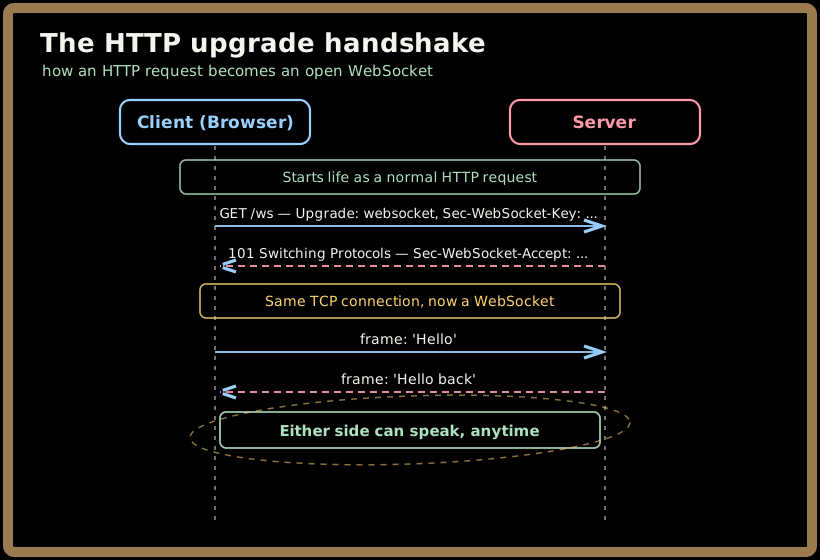
Two header details worth knowing:
Sec-WebSocket-Key/Sec-WebSocket-Accept— a little challenge-response handshake. The client sends a random key; the server hashes it with a fixed magic string and sends back the result. This isn't security — it just proves the server actually understood the WebSocket handshake and isn't some confused cache or proxy blindly echoing bytes.- Reusing port 443 — because it starts as HTTPS, secure WebSockets (
wss://) travel over the same port as normal web traffic, so they sail through most firewalls that would block an exotic new port.
💡 Why borrow HTTP at all? Because the entire internet — proxies, load balancers, firewalls — already knows how to handle an HTTP request on port 443. Starting there means WebSockets work through existing infrastructure instead of demanding new holes in every firewall on earth.
1.2 What a message looks like on the wire: frames
Once the call is connected, data travels in frames — small structured packets. You rarely touch these directly (your library does), but understanding the shape explains a lot of real-world behavior. Each frame carries a few control bits and an opcode that says what kind of frame it is:
| Opcode | Frame type | Purpose |
|---|---|---|
0x1 |
Text | UTF-8 data (usually JSON) |
0x2 |
Binary | Raw bytes (files, protobuf, images) |
0x0 |
Continuation | A piece of a larger, fragmented message |
0x8 |
Close | "I'm hanging up" |
0x9 / 0xA |
Ping / Pong | "You still there?" / "Yep" |
Two bits matter most:
- FIN — is this the last frame of a message, or is more coming? This is how one big message gets split across several frames.
- MASK — every client-to-server frame is XOR-masked with a random key. It looks like security but isn't; it exists to stop a malicious page from tricking old, dumb proxies into mis-caching traffic. Server-to-client frames are not masked.
The payoff of all this structure: framing overhead is just 2–14 bytes per message, versus the 500–1000+ bytes of HTTP headers on every single polling request. That difference is most of why WebSockets are so much lighter.
Quick check before moving on:
2. Why this beat the old ways
Before WebSockets, developers faked "real-time" with HTTP, and every approach had a sharp edge. It's worth seeing them, because interviewers love asking "why not just poll?"
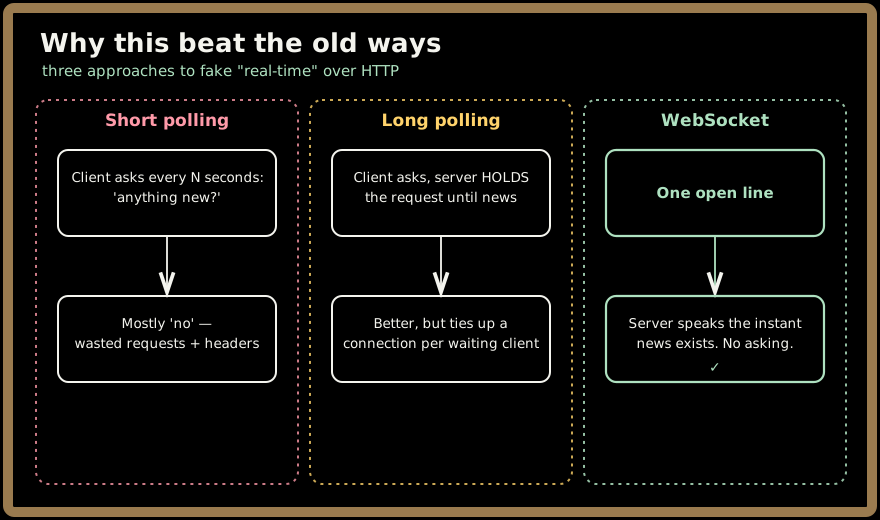
- Short polling — the client asks "anything new?" every few seconds. Simple, but most answers are "no," and each pointless round trip drags a full set of HTTP headers with it. A thousand clients polling once a second is a thousand requests per second of mostly-nothing.
- Long polling — smarter: the client asks, and the server holds the request open until it actually has something, then answers and the client immediately asks again. Closer to real-time, but every waiting client occupies a server connection doing nothing, and the constant reconnect churn is awkward to scale.
- Server-Sent Events (SSE) — a genuine one-way server→client stream over HTTP. Great when only the server needs to push (we'll compare it properly in Part 3), but it can't carry client→server messages on the same channel.
WebSockets collapse all of this into one persistent, two-way line. The concrete wins:
- Latency drops from the 100–500ms of "set up a new request" down to single-digit milliseconds for each subsequent message — the connection's already there.
- Overhead falls ~90%, because you pay HTTP's header tax once at handshake instead of on every message.
- The server can finally initiate. This is the qualitative leap, not just an optimization — push notifications, live cursors, and "someone is typing…" are only possible when the server can talk first.
3. The life of a connection
A WebSocket isn't fire-and-forget; it's a relationship with a lifecycle you have to manage. At any moment a connection sits in one of four states.
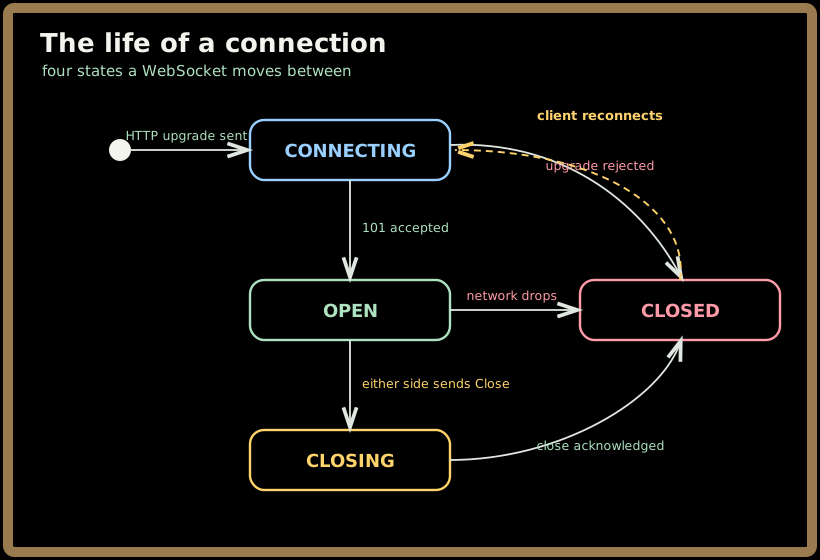
The interesting transitions are the unhappy ones. A clean shutdown sends a Close frame and waits for acknowledgment. But networks don't always cooperate — a phone in a tunnel, a laptop lid closing, a flaky Wi-Fi handoff — and the connection just dies with no goodbye. Which raises the key question: how do you even know the line went dead?
3.1 Heartbeats: "you still there?"
On a long phone call where nobody's spoken for a while, you say "...you still there?" to check the line didn't drop. WebSockets do exactly this with Ping/Pong frames. Every 30–60 seconds, one side sends a Ping; a healthy peer replies Pong. Miss a few Pongs and you can confidently declare the connection dead and start reconnecting — instead of cheerfully sending messages into a void.
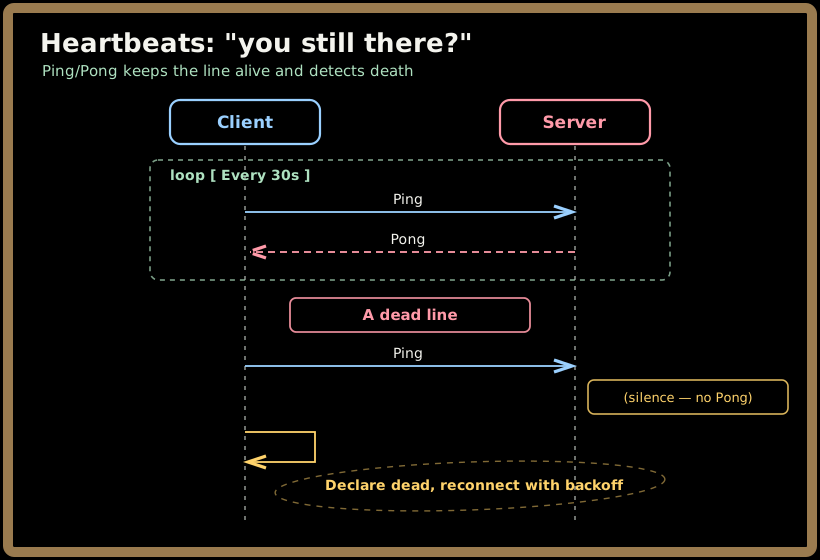
⚠️ Heartbeats do double duty: they detect dead connections and keep them alive. Many load balancers and proxies silently kill a TCP connection that's been idle for 60 seconds. A heartbeat every 30s keeps the line warm so the infrastructure doesn't hang up on you mid-session.
When reconnecting, never reconnect immediately — if a server drops a thousand clients and they all reconnect at the same instant, you get a stampede. Use exponential backoff with jitter (wait a bit longer each try, plus a random sprinkle). We'll come back to this "reconnection storm" in Parts 3 and 4 — it's a favorite interview topic.
Quick check before moving on:
4. Text, binary, and big messages
WebSockets carry two kinds of data frames, and the choice has real consequences:
- Text frames carry UTF-8 — almost always JSON in practice. Human-readable, easy to debug, universally supported. The default for most apps.
- Binary frames carry raw bytes — Protocol Buffers, MessagePack, images, audio chunks. More compact and faster to parse, at the cost of readability. Reach for these when message volume or size is the bottleneck (trading feeds, media streaming, games).
4.1 Fragmentation: sending an elephant through a straw
What about a 5 MB message? WebSockets don't force you to buffer the whole thing before sending. Fragmentation lets you stream it as a sequence of frames: the first frame says "Text, but not final (FIN=0)," the middle frames are Continuations, and the last frame flips FIN=1 to say "that's the end."
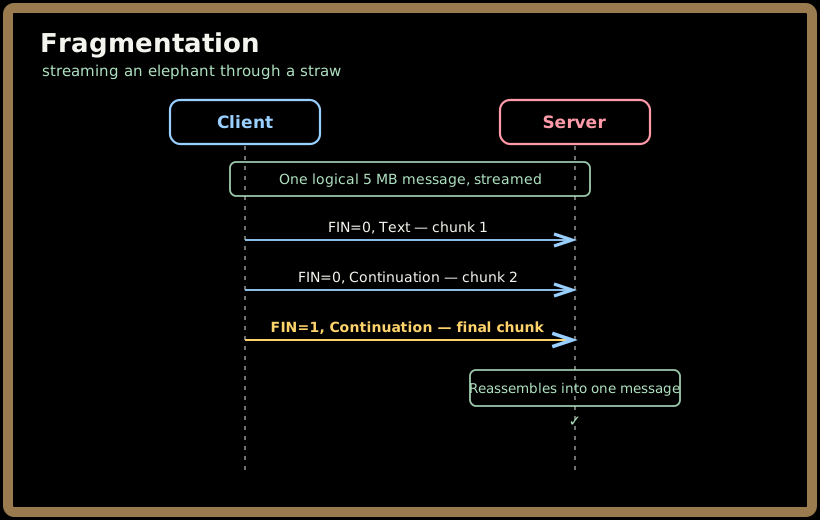
This matters for memory: the receiver can process chunks as they arrive (streaming) instead of holding the entire payload in RAM. It also raises a problem we'll spend real time on later — what if the sender produces chunks faster than the receiver can swallow them? That's backpressure, and it's one of the hardest parts of running WebSockets at scale (Part 2, Section on flow control).
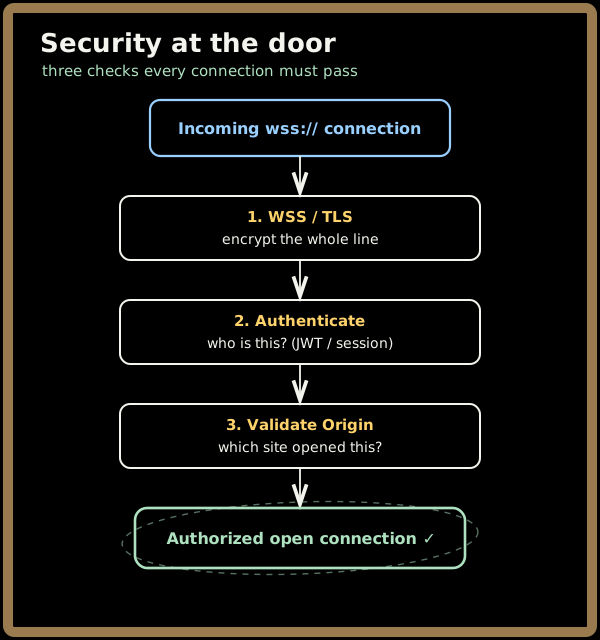
5. Security at the door
Because a WebSocket stays open and lets the server push, a hijacked one is more dangerous than a stolen single request. Three protections do most of the work:
- Always use
wss://(TLS). Plainws://is cleartext — anyone on the path reads and tampers.wss://encrypts the entire channel, exactly like HTTPS. - Authenticate the connection. The handshake is an HTTP request, so it can carry a credential — typically a JWT or session cookie. The catch unique to WebSockets: the connection lives for hours, but tokens expire in minutes. You can't just check once at connect time and forget it; you need in-band token refresh over the open connection (a whole topic in Parts 2 and 4).
- Validate the
Originheader. Browsers will happily letevil.comopen a WebSocket to your server using the victim's cookies — this is Cross-Site WebSocket Hijacking. WebSockets are not protected by the same-origin policy or CORS the way fetch requests are, so the server must explicitly check theOriginheader and reject connections from sites it doesn't trust. This is the single most-missed WebSocket security control.
Quick check before moving on:
6. Where you'll actually use this
Three classic shapes show up again and again — and each stresses a different part of the system:
- Chat / messaging. A gateway holds everyone's connections; a message from one user fans out to the right recipients. The hard parts are presence (who's online?) and routing (which server holds the connection for user X?).
- Live financial dashboards. A market feed pushes a torrent of price updates to thousands of traders. The hard parts are latency (sub-millisecond matters) and fan-out (one update, thousands of recipients) — and backpressure when a slow client can't keep up with the firehose.
- Collaborative editing (Google Docs, Figma). Every keystroke from every editor must reach everyone else and merge without conflicts. The hard part is concurrency — reconciling simultaneous edits (via techniques like Operational Transform or CRDTs).
Notice the pattern: WebSockets make the transport easy, but each use case introduces its own distributed-systems challenge — presence, fan-out, backpressure, or conflict resolution. Part 2 is about building the architecture that handles those at scale.
7. Key takeaways
- A WebSocket is one persistent, two-way connection — an open phone line — that replaces HTTP's "ask, answer, hang up, repeat" and finally lets the server initiate.
- It starts as an HTTP request and upgrades (the
101 Switching Protocolshandshake), which is why it glides through existing port-443 infrastructure. - Messages travel as lightweight frames (2–14 bytes of overhead vs. HTTP's hundreds), in text (JSON) or binary (protobuf), and big messages can be fragmented and streamed.
- Connections need active management: heartbeats (Ping/Pong) to detect and prevent dead lines, plus reconnection with backoff and jitter to avoid stampedes.
- Security rests on three legs:
wss://(TLS), authenticating the connection (with in-band token refresh for long sessions), and validatingOriginto stop cross-site hijacking.
Test yourself before moving on:
Next, Part 2 tackles the real challenge: how do you take this elegant single connection and run millions of them at once, across many servers, without losing messages when a node dies?