Rate Limiting — Part 1: Foundations & Algorithms
maang.io System Design Series
What is this?
Picture a popular nightclub on a Friday night. There's a fire-code limit on how many people can be inside, and a bouncer at the door holding a clicker. People show up in clumps — a taxi pulls up and six friends spill out at once. The bouncer doesn't panic. He has a simple mental model: how fast are people coming in, and is the room near capacity? When it's full he doesn't slam the door forever — he tells the next group, "give it a few minutes, we're at capacity right now," and lets them back in as space frees up. He's not being mean. He's protecting everyone already inside from a crush that would ruin the night for all of them.
A rate limiter is that bouncer, standing in front of your service. Your backend has a finite capacity — so many requests per second before databases choke, queues back up, and latency spikes for everyone. The rate limiter watches the flow of incoming requests against a policy ("100 requests per minute per user") and, when a caller exceeds their share, politely turns excess requests away with a clear message: not now, try again shortly. The whole art is in the bouncer's clicker — how exactly do you count, and over what window? That counting strategy is the algorithm, and choosing it well is what the rest of this chapter is about.
The one-line idea: a rate limiter caps how many requests a given caller may make in a given time window, protecting finite capacity and shared fairness by turning excess traffic away cleanly instead of letting it melt the system for everyone.
A quick scoping note before we dive in. This is the concepts chapter — the algorithms and primitives. Wiring those primitives into a full production distributed rate limiter (with its own sharding, replication, and capacity math) is a separate, larger design exercise you'll meet in the 301 tier. Here we make sure you deeply understand the tools; there you'll assemble them under pressure.
1. Why rate limit at all?
It's tempting to think of rate limiting as a security feature — a wall against bad actors. It is that, but it's much more, and the bigger reasons are about health and fairness, not just defense. Four motivations, roughly in order of how often they bite:
- Protect capacity. Every system has a breaking point. Past it, you don't get "slightly slower" — you get a collapse, where queues fill, timeouts cascade, and a system serving 10,000 req/s happily falls over completely at 11,000. A rate limiter is the governor that keeps you on the safe side of that cliff. It trades a few rejected requests now for the whole system staying alive.
- Fairness across tenants. On a shared, multi-tenant platform, one noisy customer running a runaway script can starve everyone else. Rate limiting carves the pie into per-tenant slices so one greedy caller can't eat the whole thing. This is the "fire-code limit, fairly enforced" idea.
- Cost control. When every request costs you money — a downstream paid API, expensive compute, per-query database spend — an unbounded caller is an unbounded bill. A limit is a budget.
- Abuse and DDoS mitigation. Credential-stuffing attacks, scrapers, and volumetric floods all look like too many requests, too fast. Rate limiting is the first, cheapest filter that sheds that load before it reaches anything expensive.
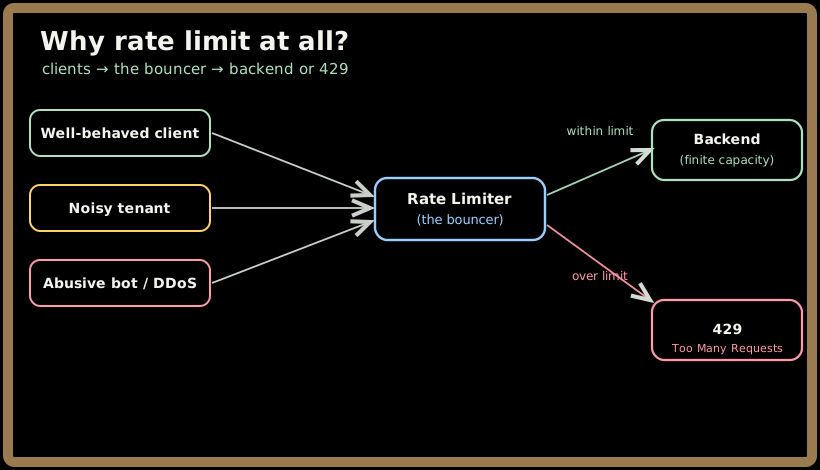
💡 The mindset shift that makes rate limiting click: it is not punishment, it is load shedding under a policy. A request you reject in 1 millisecond is a request that didn't get to spend 500 milliseconds dragging your database down for everyone else.
There's a natural question lurking here — where does this bouncer stand? At the gateway? In each service? On the client? That's an architecture question, and it's the whole of Part 2. For now we're focused on the bouncer's clicker: the counting algorithm.
2. The shape of every algorithm
Before the five algorithms, hold the shared frame. Every rate limiter answers one question — "has this caller used up their allowance for the current window?" — and they differ only in:
- How they define the window (a fixed calendar minute? a rolling 60 seconds? a continuously refilling pool?).
- What they store (a single counter? a list of timestamps? a level in a bucket?).
- How they handle bursts (do they allow a sudden clump of requests, or smooth them out?).
Keep those three axes in mind. As we walk the algorithms, you'll see each one is just a different answer to "window, storage, bursts." We'll use one running example throughout so the numbers compound: a limit of 5 requests per 60 seconds for one user. Watch how the same traffic gets a different verdict under each algorithm.
3. Fixed window counter
The simplest possible bouncer. Chop time into fixed calendar buckets — 12:00:00–12:00:59, then 12:01:00–12:01:59 — and keep one counter per bucket. Every request increments the current bucket's counter; if it would exceed the limit, reject it. When the clock ticks into the next minute, the counter resets to zero.
Worked example. Limit = 5 per minute. In the window 12:00:00–12:00:59 the user makes 5 requests — all allowed, counter now 5. A 6th request at 12:00:45? Rejected. At 12:01:00 the clock rolls over, the counter resets to 0, and they get 5 fresh requests.
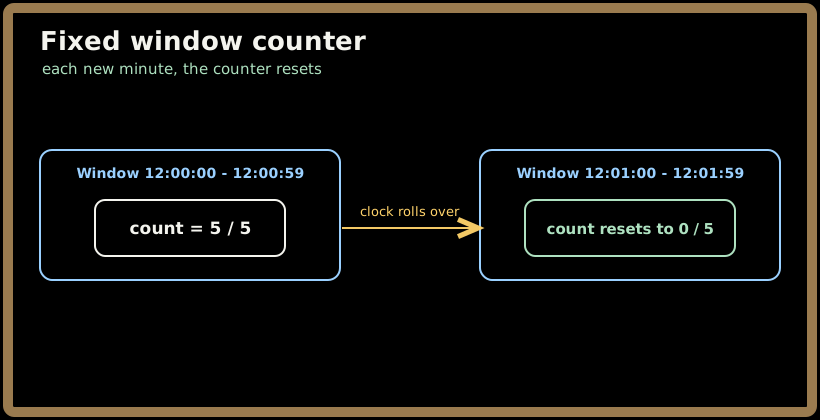
It's beautifully cheap: one integer per caller, trivial to reason about. But it has a notorious flaw — the boundary burst.
⚠️ The fixed-window edge problem. Because the window resets on a hard calendar boundary, a caller can fire their full allowance at the end of one window and their full allowance at the start of the next. With our 5/minute limit, imagine 5 requests at 12:00:59 and 5 more at 12:01:01. That's 10 requests in 2 seconds — double the intended rate — yet every request is "legal" because they land in different windows. For a limit meant to protect a fragile backend, that 2× burst can be exactly the spike you were trying to prevent.
Fixed window is the right pick when approximate limiting is fine and simplicity wins (think coarse abuse protection). When the boundary burst actually matters, you reach for a sliding window.
Quick check before moving on:
4. Sliding window log
The most accurate algorithm, and the one that fixes the boundary burst by brute force: instead of bucketing time, remember the exact timestamp of every request in a sorted log. To decide on a new request, look back exactly window seconds from now and count how many timestamps fall inside. If that count is below the limit, allow it and append the new timestamp; otherwise reject.
Worked example. Limit = 5 per 60s. The user has requests logged at 12:00:10, 12:00:20, 12:00:30, 12:00:40, 12:00:50. A new request arrives at 12:00:55. We look back to 11:59:55 and count: all 5 are inside the last 60 seconds, so we're at the limit — reject. Now the same request arrives instead at 12:01:11: we look back to 12:00:11, which excludes the 12:00:10 entry, so only 4 are in-window — allow, and the log slides forward.
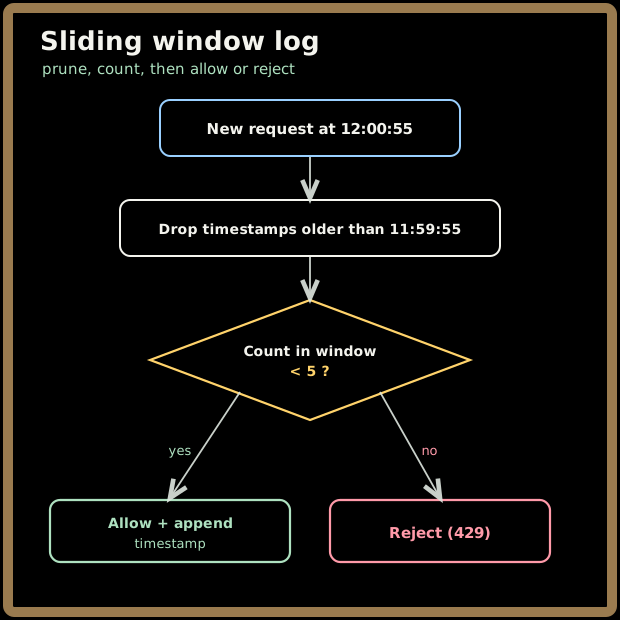
There is no boundary to game — the window genuinely slides with every request, so the limit is exact. The price is memory and cost: you store up to limit timestamps per caller, and for a high limit (say 10,000/hour) that's a lot of state to keep and scan per request. Sliding window log is the algorithm you choose when accuracy is non-negotiable and the limit is small enough that storing the log is cheap.
5. Sliding window counter
The pragmatic compromise — and the one you'll see most often in real gateways — because it gets most of the sliding-window accuracy at fixed-window cost. The trick: keep two fixed-window counters (current and previous), and estimate the rolling count by weighting the previous window by how much of it still overlaps the rolling window.
The formula is:
estimate = current_count + previous_count × (overlap fraction of previous window)
Worked example. Limit = 5 per minute. Suppose the previous window (12:00) saw 5 requests and the current window (12:01) has seen 3 so far. A new request arrives at 12:01:15 — so we are 15 seconds (25%) into the current minute, meaning the rolling 60-second window still overlaps 75% of the previous minute. Estimate = 3 + 5 × 0.75 = 6.75, which rounds to 7. That's over our limit of 5 → reject. Notice how it "remembers" the heavy previous window and smooths the hard reset that fixed-window suffered from.
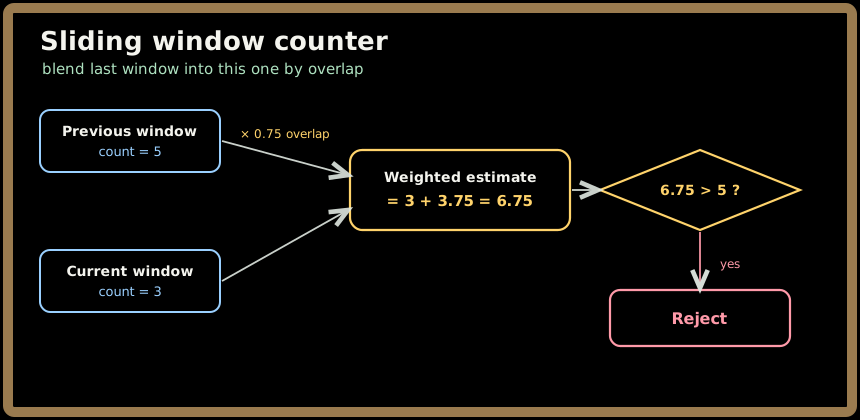
💡 This is an approximation — it assumes the previous window's requests were spread evenly, which isn't always true — but in practice the error is tiny (Cloudflare famously reported well under 1% error on real traffic), and you pay for only two counters per caller instead of a full log. For the vast majority of systems, sliding window counter is the sweet spot: it kills the boundary burst, costs almost nothing, and is accurate enough that nobody notices the rounding.
Quick check before moving on:
6. Token bucket
Now we shift from "count requests in a window" to a more elegant mental model that also handles bursts gracefully. Picture an old arcade: to play a game you need a token, and there's a machine slowly dispensing tokens into a bucket at a steady rate. You can save up tokens — the bucket holds at most, say, 10 — so if you've been away you can walk up and play several games back-to-back. But once the bucket's empty you have to wait for the machine to drip more.
That's the token bucket exactly. A bucket holds up to B tokens (the capacity, which is your burst allowance). Tokens are added at a steady refill rate R (tokens per second, your sustained rate). Each incoming request must take one token to proceed; if the bucket is empty, the request is rejected (or made to wait).
Worked example. Capacity B = 10, refill R = 5 tokens/sec (the bucket adds 1 token every 200ms, up to a max of 10). The user has been idle, so the bucket is full at 10. A burst of 10 requests arrives instantly — all 10 succeed, draining the bucket to 0. The 11th request that same instant is rejected. But wait 1 second: 5 tokens have refilled, so 5 more requests can go through. The steady-state ceiling is 5 req/s (the refill), but the bucket tolerates a burst of 10 when tokens have accumulated.
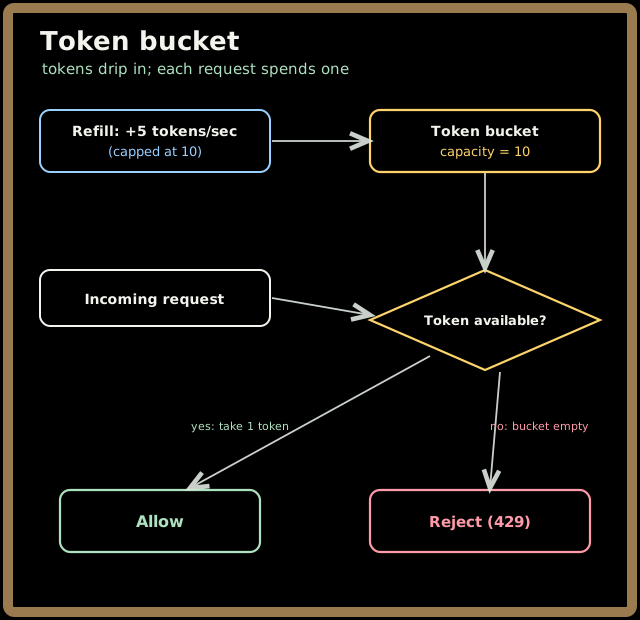
This decoupling of burst capacity (B) from sustained rate (R) is what makes token bucket so beloved. Real traffic is bursty — users click three times quickly, a mobile app syncs a batch — and token bucket absorbs those clumps without raising the long-run average. It's the default algorithm in countless gateways (the API Gateway chapter introduces token bucket for exactly this reason), and it's a perfectly good interview answer when someone says "design a rate limiter." We'll lean on this bucket again in Part 3, where the question becomes: what happens when you have many buckets across many nodes?
7. Leaky bucket
Token bucket's close cousin, with one crucial difference in personality: where token bucket allows bursts, leaky bucket smooths them out. Picture a funnel — a bucket with a small hole in the bottom. You can pour water in fast (bursty arrivals), but it can only drip out at a fixed rate. Requests queue inside the bucket and are released to the backend at a constant, even pace. If you pour in faster than the hole can drain and the bucket overflows, the excess spills (those requests are dropped).
The key property: the backend sees a perfectly smooth, constant outflow no matter how spiky the input. That's its gift and its catch.
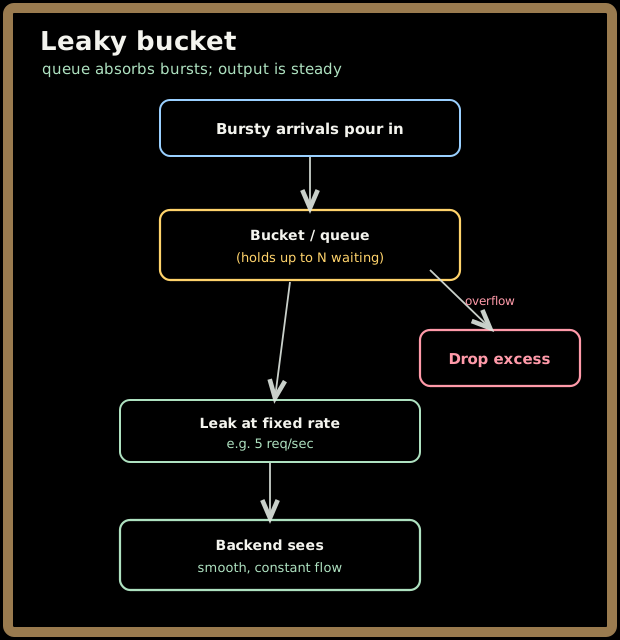
Worked example. Leak rate = 5 req/sec, queue capacity = 10. A burst of 12 requests arrives at once. The first 10 enter the queue; the last 2 overflow and are dropped. The queued requests now drain to the backend at a steady 5/sec — so the backend never sees the spike, it sees a calm 5/sec stream that takes 2 seconds to clear.
The trade-off versus token bucket comes down to one question: do you want to absorb bursts or eliminate them?
| Token bucket | Leaky bucket | |
|---|---|---|
| Burst behavior | Allows bursts up to capacity | Smooths bursts into a steady stream |
| Backend sees | Spiky (up to B at once) | Perfectly even outflow |
| Adds latency? | No (immediate allow/reject) | Yes (requests can wait in the queue) |
| Best when | Backend can handle short spikes | Backend needs a strictly even, protected feed |
⚠️ Leaky bucket can add latency — a request might sit in the queue waiting to drip out — and under sustained overload that queue stays full, so callers experience delay rather than a fast rejection. Token bucket, by contrast, gives an instant yes/no. Choose leaky bucket when the thing you're protecting genuinely needs a smooth, even flow (a downstream that hates spikes); choose token bucket when bursts are fine and you'd rather fail fast than make people wait.
Quick check before moving on:
8. The client contract: how to say "no" properly
Choosing an algorithm is half the job. The other half — the half juniors forget — is telling the client clearly what happened so well-behaved clients can cooperate instead of hammering you harder. A rate limiter that just drops requests silently trains clients to retry aggressively, which is the opposite of what you want.
The HTTP contract is well-established and you should know it cold:
- Respond with status
429 Too Many Requests— the standard, unambiguous "you've hit the limit" code. - Include a
Retry-Afterheader telling the client how long to wait (in seconds, or an HTTP date). This is the single most important courtesy: it turns blind retrying into a polite, timed back-off. - Include the
X-RateLimit-*family so clients can self-pace before they hit the wall:X-RateLimit-Limit— the ceiling (e.g. 100).X-RateLimit-Remaining— how many requests are left in the current window (e.g. 0).X-RateLimit-Reset— when the window resets (a timestamp or seconds).
A real 429 response looks like this:
HTTP/1.1 429 Too Many Requests
Retry-After: 30
X-RateLimit-Limit: 100
X-RateLimit-Remaining: 0
X-RateLimit-Reset: 1718900000
Content-Type: application/json

{ "error": "rate_limit_exceeded", "message": "Try again in 30 seconds." }
💡 A subtle distinction worth keeping straight: 429 means you, the caller, are over your limit — back off and you'll be fine. 503 Service Unavailable means the server is overloaded — a different situation. Don't return 503 for a rate-limited caller; 429 tells them precisely whose "fault" it is and that retrying after Retry-After will work. Returning the right code, with Retry-After, is the difference between clients that gracefully back off and clients that retry-storm you into the ground.
Quick check before moving on:
9. Key takeaways
- Rate limiting exists for four reasons — protect finite capacity, enforce fairness across tenants, control cost, and shed abuse/DDoS load — and the core mindset is "load shedding under a policy," not punishment.
- Every algorithm answers the same question (has this caller used their allowance?) and differs only in window definition, stored state, and burst handling.
- Fixed window is cheapest but suffers the 2× boundary burst; sliding window log is exact but memory-heavy; sliding window counter is the practical sweet spot — near-exact at two-counter cost.
- Token bucket decouples burst capacity from sustained rate and allows bursts; leaky bucket smooths bursts into a steady, even outflow at the cost of added latency. Pick based on whether you want to absorb spikes or eliminate them.
- Saying "no" correctly is half the job: return
429withRetry-AfterplusX-RateLimit-*headers so well-behaved clients self-pace instead of retry-storming you.
Check your understanding: