OSI Model — Part 1: Foundations & Core Concepts
What is this?
Imagine you want to mail a fragile gift to a friend across the country. You don't just hand the bare object to a truck driver. It goes through a chain of departments, and each one wraps it in another layer. You write a note and put it in an envelope. The shipping desk seals that in a labeled box. The logistics team slaps a routing barcode on the box and drops it in a regional pouch. The pouch goes into a truck, the truck onto a highway. At the other end, the whole thing runs in reverse — the highway delivers the truck, the truck releases the pouch, someone scans off the barcode, opens the box, and finally your friend reads the note. Each department only cares about its own layer of wrapping. The highway never reads your note; your friend never thinks about barcodes.
The OSI model is exactly this, for data on a network. When your browser sends a request, it doesn't fling raw bytes onto a wire. The data descends through seven layers, and each one wraps it in another envelope of information — a header — that the matching layer on the other side knows how to read and strip off. By the time it hits the physical wire, your tidy little HTTP request is bundled inside a TLS envelope, inside a TCP envelope, inside an IP envelope, inside an Ethernet frame. On arrival, the receiver unwraps them in reverse order until your request emerges, pristine.
The one-line idea: the OSI model splits the impossibly complex job of "make two computers talk" into seven stacked layers, each wrapping the layer above it — so every piece can be built, swapped, and debugged independently.
That postal chain — departments that each add a layer of wrapping on the way out and strip one on the way in — is the analogy we'll reuse through all four parts. Let's earn every layer of it.
1. Why layers exist at all
Picture the world before a shared model. Every networking vendor invented its own everything — its own cables, its own addressing, its own notion of "is this message reliable?" Buy machines from two vendors and they simply couldn't talk. Worse, when something broke, you had no way to ask where it broke: was it the cable, the addressing, the application? It was all one tangled blob.
The fix is the single most powerful idea in all of systems engineering: layered abstraction. Slice the giant problem into independent layers, give each a narrow job and a clean interface to its neighbors, and three wonderful things happen.
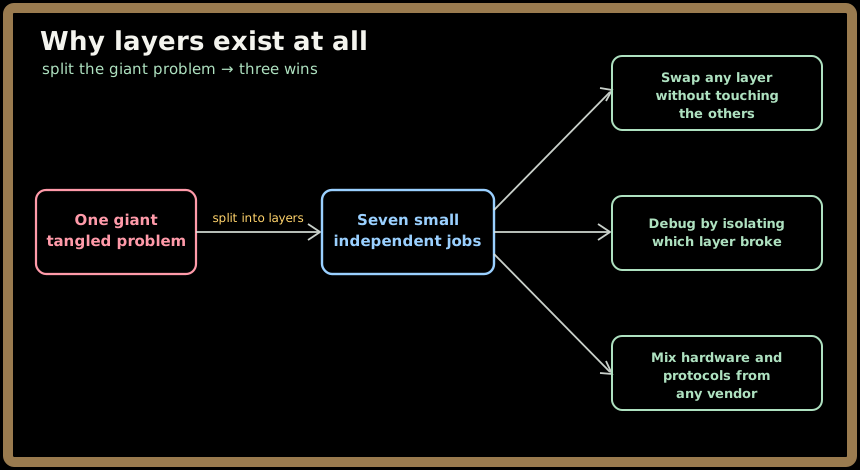
- Independent evolution. Wi-Fi can replace an Ethernet cable at Layer 1 and nothing above it has to change — your browser never notices it went wireless. We swapped TCP for QUIC under HTTP/3 the same way.
- Interoperability. As long as two machines agree on what each layer means, the gear underneath can come from anyone. A Cisco router and a Linux laptop both speak IP.
- Targeted debugging. When a request fails, you don't stare at the whole universe. You ask: is this an addressing problem (Layer 3) or an encryption problem (Layer 6)? The layers give you a map.
That last point is why this chapter pays for itself even though, as we'll see, the literal OSI model isn't what the Internet actually runs.
2. What the OSI model actually is (and isn't)
OSI stands for Open Systems Interconnection — a seven-layer reference model standardized by the ISO in the 1980s. The crucial word is reference. OSI is a mental framework, a shared vocabulary for reasoning about networks. It is not the protocol stack your packets travel through.
💡 The Internet does not "run on OSI." It runs on the TCP/IP model, a leaner four-layer design we'll map out in Section 6. OSI is the teaching model — the ruler everyone measures against — while TCP/IP is the working model. Confusing the two is the most common OSI mistake, and we'll keep them straight throughout.
So why learn a model the Internet doesn't literally use? Because it remains the industry's shared language. When an engineer says "that's an L7 problem" or "we need an L4 load balancer," they're pointing at OSI layers. The model is how we talk about where things live — which is most of the job in design reviews and on-call debugging.
3. The 7 layers, top to bottom
Here is the whole stack. Data created by your app starts at the top (Layer 7) and travels down to the wire; the receiver takes it back up from Layer 1 to Layer 7. Read it from 7 down to 1 — the direction an outgoing message flows.
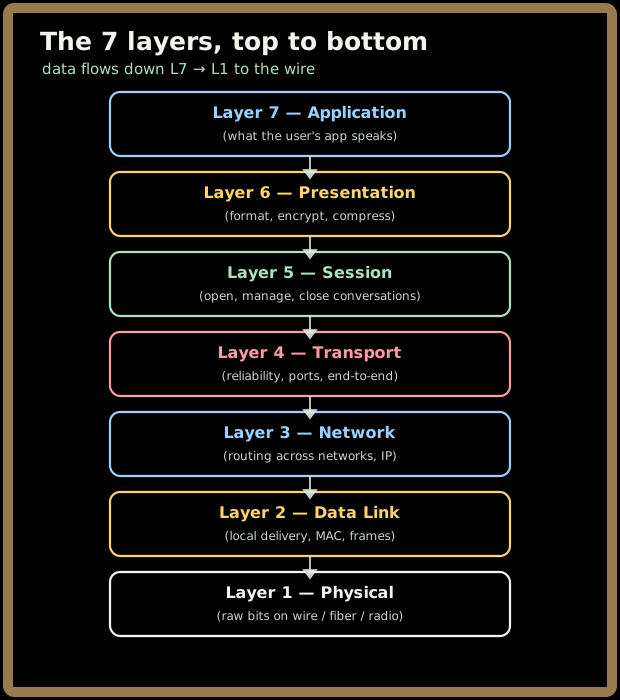
| Layer | Name | One-line job | You'll recognize |
|---|---|---|---|
| 7 | Application | The protocol your app actually speaks | HTTP, gRPC, DNS, SMTP |
| 6 | Presentation | Make data portable: serialize, encrypt, compress | TLS, JSON, Protobuf, gzip |
| 5 | Session | Open, track, and tear down a conversation | TLS sessions, WebSocket upgrade |
| 4 | Transport | End-to-end delivery, ports, reliability | TCP, UDP, QUIC |
| 3 | Network | Route packets across networks | IP, ICMP, BGP, NAT |
| 2 | Data Link | Deliver frames on the local link | Ethernet, ARP, Wi-Fi, switches |
| 1 | Physical | Push raw bits across the medium | Fiber, copper, radio, NICs |
A memory hook helps these stick. The classic mnemonic, top down (7→1), is:
All People Seem To Need Data Processing
Application · Presentation · Session · Transport · Network · Data Link · Physical
Going the other way, bottom up (1→7): Please Do Not Throw Sausage Pizza Away. Pick whichever sticks — interviewers love hearing you rattle off all seven without hesitation.
We'll do a full deep dive on each layer in Parts 2 and 3. For now, just hold the shape: seven layers, top to bottom, each with one clear concern.
4. Encapsulation: the nested-envelope trick
This is the heartbeat of the whole model, so let's make it concrete. As data travels down the layers, each layer wraps it in its own header (and Layer 2 also adds a trailer). This wrapping is called encapsulation — exactly like the shipping departments nesting your gift in box after box.
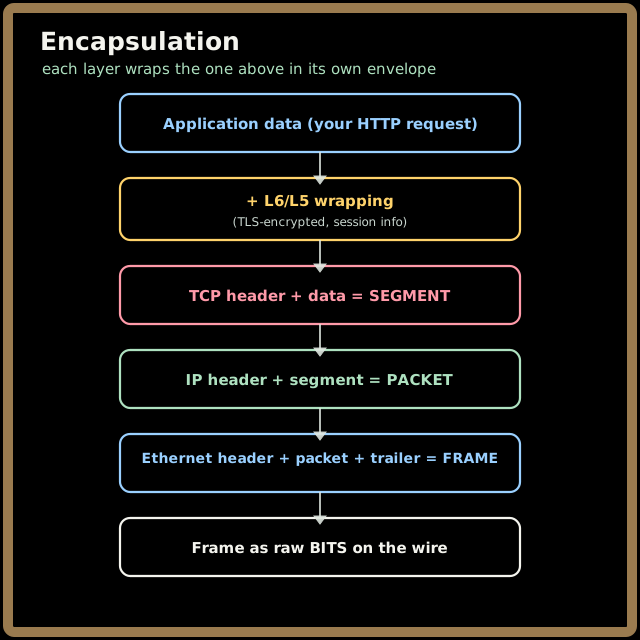
Notice each layer has its own name for the thing it produces — the PDU (protocol data unit). This vocabulary shows up constantly:
- Layer 4 (TCP) makes a segment (UDP makes a datagram).
- Layer 3 (IP) makes a packet.
- Layer 2 (Ethernet) makes a frame.
- Layer 1 just sees bits.
When the data arrives, the receiver runs the film in reverse: decapsulation. Layer 1 hands up bits, Layer 2 reads the Ethernet header and strips the frame, Layer 3 reads the IP header and strips the packet, Layer 4 reassembles the segments, and so on up — until Layer 7 hands your app a clean HTTP request, every envelope removed. The golden rule: each layer only talks to its twin on the other side. Layer 3 on the sender writes a header that only Layer 3 on the receiver reads. The layers between are just couriers.
5. Follow one request down and back up
Let's tie it together by watching a single click — https://maang.io — travel the stack. This is the worked example we'll keep returning to.
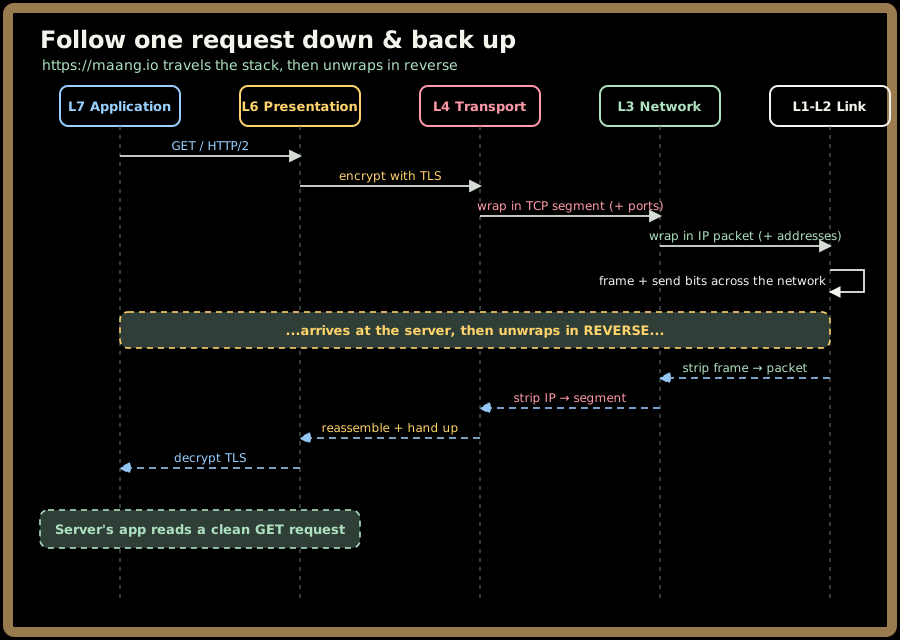
Walk it slowly. Your browser (L7) produces GET /. L6 encrypts it with TLS so eavesdroppers see only ciphertext. L4 (TCP) stamps on port numbers so the right program receives it, and promises to retransmit anything lost. L3 (IP) stamps on source and destination IP addresses and figures out the route across the Internet. L1/L2 turn it into a frame and finally into electrical, optical, or radio signals on the medium. The server receives those signals and unwraps every envelope in reverse until its L7 reads a clean request. That round trip is the OSI model doing its entire job.
6. OSI vs. the TCP/IP model (what really runs)
Here's the honest reconciliation. The real Internet uses the TCP/IP model, which collapses OSI's seven layers into a practical four. The top three OSI layers (Application, Presentation, Session) get squashed into one Application layer, because in practice your app handles its own formatting, encryption, and session logic rather than treating them as separate stacked services.
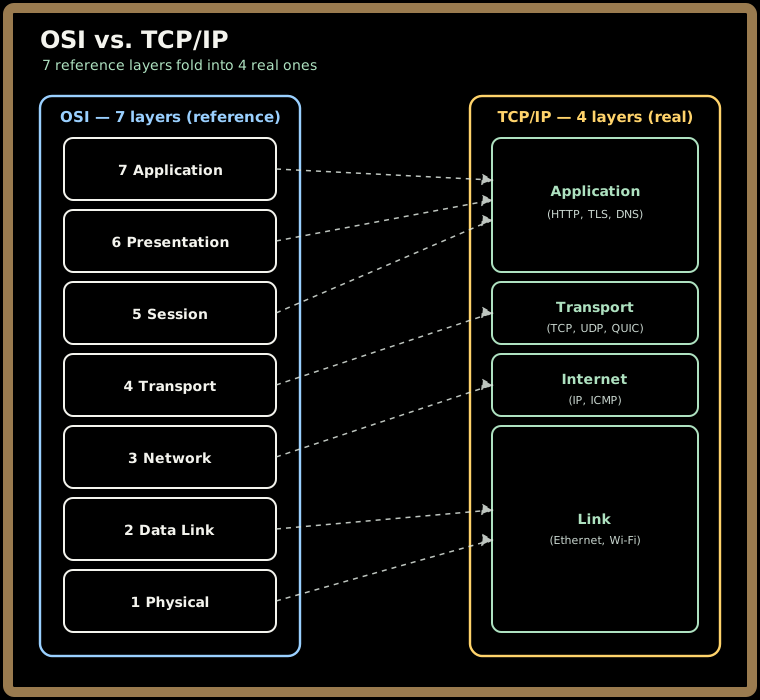
The mapping to memorize:
| TCP/IP layer | Absorbs OSI layers | Lives at |
|---|---|---|
| Application | 7 + 6 + 5 | HTTP, TLS, DNS, gRPC |
| Transport | 4 | TCP, UDP, QUIC |
| Internet | 3 | IP, ICMP, BGP |
| Link | 2 + 1 | Ethernet, Wi-Fi, NICs |
So why do engineers still talk in seven layers if only four are real? Because OSI's finer slicing gives us precise vocabulary. Saying "TLS is Layer 6" instantly tells a colleague it sits above transport but below the application protocol — a distinction TCP/IP's single fat "Application" layer blurs. Use OSI to reason and communicate; remember TCP/IP is what actually runs.
7. Where the layers meet real infrastructure
This is the payoff that makes OSI worth knowing for system design. Every box in your architecture lives at a specific layer, and knowing which one tells you instantly what it can and cannot do.
- Switch → Layer 2. Forwards frames by MAC address within a local network. Blind to IP.
- Router → Layer 3. Forwards packets between networks by IP address. The thing that makes "the Internet" an inter-network.
- L4 load balancer → Layer 4. Routes by the connection's ports and IPs — fast, content-blind, carries any protocol. (This is the "postal sorting facility" from the load balancer chapter.)
- L7 load balancer / reverse proxy / API gateway → Layer 7. Reads the HTTP request and routes by path, host, or header — the "executive assistant." The famous L4-vs-L7 split is literally a question of which OSI layer the load balancer works at.
- Firewalls span layers. A cloud security group filters at L3/L4 (IPs and ports); a WAF inspects at L7 (request content).
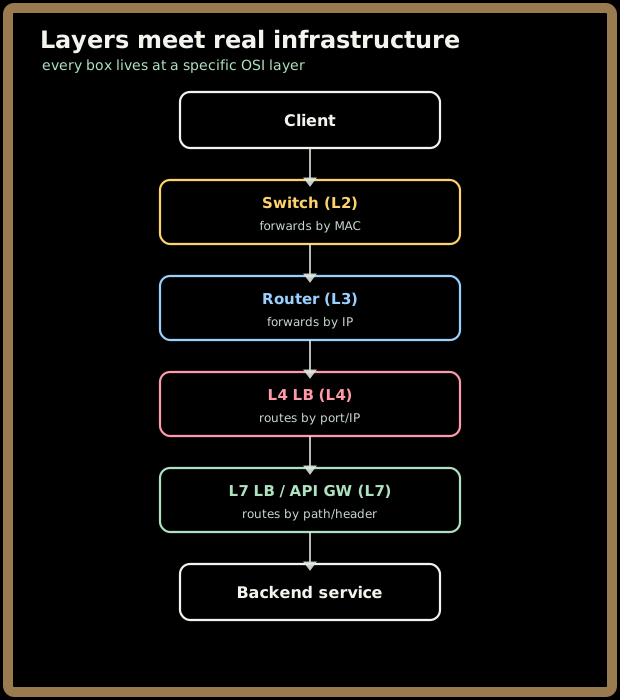
Keep this picture handy — it's the through-line for the rest of the series. When we deep-dive each layer in Parts 2 and 3, we'll keep pointing back to "and this is the device that lives here."
Key takeaways
- The OSI model breaks "make two computers talk" into seven stacked layers, each with one job — the same way a postal chain wraps a gift in nested envelopes.
- OSI is a reference model for reasoning and vocabulary; the Internet actually runs on the leaner 4-layer TCP/IP model, which folds OSI's top three layers into one.
- Encapsulation wraps data in a header per layer on the way down (app data → segment → packet → frame → bits); decapsulation unwraps it in reverse on the way up. Each layer only talks to its twin on the far side.
- Memorize the seven in order (All People Seem To Need Data Processing) — and which infrastructure lives where: switch = L2, router = L3, L4 vs L7 load balancers map straight onto OSI layers.
- OSI's real power today is debugging and design: it gives you a map to isolate which layer broke and to reason about where each component belongs.
Next up, Part 2 drops into the bottom of the stack — Layers 1 through 4 — where bits become signals, MAC addresses find their way around a local network, IP routes packets across the planet, and TCP/UDP/QUIC decide how reliable the whole journey is.