Part 1 — Load Balancers: Foundations and Fundamentals
maang.io System Design Series
What is this?
Picture a popular restaurant on a Friday night. Guests pour through the front door, but they don't wander into the kitchen looking for an open stove — there's a host at the entrance who seats each party at a free table, keeps any one section from getting slammed, and quietly stops seating a table whose waiter just called in sick. Guests never see any of that. They just get seated and fed.
A load balancer is that host, for servers. Clients knock on one door — a single address — and the load balancer decides which of your many backend servers actually handles each request. It hides everything messy behind the scenes: how many servers there are, which ones are healthy, which one you're mid-deploying. To the outside world, a hundred servers look like one calm, dependable service.
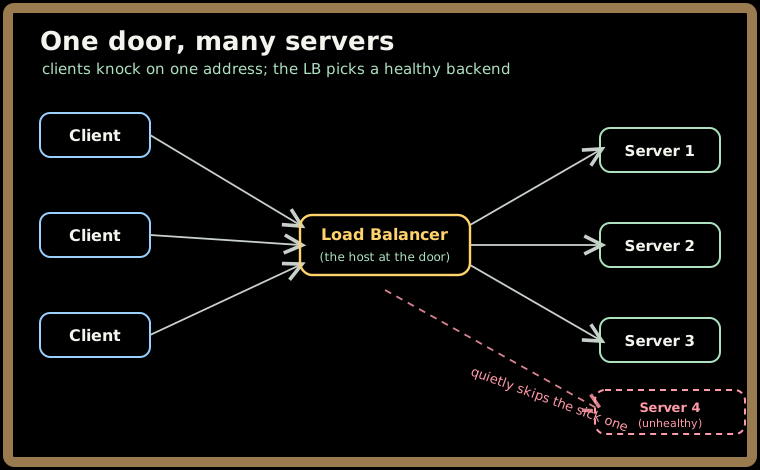
The one-line idea: a load balancer makes a pool of servers behave like a single resilient service — so you can add capacity by adding plain, interchangeable machines instead of buying one heroic supercomputer.
That last sentence is the whole reason load balancers exist. Let's unpack it.
1. Why we even need one
Run your app on a single server and you've signed up for three problems — and they all bite eventually.
- You hit a ceiling. One machine has a fixed amount of CPU, memory, and connections. Past that point, requests queue, latency climbs, and some just get dropped.
- You have one heart. If that server dies, the whole service dies with it. There's no "degrade gracefully" — there's just down.
- You can't do maintenance quietly. Patching the OS or shipping new code means taking the only server offline. Every deploy is an outage.
Now put a load balancer in front of a pool of servers and watch all three melt away:
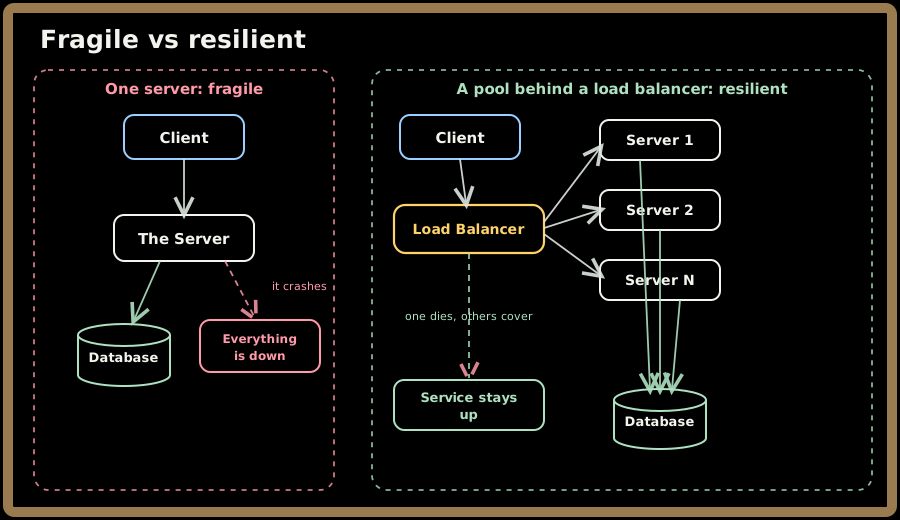
Here's the part people underestimate: under real traffic these problems don't show up politely one at a time — they gang up. A spike pushes your lone server past its connection limit → requests start timing out → frustrated clients retry → the retries pile on even more load (this self-inflicted avalanche has a name, a retry storm) → memory pressure now degrades every in-flight request at once. A pool absorbs the spike by spreading it, and sheds traffic from any one server that starts to wobble before it drags the rest down with it.
2. The real magic: a clean boundary
If you remember one conceptual thing from this chapter, make it this. A load balancer draws a line between how clients reach you and how your service is actually built — and it gives each side a simple promise.
Think of it like the counter at a coffee shop. You (the client) order at the counter. You don't know or care whether there are two baristas or six, whether one just clocked out, or whether they swapped the espresso machine mid-shift. You get your coffee. Meanwhile the baristas (the backends) don't deal with you directly — they pull tickets off the rail and make drinks.
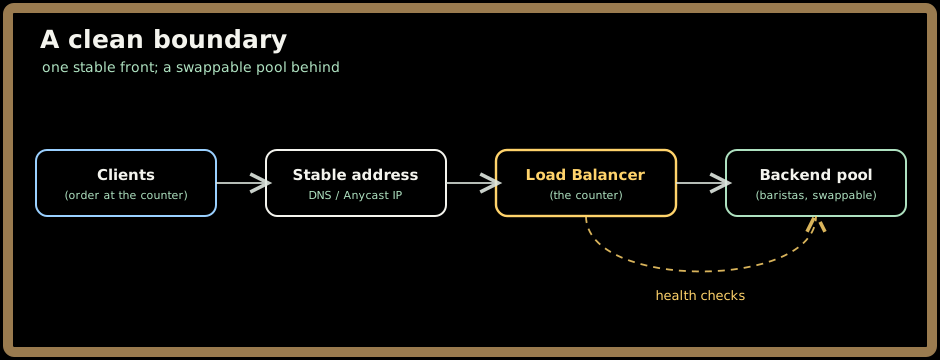
The promise to clients: one address that never changes, even as servers come and go, and failover so smooth they usually don't notice a server died mid-request.
The promise to backends: a simple way to say "I'm healthy" (answer a /health check), the freedom to join or leave the pool at will, and protection from the raw weirdness of the internet — slow clients, half-open connections, TLS handshakes — all absorbed at the counter.
And that boundary is what unlocks stateless horizontal scaling: if your servers keep no per-user state locally, then adding capacity is just "launch another identical machine and let it register." No client change. No redesign. Just more baristas.
Quick check before moving on:
3. The big fork in the road: Layer 4 vs Layer 7
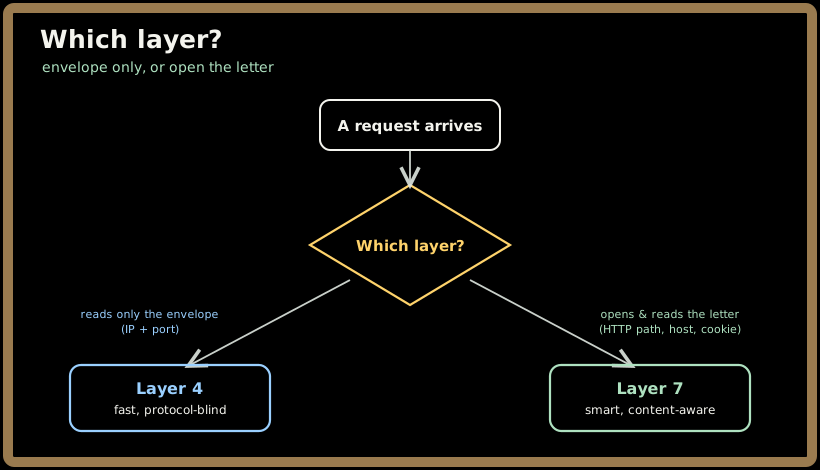
When you reach for a load balancer, the very first decision is which layer it works at. This single choice decides what routing tricks are possible and how much each request costs to handle. There are two answers.
A quick analogy before the details: think of mail.
- Layer 4 is the postal sorting facility. It reads the address on the envelope and routes it — fast, by the millions — but it never opens the envelope.
- Layer 7 is the executive assistant who opens each letter, reads it, and decides "this goes to legal, this goes to the CEO, this is spam." Slower per letter, but far smarter.
3.1 Layer 4 — the sorting facility
An L4 load balancer routes using only the connection's four corners: source IP, source port, destination IP, destination port. It never reads what's inside.
- It carries anything. Because it doesn't care about the protocol, it happily forwards WebSockets, gRPC, database connections, your weird custom binary protocol — all of it.
- It's blazing fast. No parsing, no decrypting. Latency overhead is a fraction of a millisecond, and its cost scales with packet rate, not how big or complex each request is.
- It keeps a little notebook. It rewrites destination addresses on the way in and remembers the mapping in a connection table, so the reply finds its way back to the right client.
The trade-off: it's blind to content. It can't route by URL, can't peek at a cookie, can't retry a failed HTTP request — once a connection is pinned to a backend, that's where it lives for its whole life.
3.2 Layer 7 — the executive assistant
An L7 load balancer terminates the connection, reads the request, and routes on what's inside.
- Route by meaning. Send
/api/*to one pool and/images/*to another. Sendadmin.yoursite.comsomewhere special. Split 5% of traffic to a new version by reading a cookie. - Reshape on the fly. Rewrite paths, add or strip headers (like stamping on the client's real IP), compress responses.
- Heal per request. Because each request is its own little unit, if a backend fluffs one request, the load balancer can quietly retry it on a healthy neighbor.
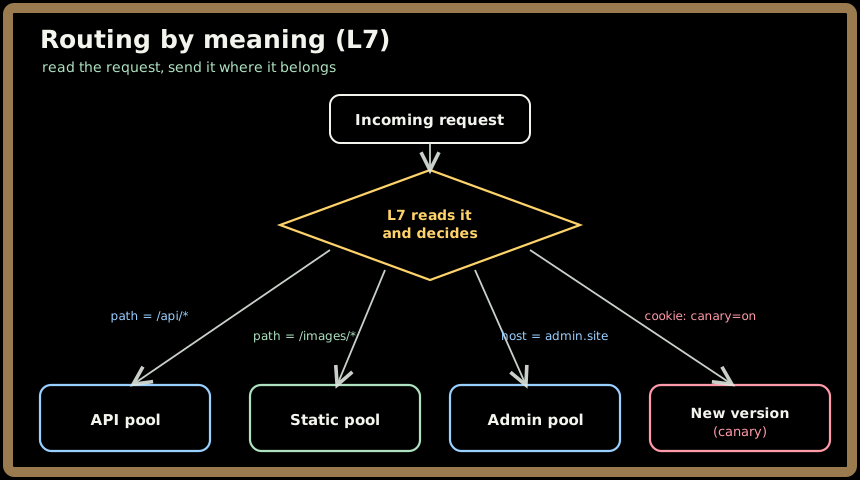
All that intelligence costs a little CPU — parsing headers, juggling two connections, re-encrypting. We're talking single-digit milliseconds. For almost every HTTP service that's a rounding error next to the flexibility you get, which is why L7 is the default for web traffic and L4 shines for raw speed and non-HTTP protocols.
💡 Rule of thumb: if you need to route on what the request says (path, host, header), you need Layer 7. If you just need to spread connections fast, or you're carrying something that isn't HTTP, Layer 4 is your friend. Big systems often use both — L4 at the very edge for speed, L7 behind it for smarts.
3.3 Where these things actually live
The same L4/L7 brains ship in three very different boxes, and it helps to know the landscape:
| Flavor | Examples | The vibe |
|---|---|---|
| Hardware appliance | F5 BIG-IP, Citrix ADC | A physical box with custom chips. Screaming fast, pricey, common in established on-prem data centers. |
| Software | NGINX, HAProxy, Envoy | Runs on ordinary servers, configured with text files, lives happily in containers. The cloud-native workhorse. |
| Cloud-managed | AWS ELB, GCP Cloud LB, Azure LB | The provider runs it for you, scales it across zones, bills by usage. You give up some control for a lot of "not my problem." |
For interviews and most new systems, reach for a managed cloud load balancer or a software proxy like Envoy by default. Hardware appliances mostly show up in big enterprises that have run them for years.
4. The extra jobs it picks up at the door
Because the load balancer is the first thing external traffic touches, it's the natural place to handle a few chores you'd otherwise have to copy into every single backend. Doing them once, at the door, is just tidier.
4.1 Handling encryption (TLS termination)
Every HTTPS connection starts with a TLS handshake — a little cryptographic "let's agree on a secret" dance. Doing that work, and managing certificates, on every backend is a headache. So we usually do it once, at the load balancer: it decrypts incoming traffic, and backends receive plain, simple HTTP over the trusted internal network.
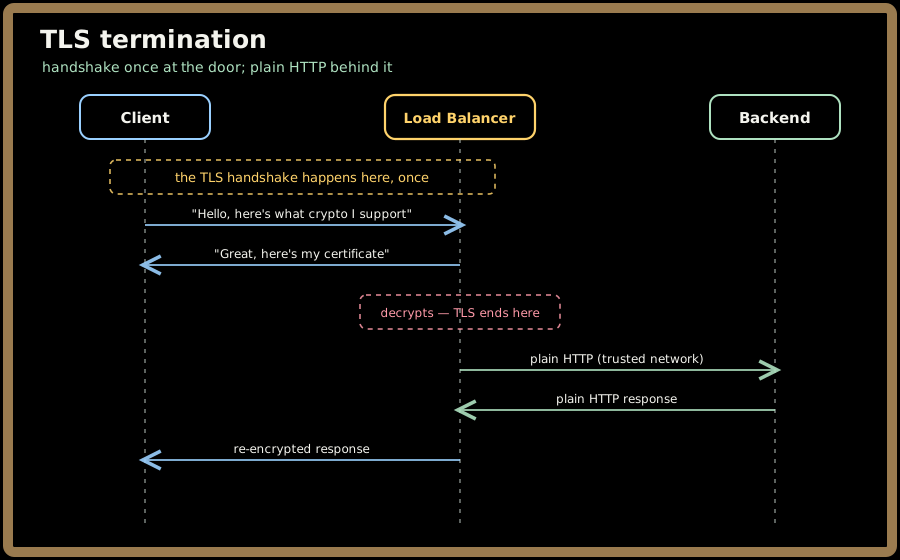
Doing it centrally also lets you enforce good security habits in one place — forcing HTTPS, stapling proof that your certificate isn't revoked, and so on. (We'll go deeper on certificates in Part 2.) When backends genuinely must not see plaintext — think banking or zero-trust setups — you instead let the encryption pass straight through (L4) or decrypt, inspect, then re-encrypt to the backend.
4.2 Being the bouncer (DoS protection)
A good bouncer stops trouble at the door before it reaches the dance floor. The load balancer does the same: it caps how many connections any one client can open, limits request rates, shrugs off connection-flood attacks, and times out the slow-drip attacks that try to tie up resources by trickling a request out one byte at a time. All of that abuse gets absorbed before it ever touches your application servers.
Quick check before moving on:
5. Where you'll actually meet load balancers
This isn't a textbook abstraction — it's a shape that recurs everywhere once you start looking:
- In front of a web app. A public load balancer terminates TLS and spreads requests across a pool of stateless app servers. The bread and butter.
- As your Kubernetes "front door." An ingress controller is just an L7 load balancer for your cluster, mapping hostnames and paths to internal services.
- Edge + origin. A CDN like Cloudflare or CloudFront balances globally by geography, then hands off to a regional load balancer that spreads traffic within that region.
- Inside a service mesh. Here load balancing gets embedded into a little proxy next to every service, so each service-to-service call is balanced and retried — no central bottleneck.
The fun part: a single request often passes through several of these in a row — a global edge balancer, then a regional one, then a per-service one — before it ever reaches your code.
6. How this shows up in interviews
In a system design interview, "add a load balancer" is table stakes — everyone says it. What separates a senior answer is reasoning about the consequences of that box. Interviewers are listening for:
- Capacity math. "We expect X requests/sec, each server handles ~Y, so we need N servers plus headroom for failures and spikes." Show the arithmetic.
- Failure thinking. What happens when one backend dies? (The rest soak up its share.) And the question people forget — what happens when the load balancer itself dies? (You need a redundant pair, or a managed multi-zone service. Never a single one.)
- State and stickiness. Do you need to pin users to a server? Usually not — and explaining why stateless backends are better is the senior move.
- Zero-downtime deploys. Show how the load balancer lets you roll out new code with no outage (blue/green, canary — coming in Part 4).
- The right metrics. Talk about latency percentiles (p95, p99) and error rates, not just "average latency," which hides your unhappiest users.
Underneath it all is one principle worth saying out loud: separation of concerns. The load balancer owns traffic management as its own clean layer, which frees your application code to just own business logic.
Quick check before moving on:
7. Key takeaways
- A load balancer turns a pool of servers into one resilient service — it's the thing that makes horizontal scaling possible.
- It kills the three single-server demons: the capacity ceiling, the single point of failure, and maintenance downtime.
- Its deepest gift is a clean boundary between clients and backends — which is what lets you scale statelessly by just adding machines.
- The first big fork is Layer 4 vs Layer 7: the fast, content-blind sorting facility vs the smart, content-aware executive assistant.
- Because it sits at the door, it also handles TLS termination and abuse protection once, for everyone.
Test yourself on this part's key ideas:
Next up, Part 2 cracks open the box: how a load balancer is built inside, the algorithms it uses to pick a server, how it knows a backend is healthy, and how it keeps itself from being a single point of failure.