DNS — Part 1: Foundations & Core Architecture
What is this?
Think about the contacts app on your phone. You don't memorize anyone's phone number anymore — you type "Mom" and tap call, and the phone quietly looks up the actual digits behind the scenes. You deal in names; the machine deals in numbers; the contacts app is the translator sitting in between.
DNS — the Domain Name System — is that contacts app, for the entire internet. You type maang.io because humans remember words. But no router on Earth knows how to deliver a packet to a word; it needs an address like 192.0.2.10. DNS is the global, always-on lookup service that turns the name you typed into the number your computer actually dials. It has been doing this quietly since 1983, and you trigger it dozens of times a day without ever noticing.
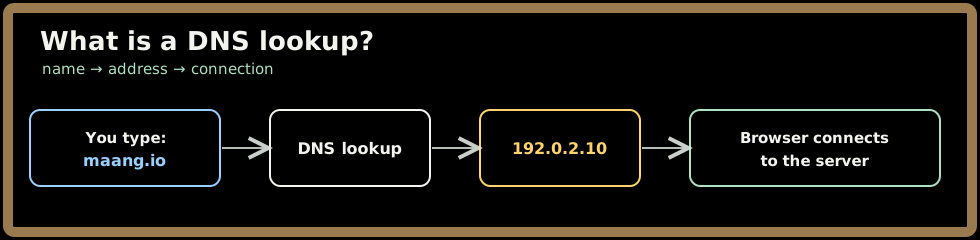
The one-line idea: DNS is the internet's phone book — a massive, distributed, cached lookup service that translates the human-friendly names you remember into the numeric IP addresses machines need to route traffic.
Here's what makes it remarkable: there is no single giant phone book somewhere. The "book" is split across thousands of organizations worldwide, stitched together by a tree-shaped hierarchy, and held together by aggressive caching. Understanding how it pulls that off is the whole point of this series — and it teaches you patterns (delegation, caching, eventual consistency) you'll reuse in almost every distributed system you ever design.
1. The problem DNS was born to solve
The need is almost embarrassingly simple. Computers route traffic using IP addresses:
- IPv4 addresses are 32-bit numbers, written as four octets —
192.0.2.10. - IPv6 addresses are 128-bit, written in hex —
2001:db8::1.
Both are perfectly readable to a router and nearly impossible for a human to remember. Nobody is going to tell a friend "check out 2001:db8::1." So we need a layer of names that map to those numbers — and crucially, a way to look up the number whenever the mapping changes (servers move, IPs get reassigned, traffic gets rerouted) without anyone re-memorizing anything.
💡 The key insight: a name is a level of indirection.
maang.iocan point to one server today and a completely different one tomorrow, and you never have to know. That indirection is what makes load balancing, failover, and CDNs possible — all of which we'll build on in later parts.
How we got here (and why the first attempt failed)
In the ARPANET days, the entire internet's naming lived in one file: HOSTS.TXT. Every machine downloaded the same master list from a central authority (the Stanford Research Institute) and that file mapped every hostname to every address.
This worked when "the internet" was a few hundred machines. Then it didn't:
- It was a single point of failure — one file, one authority.
- Updates were manual and slow — you emailed your change in and waited.
- It didn't scale — every machine pulling the whole list as the network grew meant the update traffic alone would eventually swamp the network.
In 1983, Paul Mockapetris designed DNS to replace it, around three ideas that are still the backbone today:
- Hierarchical delegation — instead of one list, a tree where each branch is owned by someone different.
- Caching — answers get remembered close to where they're used, so the same question rarely travels far twice.
- Redundancy — every part of the tree is served by multiple servers, so no single failure takes naming down.
Hold onto those three. The rest of this series is really just those ideas, in detail.
2. DNS as a giant distributed key–value store
Strip away the jargon and DNS is a distributed key–value lookup. The "key" is a name plus the kind of answer you want; the "value" is the data. The kind-of-answer part matters, because one name can hold many different kinds of records at once — its IPv4 address, its IPv6 address, its mail server, and so on.
The unit of storage is a resource record, and a handful of record types carry almost all the world's traffic:
| Type | What it maps a name to | Example |
|---|---|---|
| A | An IPv4 address | maang.io → 192.0.2.10 |
| AAAA | An IPv6 address | maang.io → 2001:db8::1 |
| CNAME | Another name (an alias) | www.maang.io → maang.io |
| MX | A mail server (with a priority) | maang.io → 10 mail.maang.io |
| NS | The nameservers authoritative for a zone | maang.io → ns1.cloudflare.com |
| TXT | Arbitrary text (SPF, domain verification) | maang.io → "v=spf1 ..." |
| SOA | "Start of authority" — admin info for a zone | serial, refresh, TTLs |
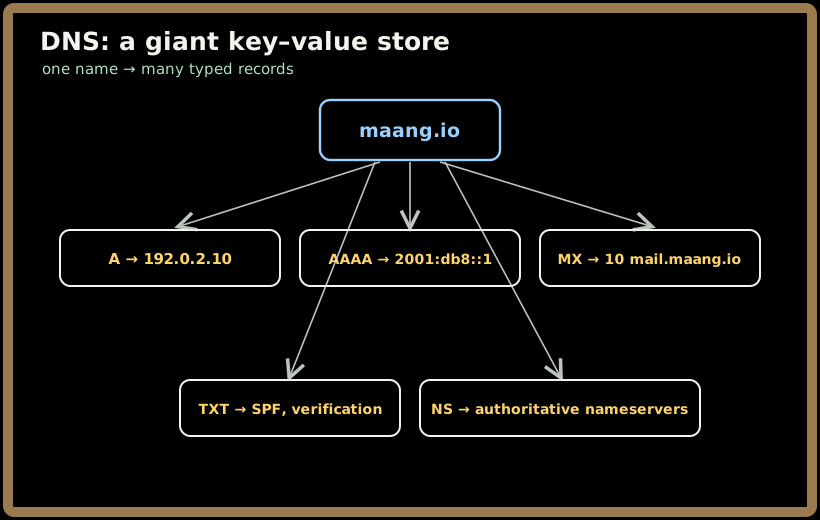
Two of these deserve a flag now, because people trip on them in interviews:
- ⚠️ A CNAME points a name at another name, not an address — the resolver then has to look that name up too. Handy for aliasing (
www→ the apex), but it costs an extra hop, and you famously cannot put a CNAME at the root of a domain (the apex), because the root must carry NS and SOA records and a CNAME isn't allowed to coexist with them. (Providers like Route 53 and Cloudflare paper over this with a synthetic ALIAS/ANAME record that looks like an apex CNAME but resolves to a plain A record behind the scenes — handy when you wantmaang.ioitself to point at a load balancer's hostname.) - An MX record carries a priority number; lower wins. That's how you list a primary and a backup mail server.
The scale this runs at
To appreciate why the design choices matter, the numbers:
- ~360 million registered domain names globally.
- ~trillions of DNS queries answered every day.
- 13 logical root server identities, served by 1,000+ physical machines worldwide.
- Despite all that, the median lookup resolves in tens of milliseconds, and DNS is well under 1% of a typical page's load time.
It hits those numbers not by being one enormous database, but by being a tree of small databases plus caching everywhere. Let's build the tree.
3. The hierarchy: one tree, owned by thousands
DNS names are read right to left, and each step to the right is a level up the tree. Take www.maang.io:
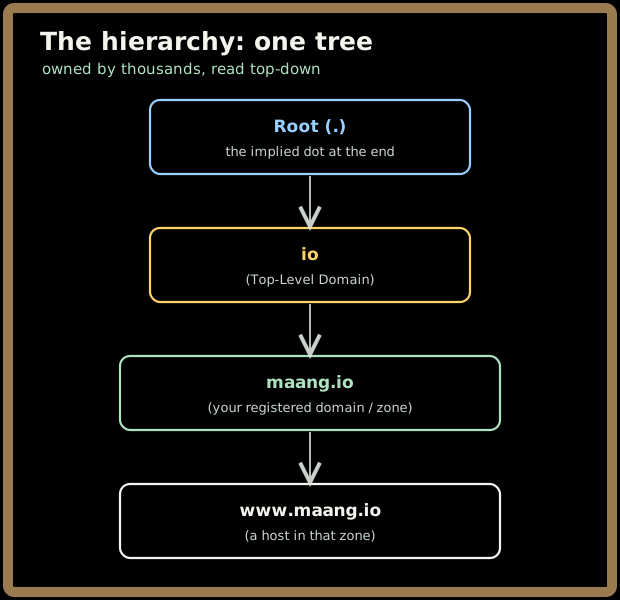
There's even an invisible dot at the very end (www.maang.io.) — that's the root. Each level is owned and operated by someone different, and that division of ownership is the genius of the whole system. Let's walk down it.
3.1 Root servers — the top of the tree
The root knows almost nothing about your website. Its only job is to answer one question: "who handles .io?" (or .com, or .org). It holds the delegations to all the top-level domains and nothing else.
- There are 13 logical roots, named
a.root-servers.netthroughm.root-servers.net. - Behind those 13 identities sit 1,000+ physical servers, spread worldwide using Anycast (Part 2 explains how one IP can live in hundreds of places at once).
- The root zone is tiny, rarely changes, and is operated under ICANN/IANA oversight — which is exactly why it can be so heavily replicated and cached.
💡 Because every resolver already knows the root server addresses (they're baked in, in a tiny "root hints" file) and caches them aggressively, the root is almost never the slow part of a lookup, despite sitting at the very top.
3.2 TLD servers — the section dividers
The next level down is the Top-Level Domain. The root pointed us at the .io TLD servers; their job is equally narrow: "who is authoritative for maang.io?" They don't know your A record either — they just know which nameservers you delegated your domain to.
TLDs come in a few flavors:
- gTLDs (generic):
.com,.org,.net—.comalone holds ~157 million domains, run by Verisign. - ccTLDs (country-code):
.us,.uk,.de,.io. - newer gTLDs:
.app,.dev,.ai— often with special rules (.apprequires HTTPS, for instance).
3.3 Authoritative servers — where the real answers live
Finally, the bottom of the tree: the authoritative nameservers for your zone. These are the servers that actually hold maang.io's A record, its MX, its TXT — the real data. When you sign up with Cloudflare, Route 53, or run BIND yourself, you're choosing who serves this layer.
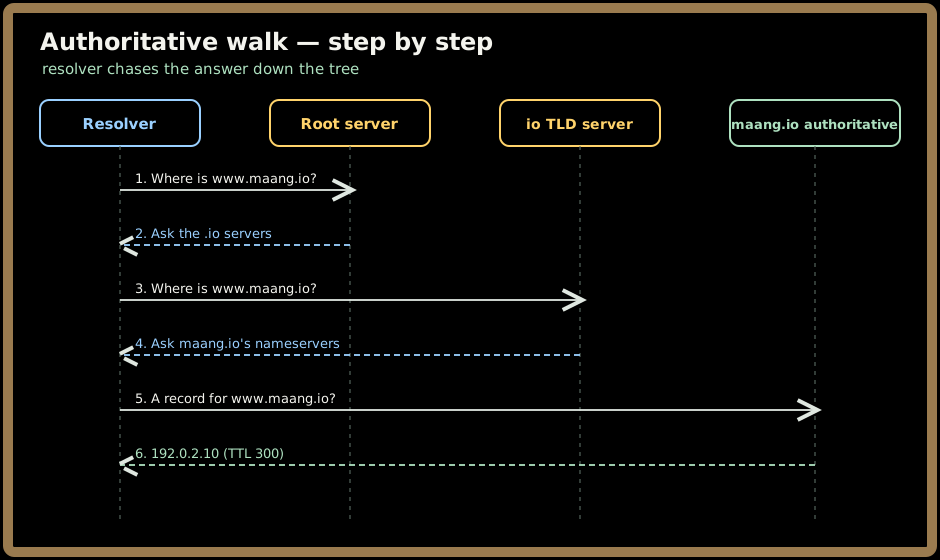
Notice the pattern: each level only knows enough to point you one step lower. The root delegates to the TLD, the TLD delegates to you, and you give the final answer. That's hierarchical delegation — the first of Mockapetris's three ideas — and it's why no single organization has to know everything. (Part 3 walks this resolution dance in full detail, including who does the asking.)
Quick check before moving on:
4. Why DNS is fast despite all those hops
Reading Section 3, you might worry: root, then TLD, then authoritative — that's three round trips across the planet for every page load? It would be, except for the second big idea: caching is everywhere.
Every answer carries a TTL (Time To Live) — a number of seconds saying "you may remember this for up to this long." Once a resolver learns www.maang.io → 192.0.2.10 with a TTL of 300, it can answer that same question instantly for the next 5 minutes without bothering the root, the TLD, or your servers at all.
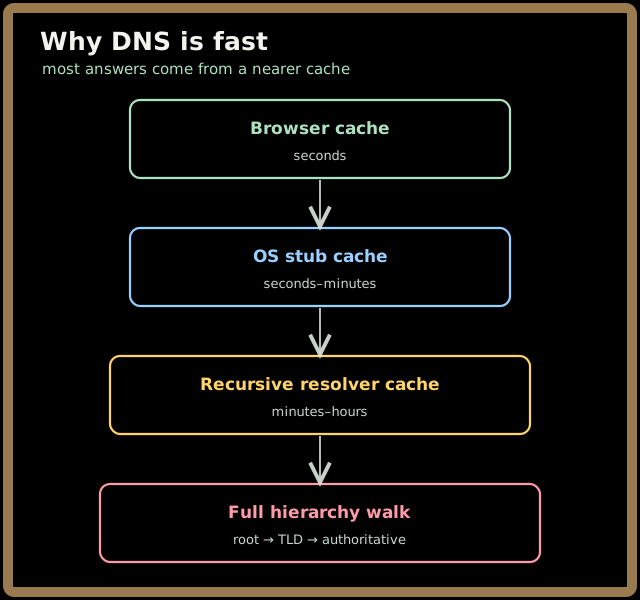
Each layer catches most queries so they never fall through to the next:
- A typical recursive resolver serves the vast majority of queries straight from cache — it almost never has to do the full walk.
- A cold lookup (nothing cached anywhere) might take 100–500 ms.
- A warm lookup (cached at the resolver) is often a millisecond or two.
💡 The TTL is a genuine trade-off you'll set deliberately. High TTL = fewer queries, cheaper, faster on average, but changes take longer to spread. Low TTL = changes propagate fast (great for failover), but more query load. We devote real attention to this in Part 3 (the mechanics) and Part 4 (the system-design judgment calls).
The third idea, redundancy, rounds it out: every zone is served by multiple nameservers, the roots and big resolvers use Anycast so the "nearest" copy answers, and a single dead server is invisible to you. Caching makes DNS fast; redundancy makes it survive.
Quick check before moving on:
5. Why DNS is load-bearing for everything else
Because nearly every internet action starts with a name lookup, DNS sits underneath an enormous amount of infrastructure — which means when DNS breaks, a startling number of things break at once:
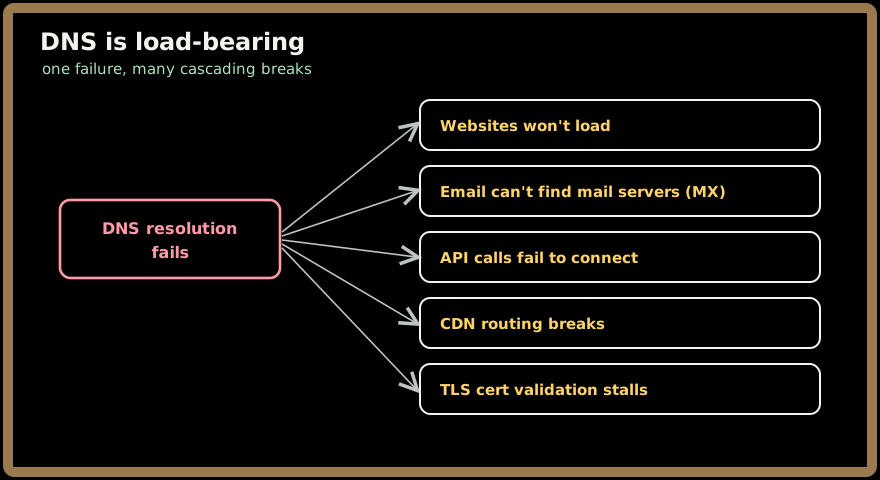
This isn't hypothetical. In October 2016, a massive DDoS attack (the Mirai botnet, ~100,000 hijacked IoT devices) flooded Dyn, a major managed-DNS provider. Dyn itself was the target, but because Dyn served DNS for Twitter, Reddit, GitHub, Spotify and more, all of those sites effectively went dark across the US East Coast for hours — even though their own servers were perfectly healthy. The lesson engineers took away: DNS is a dependency you must design for redundancy (multi-provider DNS, which we cover in Parts 4 and 5), because a single DNS failure can take down a service whose actual application never went down at all.
6. Key takeaways
- DNS is the internet's phone book — it translates human-friendly names into the IP addresses machines route on, adding a layer of indirection that makes load balancing, failover, and CDNs possible.
- It replaced the unscalable central
HOSTS.TXTwith three durable ideas: hierarchical delegation, caching, and redundancy. - The system is a tree owned by thousands: the root delegates to TLDs, TLDs delegate to your authoritative servers, and each level knows only enough to point one step lower.
- A small set of record types carries almost everything — A/AAAA (addresses), CNAME (aliases), MX (mail), NS (delegation), TXT, SOA — and every answer carries a TTL that controls how long it's cached.
- Caching is what makes DNS fast (most queries never reach the authoritative servers) and redundancy is what makes it survive — and because nearly everything depends on it, DNS outages (like Dyn 2016) cascade far beyond the part that actually failed.
Test yourself on this chapter's key ideas:
Next, Part 2 opens up the architecture: how zones and delegation actually work, how Anycast lets one IP answer from hundreds of locations, and how the whole hierarchy stays consistent at global scale.