Caching — Part 1: Foundations & Core Patterns
maang.io System Design Series
What is this?
Picture your desk. The three things you reach for all day — your pen, your notebook, your coffee — live in the top drawer, a hand's reach away. Everything else lives in the supply closet down the hall: more pens, reams of paper, the stapler you use twice a year. You could keep everything in the closet and walk down the hall every time you needed a pen. You don't, because that would be absurd. Instead you keep a small, fast-access copy of the things you use most, right next to you, and only make the long trip when you need something rare.
A cache is that desk drawer for your system. It's a small, fast store that holds copies of data you'd otherwise have to fetch from somewhere slow and far — a database, a disk, a service across the network, the origin behind a CDN. You keep the hot stuff close, and only make the expensive trip when you must.
The one-line idea: a cache trades a little memory and a little staleness for a lot of speed — by keeping a fast copy of frequently-used data close to whoever needs it, so most requests never reach the slow source at all.
That single move — a fast copy of hot data, close by — is the whole game, and it shows up at every layer of every system you'll ever design. We'll keep returning to the desk-drawer image across all four parts: the drawer is your cache, the supply closet is your backing store (the database or origin), and the skill is knowing what belongs in the drawer, for how long, and how to keep it from lying to you.
💡 If you've read the CDN chapter, you've already met one specific kind of caching: a CDN is caching at the edge — drawers placed in cities near your users, holding copies of your origin's content. Caching is the general principle; the CDN is one famous application of it. This topic is about the whole idea.
1. Why we cache: latency, load, and cost
Caching earns its place by attacking three problems at once. Miss any one of them and you'd still want a cache for the other two.
Latency — the trip is slow. Different data sources are wildly different distances away, measured in time. Hold onto these rough numbers; they're the bedrock intuition:
| Where the data lives | Typical access time | Desk analogy |
|---|---|---|
| CPU L1 cache | ~1 ns | already in your hand |
| Main memory (RAM) | ~100 ns | the desk drawer |
| Local SSD | ~100 µs | a cabinet across the room |
| Network round trip (same datacenter) | ~0.5 ms | a colleague's desk |
| Spinning disk seek | ~10 ms | the supply closet down the hall |
| Cross-continent network round trip | ~150 ms | a warehouse on another continent |
Look at the gaps. RAM is roughly 100,000× faster than a cross-continent round trip and about 1,000× faster than disk. A cache's whole job is to turn a "supply closet" access into a "desk drawer" access — to move data up that table into a faster tier.
Backend load — the source can't take the heat. Your database can serve, say, a few thousand reads per second before it groans. Your homepage gets a million views a minute. Those don't reconcile — unless almost all of those reads are answered by a cache, and only a trickle ever reaches the database. The cache acts as a shield, absorbing the firehose so the slow, precious backend sees a manageable drip.
Cost — fast trips are cheaper trips. Every request that hits the database costs CPU, IOPS, and often money (managed databases bill by load; cross-region bandwidth bills by the gigabyte). A request served from cache is dramatically cheaper. Push more traffic onto the cache and your bill for the expensive tier shrinks. This is the same doubled win the CDN chapter celebrated: faster and cheaper at the same time, which is rare in engineering.
💡 The mental anchor for the whole topic: a cache doesn't make your database faster. It makes most requests never reach your database at all.
2. Hit, miss, and the one number that rules them all
Every cache lookup ends one of two ways.
- A cache hit — the data's already in the drawer. Serve it instantly. Fast, cheap, happy.
- A cache miss — it's not there. Now you pay the full price: trek to the supply closet (the backing store), fetch it, and (usually) drop a copy in the drawer so the next person gets a hit.
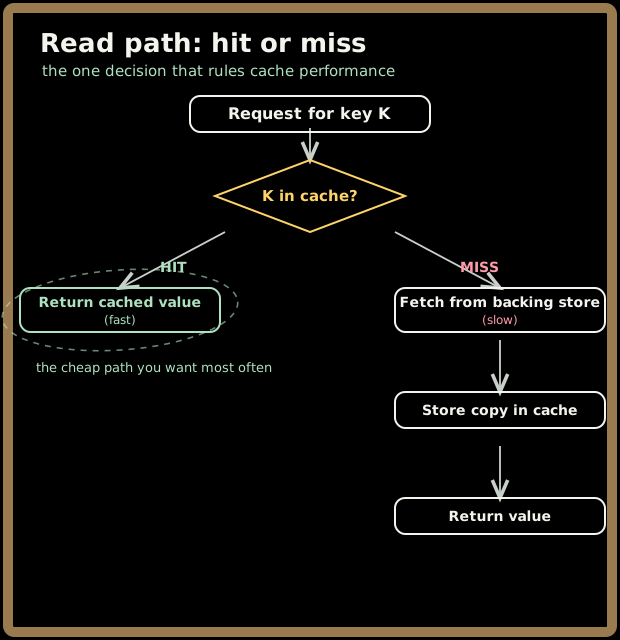
The single most important number falls right out of this: the hit ratio — the fraction of requests served from cache without bothering the backing store.
hit ratio = hits ÷ (hits + misses)
Why does this one number rule everything? Because it sets your effective average latency. Let's put real numbers on it. Say a cache hit takes 1 ms and a miss (fetch from the database) takes 100 ms. With a hit ratio of 95%:
average latency = (0.95 × 1 ms) + (0.05 × 100 ms) = 0.95 + 5 = 5.95 ms
Now watch what a small change does. Drop the hit ratio to 90%:
average latency = (0.90 × 1 ms) + (0.10 × 100 ms) = 0.9 + 10 = 10.9 ms
A five-point drop in hit ratio nearly doubled your average latency. That's the leverage. Because the miss is so much more expensive than the hit, the rare misses dominate the average — so squeezing the miss rate from 10% down to 5% is one of the highest-return things you can do to a system. The same arithmetic governs backend load: at 95% hit ratio, your database sees 1 in 20 reads; at 90% it sees 1 in 10 — double the load from a five-point swing.
⚠️ This is also why a cache that's "mostly working" can be deceptive. A 90% hit ratio feels great, but it means your slow tier is doing twice the work of a 95% cache. The interesting action is always in the misses.
Quick check before moving on:
3. Where caches live: the hierarchy
Here's the part people underestimate: there isn't one cache. A single request flowing from a user's browser to your database passes through a whole hierarchy of caches, each one a drawer catching what the layer above it missed. Knowing this map is half of caching literacy, because in an interview "where would you cache this?" usually has several right answers at once.
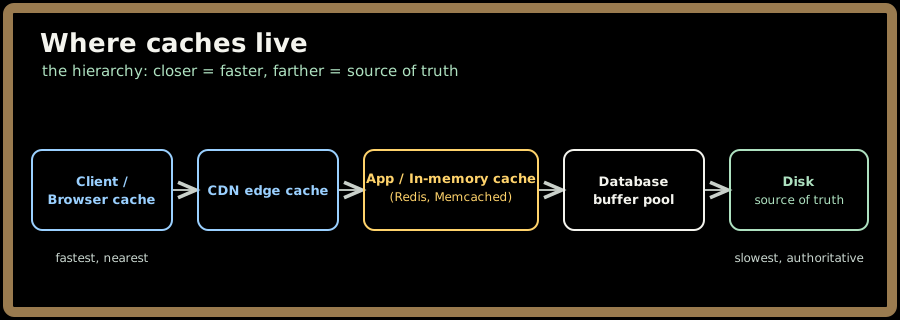
Walk it from the user inward:
- Client cache (the closest drawer). The browser keeps copies of images, scripts, and API responses right on the user's device. Zero network needed — a hit here is free and instant. Governed by the same HTTP headers the CDN chapter covered (
Cache-Control,ETag). - CDN edge cache. Copies of your content in cities near the user. This is caching, just placed at the edge of the network — the CDN chapter is the deep dive. It catches what the client didn't have, close to the user.
- Application / in-memory cache. This is the layer most people mean when they say "let's add a cache": a dedicated fast store like Redis or Memcached sitting beside your application servers, holding query results, computed values, session data, rendered fragments. Part 2 is largely about this layer.
- Database buffer pool. Your database already caches — it keeps recently-read pages in RAM so it doesn't hit disk every query. You get this for free; it's why a "warm" database is so much faster than a cold one. (The Databases chapter goes deeper on the buffer pool.)
- Disk / source of truth. The bottom of the hierarchy: the durable, authoritative copy. Slow, but it never lies.
💡 The senior instinct is to see all these layers at once. When you cache something, ask which drawer — and notice that the same value might profitably live in several. A product image can be cached in the browser, the CDN, and the app layer simultaneously, each catching a different slice of traffic.
For the rest of this topic, when we say "the cache" without qualification, we mean the application / in-memory layer — that's where you, the designer, make the most consequential choices.
4. Read patterns: how data gets into the cache
Now the heart of Part 1. There are a handful of standard patterns for wiring a cache to a backing store, and naming them precisely is exactly what separates a senior answer from hand-waving. Let's start with reads.
4.1 Cache-aside (lazy loading) — the default you'll reach for
In cache-aside, your application owns the logic. The cache is just a dumb box on the side that the app talks to. On a read, the app checks the cache first; on a miss, the app fetches from the database and the app populates the cache.
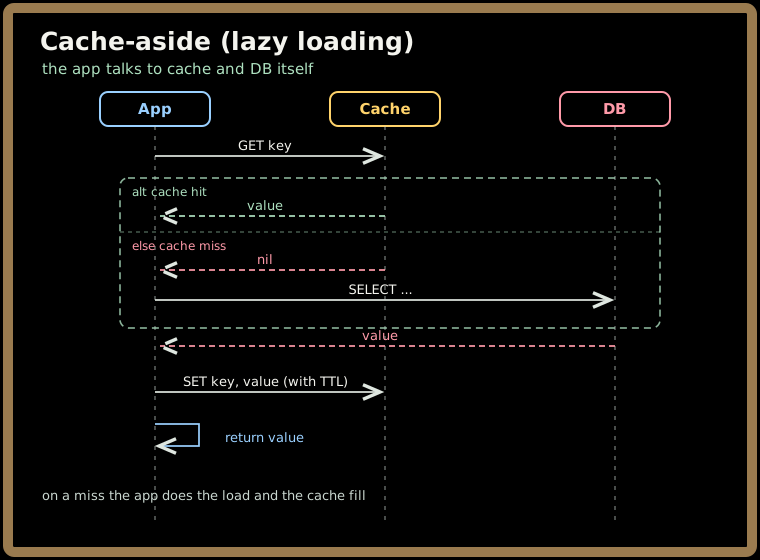
It's called lazy because data only enters the cache when someone actually asks for it — you never cache what nobody reads. This is the most common pattern in the wild, and for good reason:
- Only requested data is cached — naturally memory-efficient.
- The cache can fail without taking you down. If Redis is unreachable, the app just reads from the database directly. Slower, but alive. (This resilience is a big deal — we'll dwell on it in Part 3.)
- It's simple and explicit — the data path lives in your code where you can see it.
The cost: the first reader of any key always pays a miss (and you fix that with cache warming, Part 3), and your code has to remember to update or evict the cache on writes — forget that, and you serve stale data. We'll come back to exactly this footgun.
4.2 Read-through — let the cache fetch for you
Read-through moves the miss-handling logic out of your app and into the cache layer (or a library in front of it). The app always just asks the cache; on a miss, the cache itself transparently loads from the database, stores the value, and returns it. The app never sees the database.
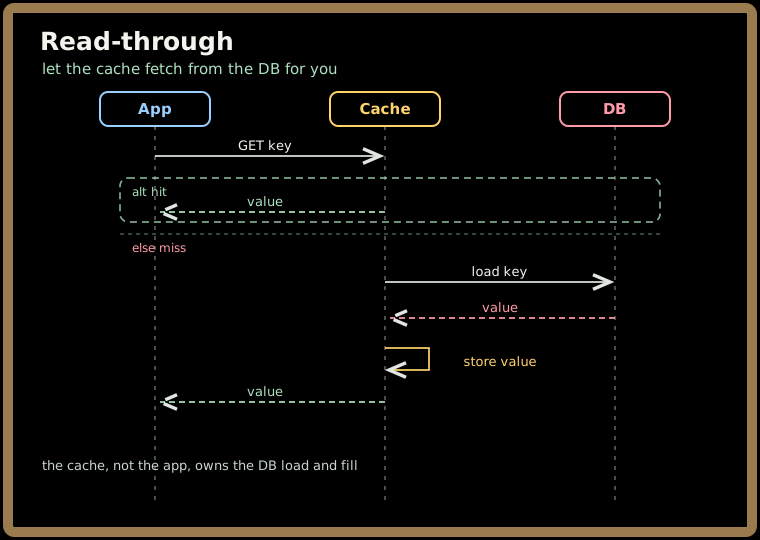
The difference from cache-aside is who owns the fetch logic. Cache-aside: the app. Read-through: the cache. The win is cleaner application code and a single, consistent place to manage caching. The trade-off is you need a cache (or client library) that supports it, and you've coupled your cache to your data-loading logic.
💡 Quick way to tell them apart in an interview: cache-aside = the app talks to both the cache and the DB. Read-through = the app only talks to the cache, and the cache talks to the DB.
Quick check before moving on:
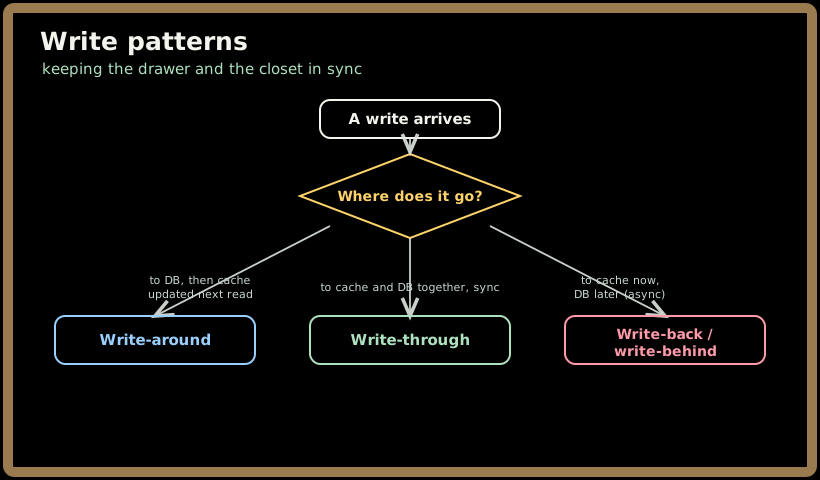
5. Write patterns: keeping the drawer and the closet in sync
Reads are the easy half. Writes are where caching gets genuinely interesting, because the moment data can change, your fast copy can start lying. The write pattern you choose decides how — and how quickly — the cache and the database agree.
5.1 Write-through — update both, in lockstep
In write-through, every write goes to the cache and the database synchronously, as one operation, before you acknowledge success. The cache is always up to date because nothing gets written without updating it.
- ✅ The cache is never stale — a read right after a write sees the new value.
- 🚫 Every write pays both costs (cache + DB), so writes are slower. And you may cache data nobody ever reads again, wasting space.
Pair write-through with read-through and you get a tidy, always-fresh cache — popular for read-heavy data that's also read soon after it's written.
5.2 Write-around — write past the cache
In write-around, writes go straight to the database and skip the cache entirely. The cache only gets populated later, on a read miss (cache-aside style). You "write around" the drawer.
- ✅ Avoids flooding the cache with write-heavy data that won't be read soon — great for, say, logs or bulk imports.
- 🚫 A key just written is not in cache, so the next read of it is a guaranteed miss. Recently-written data reads slowly.
5.3 Write-back (write-behind) — write fast, sync later
The fast and dangerous one. In write-back (a.k.a. write-behind), a write lands in the cache and returns immediately — the database is updated asynchronously, a moment later, often batched with other writes.
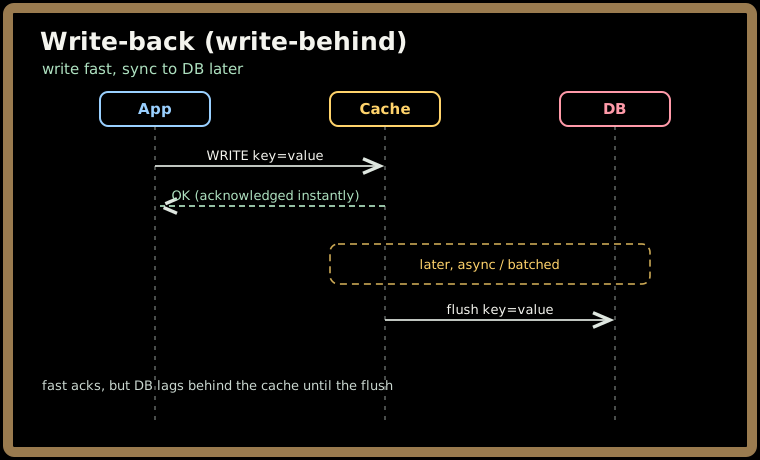
- ✅ Blazing-fast writes, and you can coalesce many updates to the same key into one database write — huge for write-heavy, bursty workloads (think view counters, leaderboards).
- ⚠️ Durability risk. If the cache node dies before it flushes, those acknowledged writes are gone. You traded durability for speed. Mitigate with a replicated/persistent cache and a write-ahead log, but understand the bargain you're making.
💡 The recurring lesson: write-through optimizes for freshness, write-back for write throughput, write-around for not polluting the cache. There's no universally right answer — there's the right answer for this data's read/write shape. That sentence is exactly the senior framing interviewers want, and we'll sharpen it in Part 4.
6. A worked example: the desk drawer in numbers
Let's make it concrete. You run a product page. The product details live in a database; a read takes 100 ms under load. You get 10,000 requests/second for the hot products, and the database tops out around 2,000 reads/second before it falls over.
Without a cache: 10,000 req/s slamming a database that handles 2,000. It melts. Game over.
With a cache-aside layer at a 95% hit ratio:
- Database load drops to the 5% that miss: ~500 reads/second. Comfortably under the 2,000 ceiling. The database survives.
- Average latency, using §2's formula with a 1 ms hit: (0.95 × 1) + (0.05 × 100) = 5.95 ms instead of a flat 100 ms — about a 17× speedup.
- And the bill: 95% of reads now hit cheap RAM instead of the expensive database tier.
One small drawer in front of the closet turned an impossible workload into an easy one — faster and cheaper and survivable. That's why caching is one of the first tools you reach for in almost any system-design problem.
Quick check before moving on:
7. Key takeaways
- A cache is a fast copy of hot data, kept close — it wins on three fronts at once: latency (RAM is ~1,000× faster than disk, ~100,000× faster than a cross-continent trip), backend load (it shields the slow tier), and cost (cheap trips replace expensive ones).
- The number that rules everything is the hit ratio. Because misses are so much costlier than hits, a few points of hit ratio swing your average latency and backend load dramatically — a 95%→90% drop can double both.
- Caches live in a hierarchy — client → CDN edge → app/in-memory (Redis, Memcached) → database buffer pool → disk. The same value may live in several drawers at once. A CDN is caching at the edge, one specific application of the general idea.
- Read patterns: cache-aside (lazy) — the app talks to both cache and DB, populating on a miss (the common default); read-through — the app talks only to the cache, which fetches for it.
- Write patterns: write-through (update both in sync — always fresh, slower writes), write-around (write to DB, skip cache — avoids polluting it, slow re-read), write-back/write-behind (write to cache now, DB later — fastest writes, but a durability risk). Choose by the data's read/write shape.
Drill the core patterns before you go:
Next up, Part 2 opens the drawer and looks inside: the eviction policies that decide what to throw out (LRU, LFU, FIFO, TTL), Redis vs Memcached as engines, the topologies of distributed caches, and how consistent hashing lets a cache cluster scale without going cold.