Path Navigation
What is this?
A file path like /home/user/../photos is really a set of walking directions through folders, and .. just means "step back out of the folder I just entered." Since stepping back always undoes your most recent step, a stack handles it perfectly — like a pile of folders you can only add to or remove from the top. Replay the directions on a stack and whatever folders remain are the clean, simplified path.
💡 Fun fact: Your operating system simplifies paths this exact way every time you open a file, and it also uses the rule to stop sneaky paths full of
..from escaping into folders you should not reach.
🔓 The 1 problem in this chapter is free. Sign in with Google or Microsoft to start solving.
Core idea: A filesystem path is a script of stack operations. Each directory name is a
push, every..is apop, and.or empty segments (from//) are no-ops. Run the script and the stack you're left with is the resolved path.
Why a stack models a path
Walking into a directory and walking back out with .. is inherently LIFO: .. always cancels the most recently entered directory. That's a pop. So canonicalizing a path is just: split it into segments and replay them as pushes and pops.
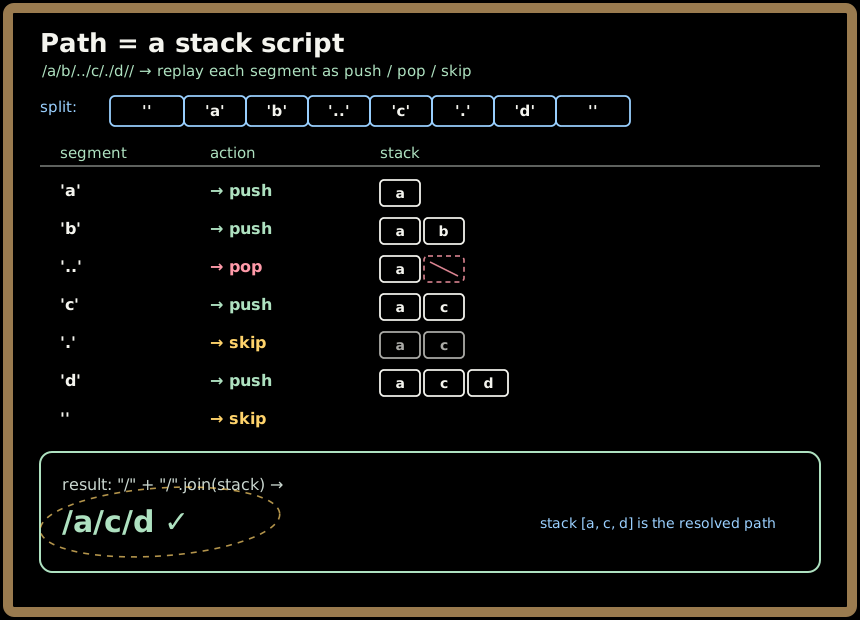
The problem in this chapter
Simplify Path — canonicalize a Unix path
Given an absolute path, produce its canonical form: starts with a single /, no trailing slash (except root), ./empty collapse away, .. goes up one level (and is a no-op at the root), and ordinary names — even odd ones like ... — stay as directories.
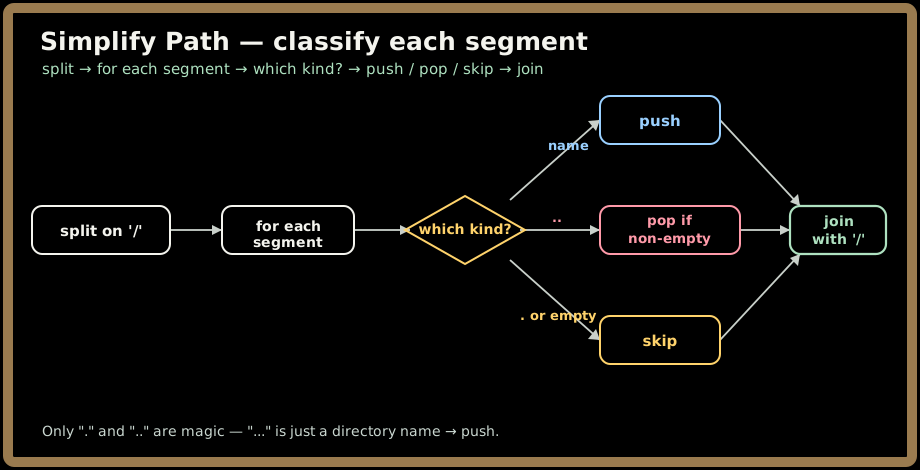
Split on /, process each token with a stack, then rebuild "/" + "/".join(stack). → O(n) time, O(n) space.
The cross-cutting skill: classify each segment
| Segment | Meaning | Stack move |
|---|---|---|
"" (from // or leading /) |
nothing | skip |
"." |
current dir | skip |
".." |
parent dir | pop (no-op if empty) |
anything else (incl. "...") |
a directory name | push |
The whole problem is a four-way classification of each token. The trap is treating
...or....as special — they're just directory names. Only exactly.and..are magic.
Where you'll meet it beyond the interview
- OS kernels resolve paths exactly this way (and must reject
..escaping a chroot — a path-traversal security check). - Container runtimes resolve overlay/bind mounts by canonicalizing paths.
- Proxies, routers, and CDNs normalize URL paths before matching routes or cache keys.
- Object stores canonicalize keys that look like paths.
📓 Draw it yourself
- Path as a stack script. Take
/x/y/../../z/and draw the directory stack evolving segment by segment. Watch..pop and the double-..-at-root do nothing. - The four cases. Make a tiny table on paper:
"",.,..,name→ skip/skip/pop/push. Internalize that...falls into "name."
Snap photos and embed them with the /host-diagrams skill.
Complexity at a glance
| Problem | Time | Space |
|---|---|---|
| Simplify Path | O(n) | O(n) |
Key takeaways
- A path is a stack script: names push,
..pops,./empty skip. ..at the root is a no-op — pop only if the stack is non-empty.- Only
.and..are special;...,....are ordinary directory names. - Rebuild as
"/" + "/".join(stack)to get the single-leading-slash, no-trailing-slash form for free. - Why this chapter matters: it's literally how kernels, containers, and proxies resolve paths — and a clean, real-world showcase of the push/pop instinct.
Problem: Simplify Path.
Simplify Path
Core idea: Walk the path as a series of directory moves — push a name to enter it, pop when you see
.., ignore.and empty pieces. The stack you end up with is the resolved directory chain.
Problem, rephrased
You're building the cd logic for a tiny shell. The user types a messy absolute path — full of doubled slashes, . ("stay here") and .. ("go up one") — and your shell has to print the one true location they ended up in: the canonical path.
The rules of the road:
- The result starts with exactly one
/. - No trailing slash, unless the answer is just the root
/. - Runs of slashes (
//,///) collapse to one. .means "current directory" — it does nothing...means "go up one level" — pop the last directory. At the root, there's nowhere to go up to, so it's a no-op.- Any other token is a real directory name and stays. That includes weird-but-legal names like
...or....— those are not special, they're just directories.
| Input path | Canonical output | Why |
|---|---|---|
/home/ |
/home |
drop the trailing slash |
/../ |
/ |
.. at root goes nowhere |
/home//user/ |
/home/user |
collapse the double slash |
/a/./b/../c/ |
/a/c |
enter a, stay, enter b, pop b, enter c |
/.../ |
/... |
... is just an ordinary directory name |
/ |
/ |
already canonical |
Sign in to continue reading
The rest of this lesson is available with a free account. Signing in with Google or Microsoft is free.
Sign in to read the full lesson