Rotate Image
Core idea: A 90° clockwise rotation is two cheap, in-place operations stacked back to back — transpose the matrix (flip it across its main diagonal), then reverse each row (mirror it left-to-right). No second matrix needed.
Problem, rephrased
You're working on the image-viewer feature of a photo app. A user taps the "rotate right" button on a square photo. The photo is stored as an n × n grid of pixels, and the product requirement is firm: rotate the image 90° clockwise, and do it in place — you may not allocate a second n × n buffer, because on a phone with a 48-megapixel sensor that buffer is hundreds of megabytes you don't have to spare.
Given an n × n grid matrix, mutate matrix itself so that it holds the clockwise-rotated image when you're done.
What "90° clockwise" means concretely: the top row becomes the right column, the right column becomes the bottom row, and so on. The element that was at the top-left corner ends up at the top-right corner.
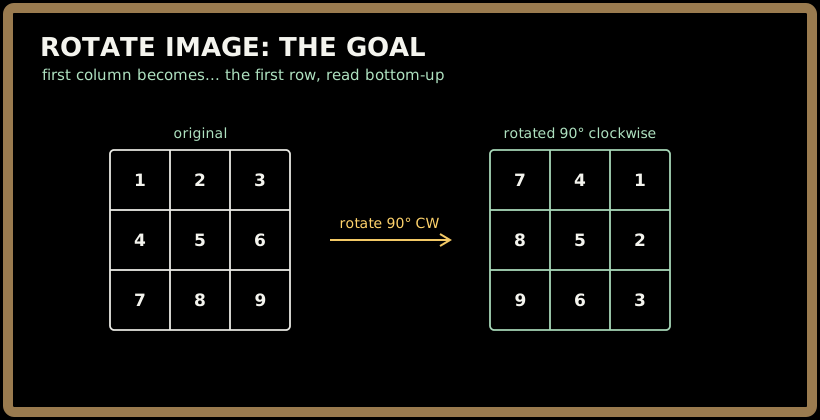
Notice where the first row 1 2 3 went: it stood up and became the last column, top-to-bottom reading 1 2 3 now reads down the right edge as 1 2 3.
Inputs / outputs
matrix (input) |
rotated 90° clockwise (output, same object) |
|---|---|
[[1,2],[3,4]] |
[[3,1],[4,2]] |
[[1,2,3],[4,5,6],[7,8,9]] |
[[7,4,1],[8,5,2],[9,6,3]] |
[[5]] |
[[5]] |
You return nothing — the caller reads the rotated result out of the same matrix they passed in.
Sign in to continue reading
The rest of this lesson is available with a free account. Signing in with Google or Microsoft is free.
Sign in to read the full lesson