Nested List
What is this?
A nested list holds plain numbers as well as more lists inside it, nested as deeply as you like — like boxes packed inside other boxes. If you picture it, the whole thing forms a tree: each number is a leaf and each inner list is a branch. To work with it you simply walk down through the layers, keeping track of how deep you currently are.
💡 Fun fact: This box-inside-a-box shape is exactly how the Lisp programming language has represented all data and code since 1958, and it is why formats like JSON can nest arrays inside arrays without limit.
🔓 The 1 problem in this chapter is free. Sign in with Google or Microsoft to start solving.
Core idea: A nested list — integers and lists, nested arbitrarily — is just a tree. Each integer is a leaf, each sub-list is a branch, and "depth" is simply how far down the traversal you are. Aggregating over it is a plain DFS (or level-by-level BFS), with depth carried along.
The reframe
![The nested list [1, [4, [6]]] drawn as a tree: a depth-1 branch holding leaf 1 and a depth-2 branch, which holds leaf 4 and a depth-3 branch holding leaf 6](https://maangioassets.blob.core.windows.net/diagrams/coding-interview/101/chapters/list/nested-list/nested-list-summary-diagram-1.svg)
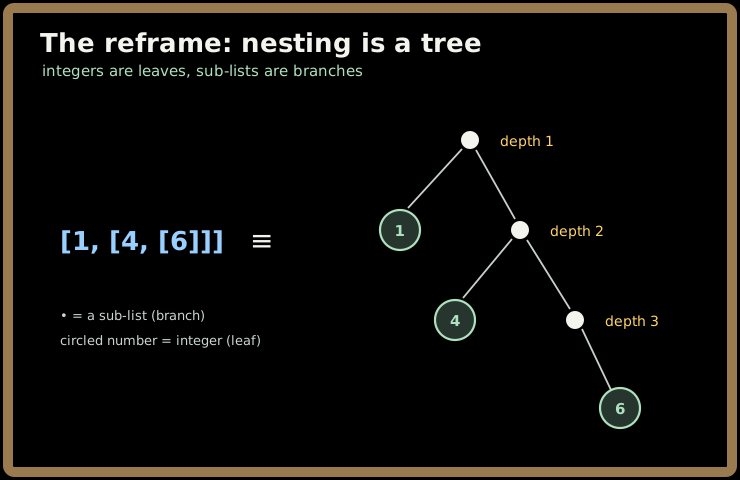
Once you see the nesting as a tree, the toolkit is the same as any tree problem: DFS carrying the current depth, or BFS processing one level at a time. The only "interface" wrinkle is that each element answers isInteger() (→ getInteger()) or holds getList().
The problem
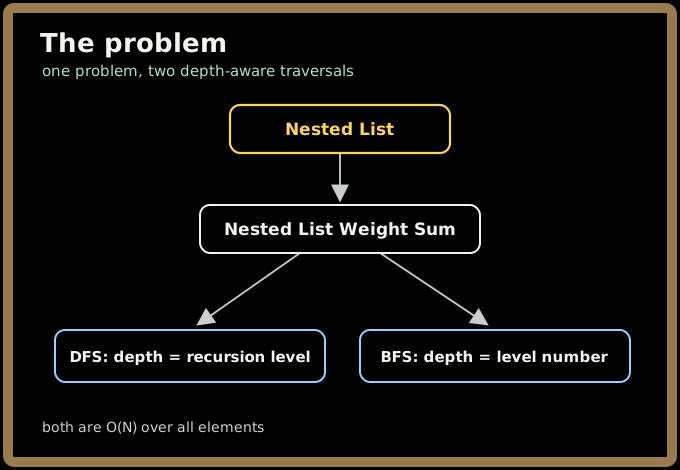
- Nested List Weight Sum — sum each integer × its depth (top level = 1). DFS: recurse into sub-lists with
depth+1, addvalue*depthat each integer — depth is just the recursion level, nothing to store. BFS: process level by level with a queue, multiplying by the level number. Both O(N) over all elements.
The follow-up (Weight Sum II) flips the weighting to inverse depth (leaves weigh most) — which is exactly why the BFS-by-level view is worth knowing: you can weight by
(maxDepth - level + 1)in a second pass.
Key takeaways
- Nested list = tree; depth = traversal level — don't store it, ride it.
- DFS carries
depth+1into each sub-list; each integer contributesvalue × depth. - BFS-by-level is the alternative and the key to the inverse-depth follow-up.
- Why interviewers like it: it checks whether you recognize a disguised tree and pick a clean depth-aware traversal — the same skill behind aggregating any nested document/hierarchy.
Problem: Nested List Weight Sum.
Nested List Weight Sum
Core idea: A nested list is a tree — so "depth" is just the recursion level, and the answer is one number: every integer's value times the level it sits at.
Problem, rephrased
Imagine you're billing for a cloud project whose budget is organized into folders inside folders. Top-level line items are charged at rate ×1. Anything one folder deep is charged ×2 (it's a sub-account, more overhead). Two folders deep is ×3, and so on — the deeper a cost sits, the more it's weighted.
You're handed this nested budget and asked for a single number: the total weighted cost, where each dollar amount is multiplied by its nesting depth (top level = depth 1).
The data arrives as a nested list of integers. Each element is either:
- a plain integer, or
- another list, whose elements are again integers or lists — to any depth.
You don't get to see "depth" as a field. You only get a NestedInteger-like handle per element: ask isInteger(), and if true read getInteger(); otherwise read getList() to descend.
Return the sum of value × depth over every integer, counting top level as depth 1.
| Nested input | Structure in words | Weighted sum | Why |
|---|---|---|---|
[1, 2, 3] |
three ints, all at depth 1 | 6 | 1·1 + 2·1 + 3·1 |
[1, [4, 6]] |
1 at depth 1; 4, 6 at depth 2 |
21 | 1·1 + 4·2 + 6·2 = 1 + 8 + 12 |
[1, [4, [2]]] |
1@1, 4@2, 2@3 |
15 | 1·1 + 4·2 + 2·3 = 1 + 8 + 6 |
[[1, 1], 2, [1, 1]] |
four 1s at depth 2, one 2 at depth 1 |
10 | (1+1+1+1)·2 + 2·1 = 8 + 2 |
Sign in to continue reading
The rest of this lesson is available with a free account. Signing in with Google or Microsoft is free.
Sign in to read the full lesson