Fundamentals
What is this?
Think of a number as a row of light switches that are each either on or off. These pages teach you the basic vocabulary for working with those switches — how to read one, turn it on, turn it off, or flip it — before you tackle any puzzles. It is the alphabet you need before you can read the words.
💡 Fun fact: A single byte holds eight bits, which is why a classic color channel runs from 0 to 255 — that is every possible combination of eight on/off switches, exactly 256 values.
🔓 The deep dives in this chapter are free. Sign in with Google or Microsoft to read the deep dives.
Core idea: every integer is just a fixed-width string of bits, and
AND,OR,XOR, and the shifts let you read, set, clear, and move those bits one column at a time. Once you see numbers as bit vectors instead of magnitudes, a surprising amount of work collapses into a single machine instruction.
The pattern
These pages are concept primers, not problems — they build the vocabulary the rest of the topic assumes.
- The operators.
ANDkeeps a bit only where both inputs have it (great for masking off what you don't want).ORkeeps it where either does (turning bits on).XORflips a bit where the inputs differ (toggling, and the engine behind self-canceling tricks).NOTinverts everything. - Shifts.
x << kmultiplies by2^kand slides bits toward the high end;x >> kdivides by2^k(floor) and slides toward the low end. Shifting is how you build powers of two and reposition fields. - Masks. A mask is a hand-built bit pattern you combine with a value to isolate or alter specific columns:
x & maskreads bits,x | masksets them,x & ~maskclears them,x ^ maskflips them.1 << ibuilds a single-bit mask for positioni. - Two's complement. Signed 32-bit integers store negatives as the complement-plus-one, so the top bit is the sign and arithmetic "just works" without special cases. This is why
-1is all ones and why overflow wraps around instead of erroring. - Where it shows up. Permission flags and feature toggles packed into one int, RGBA color channels, network masks and IP subnetting, bitsets and Bloom filters, hardware register control, and compression. Anywhere memory or speed is tight, bits earn their keep.
The problems
This bucket holds tutorials rather than coding problems: Bit Manipulation Foundations, Essential Bit Tricks, 32-Bit Signed Representation, and Bit Manipulation Applications. Read them first — the powers, XOR, and bit-pattern chapters all lean on the masks and two's-complement reasoning introduced here.
Key takeaways
- Treat an integer as a fixed-width bit vector; the operators act column by column.
ANDmasks,ORsets,XORtoggles,NOTinverts — pick the operator by what you want each bit to do.- Left shift multiplies by powers of two, right shift divides; both reposition fields cheaply.
- Two's complement makes the sign bit and wraparound behavior fall out naturally on 32-bit ints.
- Bit tricks earn their place wherever space and speed matter — flags, colors, networking, and compact data structures.
Essential Bit Tricks
Core idea: Most "clever" bit solutions are just one of a dozen standard one-liners. This is the cheat-sheet — set operations, the lowest-set-bit family, and a few classics (XOR to cancel pairs, masks to select). Learn to recognize them and you'll reach for the right trick in seconds.
How to read these
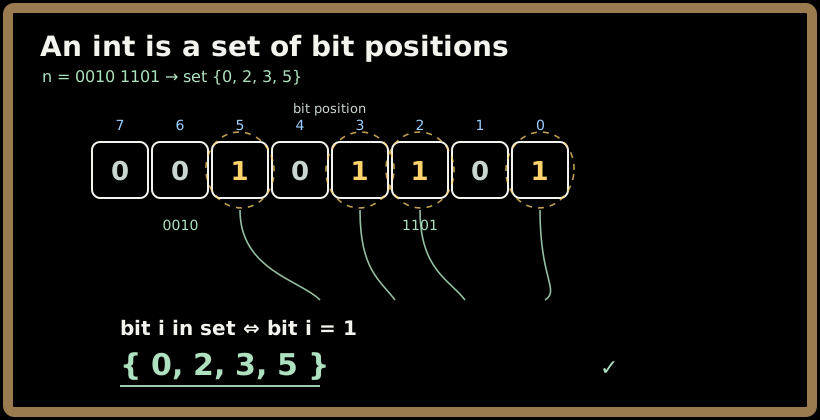
Everything below treats an integer as a set of bit positions (bit i ∈ the set iff that bit is 1). With that lens, the bitwise operators are set algebra and most tricks read like English.
Sign in to continue reading
The rest of this lesson is available with a free account. Signing in with Google or Microsoft is free.
Sign in to read the full lesson