User Stories — Part 1: What a User Story Is
maang.io AI-Native Builder Series
What is this?
Imagine you're throwing a dinner party and you've hired that brilliant-but-tasteless cook from the kitchen — the one who can make anything but has zero judgment of their own. You could hand them a 40-page binder titled "EVERYTHING ABOUT THE DINNER." They'd drown in it. Or you could hand them a stack of index cards, one promise per card: "As a guest with a nut allergy, I want a dessert I can safely eat, so that I don't end up in the hospital." Each card is small. Each card names who it's for, what they want, and why it matters. Each card is something you can later taste and check: did the guest get a safe dessert, yes or no?
A user story is that index card for software. It's one small, plain-English description of something a person wants to do with your app, written from their point of view — not a technical task, not a giant feature, just one little promise to one kind of user. You'll write a whole stack of them for StreakUp, and that stack becomes the to-do list you (and your AI cook) actually build from.
The one-line idea: a user story is a small, plain-language promise of something one kind of user wants to do and why — written so you can later check whether you delivered it.
That index-card image — small promises, one per card, each naming who/what/why — is the heart of this whole topic. Let's earn it.
1. Where stories come from (and why we don't skip straight to them)
You didn't arrive at user stories out of nowhere. Look back at what you've already built in your Spec Package:
- In Product Thinking, you wrote a product brief — who StreakUp is for and what real problem it solves.
- In Requirements, you separated the must-haves from the nice-to-haves and drew a line around a realistic MVP (the smallest version worth shipping).
A user story is the next zoom-in. The brief is the vision. The MVP is the scope. User stories are the individual, buildable promises inside that scope. Each requirement on your must-have list becomes one or more stories.
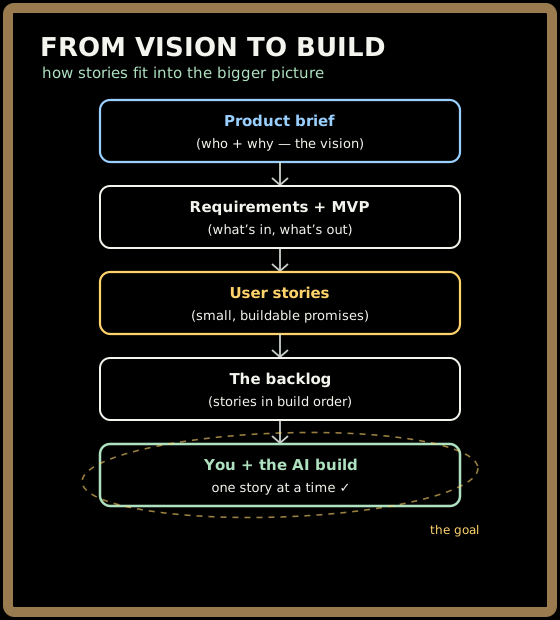
Why bother turning requirements into stories at all? Because "let a user create a habit" (a requirement) is still a bit abstract. The story form forces you to say who wants it and why — and that extra context is exactly what stops your AI cook from building the wrong thing. A requirement tells you what to build; a story tells you what to build and what success looks like to a real person.
💡 You'll never write a story for a vague feeling like "make it nice." Stories are always concrete actions a specific person takes. If you can't name the person and the thing they do, it's not a story yet.
2. The anatomy of a user story
There's a tiny, famous template that almost every team uses, and it's worth memorizing because it does three jobs at once. Here it is:
As a (kind of user), I want (to do something), so that (I get some benefit).
Three clauses, three jobs:
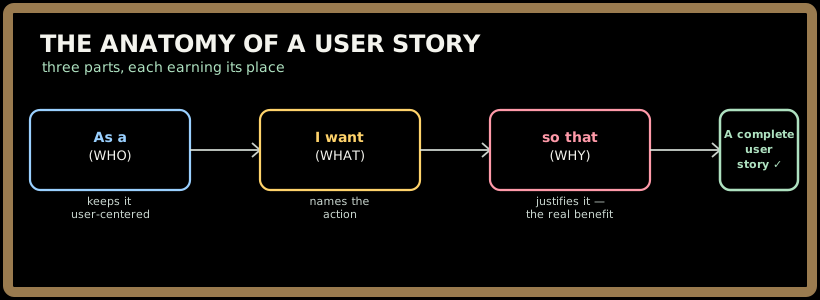
- As a (who) — names the kind of person who wants this. Not "the system," not "the database" — a human role. For StreakUp that's usually a habit-builder (someone trying to stick to a habit) or a new user (someone who just arrived).
- I want (what) — the action they want to take, in their words. "mark a habit done," "see my current streak." Notice it's what they want to do, not how you'd code it.
- so that (why) — the benefit. This is the clause beginners drop, and it's the most important one. It's the reason the feature exists. If you can't fill it in, you may be building something nobody actually needs.
Here's a real StreakUp story, fully formed:
As a habit-builder, I want to mark a habit done for today, so that my streak keeps growing.
Read it out loud. You instantly know who it's for (someone building a habit), what they do (mark a habit done today), and why it matters to them (the streak — the whole emotional hook of StreakUp). That single sentence is enough for you to picture the screen, and enough to later check whether you built the right thing. That's the magic of the format.
A good story and a weak one can describe the same feature — the difference is whether all three clauses do real work:
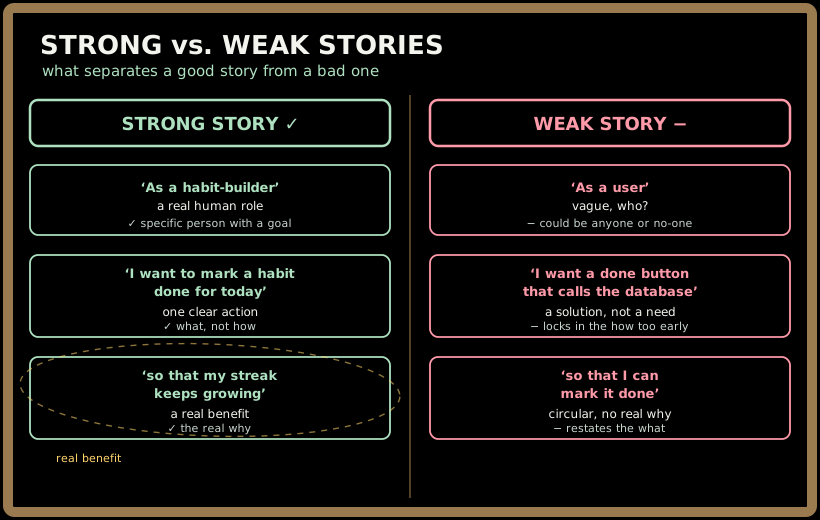
⚠️ Watch the "so that" clause especially. "As a user, I want a settings page, so that... I have a settings page" is a circular non-answer — it means you haven't found the real reason yet. A good "so that" always points at a benefit to the human, never just restates the feature.
Quick check before moving on:
3. Why this odd little format? Three reasons
The "As a... I want... so that..." sentence can feel like a gimmick at first. It isn't. It quietly enforces three things that keep your whole project healthy.
It keeps you user-centered
Starting every story with "As a..." forces you to name a real person before you describe a feature. This is a subtle but powerful trick: it's almost impossible to write "As a habit-builder, I want a microservice mesh" — the user-first framing naturally pulls you toward things users actually care about and away from technical toys. The user stays at the center because the grammar puts them there.
It stays small and singular
A good story describes one thing a user does. The moment you find yourself writing "...and also..." inside a story, that's a signal it's really two stories. Small stories are easier to build, easier to verify, and easier to reorder. (We'll push on "how small?" hard in Part 2.)
It's a conversation, not a contract
Here's a phrase you'll hear from every experienced team: a user story is a promise to have a conversation, not a contract that specifies every detail. The card is deliberately short. It's a placeholder that says "we agreed this matters — we'll work out the fine print when we build it."
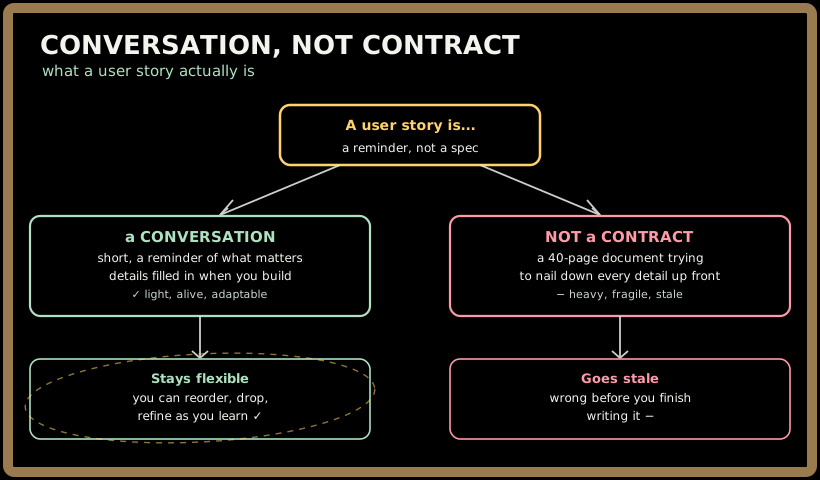
This matters even more when your teammate is an AI. You're not trying to write a story so airtight that no thinking is required to build it — that's impossible, and the AI would just fill the gaps with guesses anyway. You're writing a story clear enough to start the conversation — and then, in 201, you'll direct the AI through the details, review what it produces, and verify it against the story. Trust, then verify starts with a story clear enough to verify against.
4. Story vs. task vs. epic — the three sizes
People throw around the words epic, story, and task like they're interchangeable. They're not — they're three different sizes of work, like a country, a city, and a street address. Getting them straight now will save you real confusion in 201.
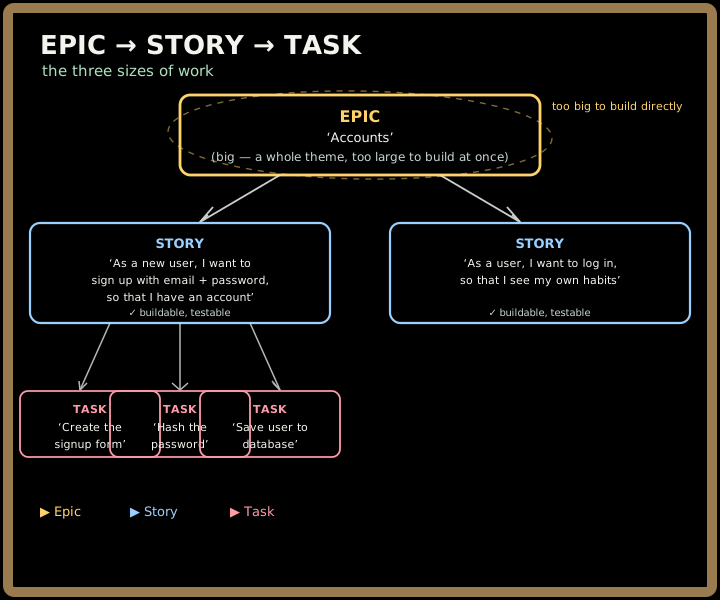
- An epic is a big chunk of value — a whole theme — too large to build in one go. "Accounts" is an epic: it contains signing up, logging in, logging out, resetting a password. You don't build an epic directly; you break it into stories. (More on breaking epics down in Part 3.)
- A story is the right-sized unit: one thing one user does, deliverable on its own. This is the level you'll spend almost all your time at. "As a new user, I want to sign up with email and password, so that I have an account" is a story.
- A task is a technical step needed to deliver a story — and it's written for the builder, not the user. "Create the signup form," "hash the password," "save the user to the database" are tasks. Tasks are about how; stories are about what and why.
The key distinction: stories are about the user; tasks are about the implementation. "As a habit-builder, I want to see my current streak" is a story — it's value to a person. "Add a streak column to the habits table" is a task — it's a step toward delivering that story. In this topic and the rest of 101, you write stories. The tasks come later, in The Spec, when you and the AI plan how to build each story.
💡 A quick test for which size you've got: Could a user care about it directly? → probably a story. Is it a step only a builder would mention? → a task. Is it so big it clearly contains several stories? → an epic.
Quick check before moving on:
5. A first taste of the StreakUp backlog
Let's make this concrete. Pulling straight from StreakUp's MVP (sign up / log in, create a habit, see today's habits, mark a habit done, see the streak), here are five real stories — the start of the backlog you'll finish building in Parts 2 and 3:
| # | User story |
|---|---|
| 1 | As a new user, I want to sign up with an email and password, so that I have my own account. |
| 2 | As a habit-builder, I want to create a new habit, so that I can start tracking it. |
| 3 | As a habit-builder, I want to see all my habits for today, so that I know what I still have to do. |
| 4 | As a habit-builder, I want to mark a habit done for today, so that my streak keeps growing. |
| 5 | As a habit-builder, I want to see my current streak for each habit, so that I stay motivated not to break the chain. |
Read down that list. Notice how it's basically StreakUp described as a series of human moments — sign up, add a habit, check today's list, tap done, watch the streak climb. That's not an accident. A good backlog reads like the story of someone using your app. If you handed just this table to your AI cook, it would already understand the shape of what you're building — far better than "make me a habit tracker" ever could.
Each of these stories is still missing one thing, though: a precise definition of "done." Story #4 says "mark a habit done" — but done when? What does the user see? What if they already marked it? That's exactly what acceptance criteria answer, and they're the whole subject of Part 2.
Test yourself on this part's key ideas:
Key takeaways
- A user story is a small, plain-language promise of something one kind of user wants to do and why — the index card of software, written from the user's point of view.
- The format is **"As a (who), I want (what), so that (why)."** The "so that" is the most-skipped and most-important clause — it names the real benefit and proves the feature deserves to exist.
- Stories are a conversation, not a contract — short by design, a placeholder for a discussion you'll have when you build. That flexibility is what lets you reorder and refine as you learn.
- Epic → story → task are three sizes: an epic is a big theme, a story is one user-sized promise, a task is a builder's implementation step. In 101 you write stories; tasks come later in The Spec.
- A good backlog reads like the story of someone using your app — and it gives your AI partner the shape of what to build, far better than a vague "make me an app."
Your turn
Open your build journal and start the second piece of your Spec Package — the StreakUp backlog:
- Copy the "As a... I want... so that..." template to the top of a fresh page so you have it in front of you.
- Look at your MVP must-have list from the Requirements topic. For each must-have, write one user story in the full format. (You'll have roughly 5–8.) Don't worry about acceptance criteria yet — just get the stories down.
- For each story, double-check the "so that" clause names a real benefit to a human, not a restatement of the feature. Fix any that are circular.
You now have a draft backlog of stories. In Part 2, we'll make each one testable — adding acceptance criteria so "done" stops being a feeling and becomes something you can actually check.