The LLM as a System Component — Part 1: Tokens, Context Windows & Sampling
maang.io Agentic System Design Series
🎬 Prefer to watch first? Here's the video walkthrough of this lesson. Watch it, then read on for the worked numbers.
What is this?
Imagine your company has hired a brilliant outside consultant. They know a little about almost everything, they write beautifully, and they can reason through a messy situation faster than most of your staff. There's a catch, though: you can only reach them by phone, on a metered line, and the arrangement has four quirks you can't negotiate away.
- They're size-limited. Every call starts from zero, so before every single question you read them the whole briefing pack: who you are, the house rules, everything that has happened so far, the reference material. That pack has a page limit: your instructions, the history, the references and the room they need for their answer all have to fit inside it.
- They're slow. They read the entire pack before saying a word, then speak at a steady pace. You can't rush either half.
- They're metered. You're billed per word, both for every word they read and every word they say, and speaking is billed at a higher rate than reading.
- They're probabilistic. Ask the same question twice and you get two differently worded answers. Usually both are fine. Now and then one is fluent, confident and wrong.
A large language model is that consultant. The briefing pack is the prompt, the page limit is the context window, the "words" on the meter are tokens, and the differently worded answers come from sampling. Seen this way, most agent design is just what you'd build around any brilliant, expensive, slightly unpredictable dependency on the end of a wire.
The one-line idea: an LLM call is a remote dependency that is size-limited, slow, metered and probabilistic, so you design around it the way you'd design around a flaky, expensive third-party API, never the way you'd call a local function.
We'll follow one example through all four parts. Larkspur Home is an online homeware store with a support agent. A customer, Priya, writes in:
"My table lamp from order #4417 arrived with a cracked base. Can I get a refund?"
The agent resolves it in 10 LLM calls: nine steps where the model picks a tool (look up the order, check the shipment, search the refund policy, check Priya's history, check eligibility, compute the amount, issue the refund, email Priya, close the ticket) and one final call that writes Priya's reply. This part is about what actually goes into each of those calls and what comes out: the size-limited and probabilistic quirks. Part 2 times the calls, and Part 3 puts them on the meter.
Tokens, not words
The consultant bills "per word", but the model doesn't see words at all. Before your text reaches it, a tokenizer chops the text into tokens: chunks drawn from a fixed vocabulary, often whole common words, sometimes fragments of rarer ones, plus punctuation and spaces. The model only ever sees a sequence of integer token IDs, and it only ever produces one too.
You don't need a tokenizer's internals to design well, but you do need the rules of thumb:
- For ordinary English, one token ≈ 4 characters ≈ 0.75 words. So 1,000 tokens ≈ 750 words.
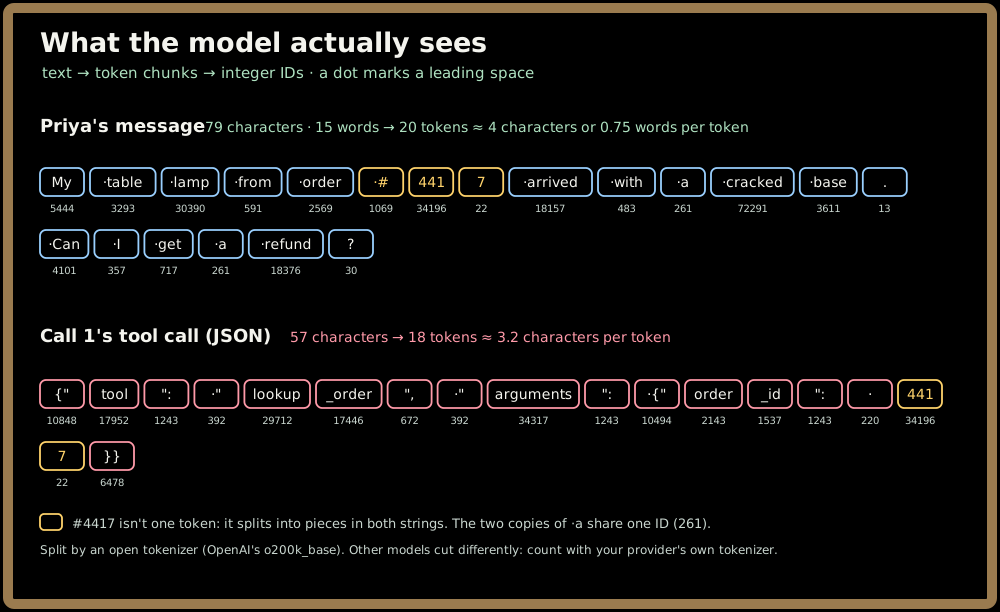
- Code, JSON, numbers and many non-English languages take noticeably more tokens per word. An order ID like
#4417may split into several pieces, and every brace, quote and key in a JSON blob costs tokens. The exact ratio varies by tokenizer, so treat 4 characters per token as an English-prose estimate, not a law.
Here's a real tokenizer at work on Priya's message and on the agent's first tool call:
🔧 Try it: open the Tokenizer Playground, paste Priya's message and then call 1's tool call JSON, and compare the characters per token. Then switch to another model's tokenizer: the same 79 characters split into different pieces.
Why care? Because tokens are the unit every limit and every bill is denominated in. Not characters, not words, not requests:
| What you're designing around | Measured in | The quirk it creates |
|---|---|---|
| Context window | tokens per call (input + output) | size-limited |
| Price | dollars per million input / output tokens | metered |
| Generation speed | output tokens per second | slow |
| Provider rate limits | tokens per minute (as well as requests) | metered |
Let's put a number on Larkspur's agent. Before Priya's message even arrives, every call carries a fixed prefix: a system prompt of 1,200 tokens (the agent's role, tone, refund rules, escalation policy) plus tool definitions for its nine tools at 800 tokens. That's 2,000 tokens, roughly 1,500 words or 8,000 characters, the length of a short magazine article. Priya's message, together with the framing the app wraps around it, adds about 100 tokens. So the very first call reads 2,100 tokens before the model produces anything.
⚠️ Gotcha: don't size production prompts by word count. A budget check written in characters is wrong in exactly the cases that matter: code, structured data and non-English customers. Call 1's tool call runs about 3.2 characters per token, so characters ÷ 4 undercounts it. Run your provider's token counter on the real assembled prompt.
Quick check before moving on:
Inside one call: the generation loop
Here's what happens between sending those 2,100 tokens and getting an answer back. Three design consequences fall straight out of it.
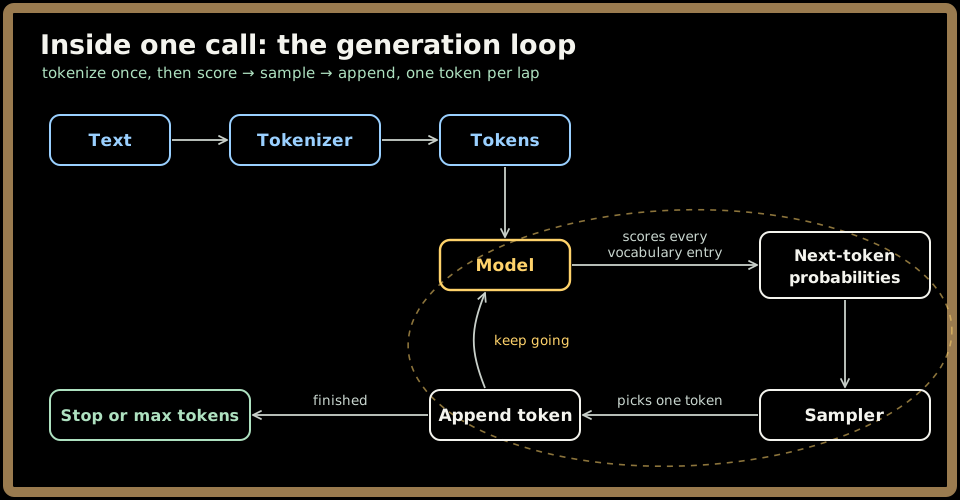
The model reads the whole token sequence and produces a probability for every possible next token. A sampler picks one, it's appended, and the model runs again on the longer sequence. Round and round, one token at a time, until the model emits a special stop token or hits the max-tokens limit you set on the request.
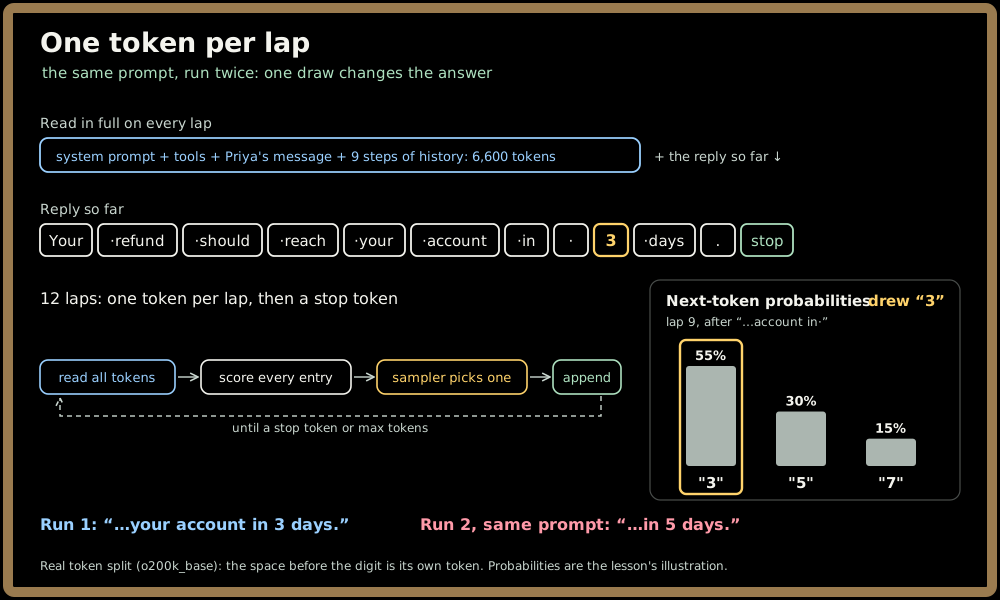
Here's that loop on the end of Priya's reply, run twice on the same prompt:
Three consequences:
- Output arrives one token at a time. There's no "compute the answer, then send it". The answer is the loop. That's the root of the slow quirk, and Part 2 is built on it.
- Max tokens is a hard cut, not a polite suggestion. If the limit hits first, the output simply stops, mid-sentence or mid-JSON. Always check the stop reason the API returns. A reply that ended because it ran out of room is not a finished reply.
- The model generates a plausible continuation; it doesn't look anything up. With the right fact in the context, the plausible continuation is usually correct. Without it, the model still produces something fluent. That's the root of the probabilistic quirk, and why the agent calls
search_policyinstead of trusting the model to remember Larkspur's refund rules.
The model is stateless: you resend the briefing pack every call
📱 This section in 61 seconds: Your AI agent reads 43,500 tokens to write 1,200, a YouTube Short.
This property surprises people most, and it drives the math in Parts 2 and 3. The model keeps nothing between calls. No session, no memory of Priya, no recollection that it already looked up order #4417.
So the "conversation" is an illusion your application maintains. On every call, the app reassembles the briefing pack: the fixed prefix, Priya's message, and every previous step, meaning each tool call the model made and each result that came back. Each step appends about 500 tokens to that history: roughly 100 for the model's tool call and 400 for the tool's result.
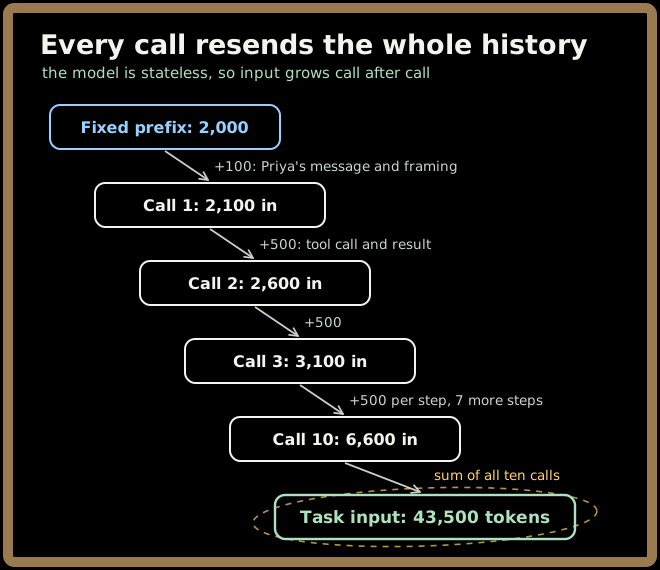
The input of call k is 2,100 + 500 × (k − 1), so it climbs from 2,100 on call 1 to 6,600 on call 10:
| Call | 1 | 2 | 3 | 4 | 5 | 6 | 7 | 8 | 9 | 10 |
|---|---|---|---|---|---|---|---|---|---|---|
| Input tokens | 2,100 | 2,600 | 3,100 | 3,600 | 4,100 | 4,600 | 5,100 | 5,600 | 6,100 | 6,600 |
Add them up: 10 × 2,100 + 500 × (0 + 1 + … + 9) = 21,000 + 22,500 = 43,500 input tokens per task. The output side is tiny by comparison: nine tool calls at about 100 tokens each, plus a final reply to Priya of 300 tokens (about 225 words), for 1,200 output tokens. That's 44,700 tokens in total, and 97% of them are input.
The model wrote 1,200 tokens. It read 43,500, mostly the same prefix and early tool results, over and over. Every step you add makes every later call longer, so the total grows roughly with the square of the step count, not linearly. A 20-step task doesn't read twice as much as a 10-step task: it reads 20 × 2,100 + 500 × (0 + 1 + … + 19) = 137,000 input tokens, about 3.1×. Stack the ten calls and the shape is plain:
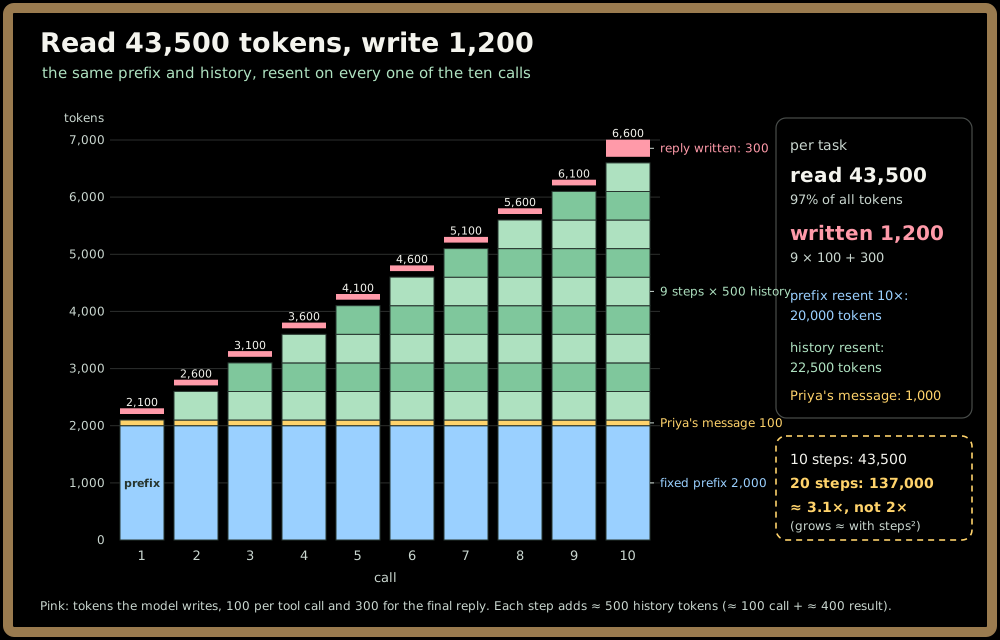
💡 This is the single most useful number-shape in agent design: input dominates, and it grows every step. Part 2 will show it slowing each call down, and Part 3 will show it dominating the bill. The levers are keeping history short and prompt caching (a discount on a stable prefix you resend), covered in Context Engineering's Prompt Caching & Prefix Stability lesson.
This isn't a framework bug, and a bigger model doesn't fix it. Anything the agent should "remember", across calls or across days, your code must put back into the context: the subject of the Agent Memory topic.
Quick check before moving on:
The context window: a fixed budget
The briefing pack's page limit is the context window: the maximum number of tokens one call can hold, input and output combined (many models also cap output separately). Throughout this topic we'll use an illustrative window of 128,000 tokens. Real windows vary widely by model, so check yours. Whatever the size, it's a fixed budget, and five things compete for it.
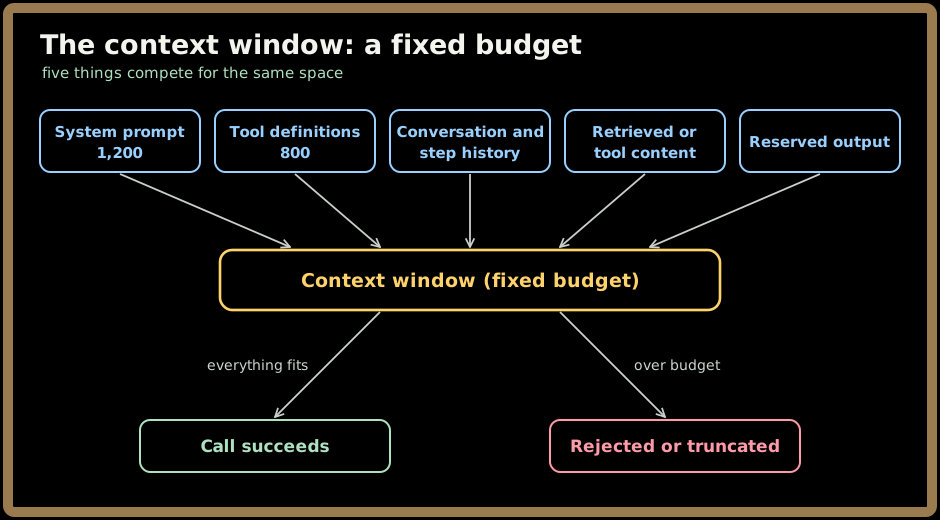
The one people forget is the last box: the answer has to fit too. If you fill the window with input, there's no room left for the model to reply. So you reserve output space up front; Larkspur reserves 1,000 tokens, comfortably more than the 300-token reply.
Here's Larkspur's budget on its biggest call, call 10:
| Component | Tokens |
|---|---|
| System prompt | 1,200 |
| Tool definitions | 800 |
| Priya's message + app framing | 100 |
| History: 9 steps × 500 | 4,500 |
| Input total | 6,600 |
| Reserved output | 1,000 |
| Used of 128,000 | 7,600 ≈ 6% |
Six percent: on the happy path the window isn't the constraint. But tools don't always return what you expect. Suppose someone adds a get_customer_emails tool that returns Priya's entire email archive: 500 messages × 300 tokens = 150,000 tokens. That single tool result is bigger than the whole 128,000-token window. Drawn to scale:
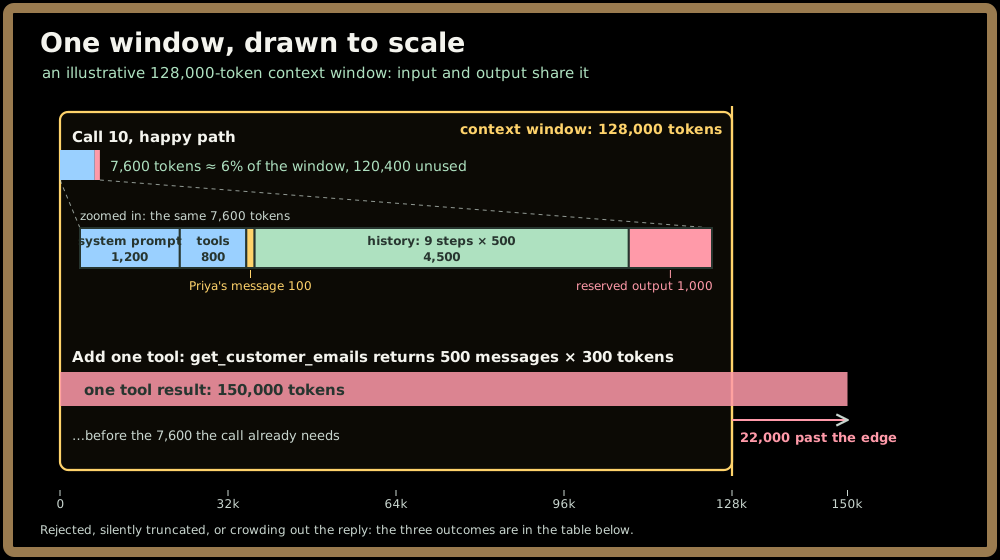
Depending on your stack, one of three things happens:
| What happens | How it shows up | Why it's dangerous |
|---|---|---|
| The provider rejects the request | An error on call k; the task dies mid-flight | Loud, at least. But the steps before it, including any writes, already happened |
| Your framework silently truncates | The request succeeds with some content dropped | ⚠️ If it drops the oldest content, it may drop the system prompt or Priya's original message |
| Input crowds out output | The reply hits max tokens and stops mid-answer | Looks like a model quality problem; it's a budget problem |
And even when an oversized result does fit, remember the previous section: it gets resent on every later call.
💡 Subtle point: "it fits" is not "it works well." Models tend to use information less reliably as the context grows long and cluttered, an effect called context rot. A bigger window raises the ceiling; it doesn't make stuffing it free in quality, latency or money.
🚫 Don't treat the context window as storage. It's a per-call working set you rebuild every time. How to paginate and truncate tool output belongs to the Tool Use topic, and how to budget each component (and why long contexts degrade) belongs to Context Engineering. The instinct to keep: every token in the window was put there by your code, on purpose, every call.
Sampling: why the same prompt gives different answers
📱 This section in 64 seconds: Same prompt, same model, different answer, a YouTube Short.
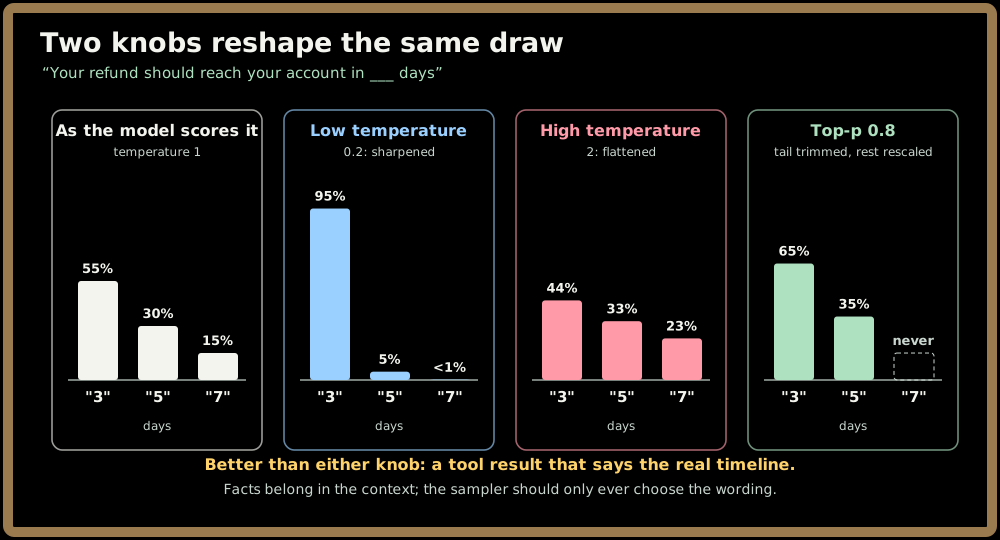
Back to the generation loop. The model doesn't output a next token; it outputs a probability distribution, and the sampler draws from it. Suppose the reply to Priya has reached "Your refund should reach your account in ___". An illustrative distribution:
| Next token | Probability |
|---|---|
| "3" | 0.55 |
| "5" | 0.30 |
| "7" | 0.15 |
Drawing in proportion, "3" wins only a little more than half the time. Run the same prompt twice and Priya might be told three days, then five.
Two knobs reshape the draw:
- Temperature sharpens or flattens the distribution. Low temperature pushes nearly all the probability onto the top candidate; high temperature spreads it out, so unlikely tokens get picked more often.
- Top-p (nucleus sampling) trims the tail: keep only the smallest set of top candidates whose probabilities add up to p, then sample among those. With top-p at 0.8, "3" and "5" together clear the bar, and "7" is never chosen.
Here's what each knob does to that same draw:
| Setting | Behaviour | Good fit in an agent |
|---|---|---|
| Low temperature | Picks the likeliest token almost every time | Tool selection, extraction, classification, anything your code parses |
| Moderate | Some variety in wording | Customer-facing prose like Priya's reply |
| High | Varied, sometimes surprising | Brainstorming, generating test cases; rarely in a production agent step |
Should the refund timeline ever be sampled? No. It's a fact, and facts belong in the context as tool results, where they sharpen the distribution toward the right answer. If no tool returned a timeline, the reply shouldn't state one. Put facts in the context instead of hoping the sampler lands on them.
💡 Subtle point: temperature 0 is not a determinism guarantee. Providers generally don't promise identical outputs across calls even at temperature 0: batching and floating-point effects on shared hardware, plus silent model updates, can change the result. Design so you don't need identical outputs.
Ask the agent to write Priya's reply twice and you'll get two different paragraphs. Both are correct if both say the refund is $95.50, give the reference R-2291, and don't promise anything the policy doesn't. So you test properties, not strings: does the reply contain the right amount, the right reference, the right tone? Measuring those properties as pass rates across a dataset of cases, rather than asserting exact outputs, is the Evals topic.
"Probabilistic" also includes "sometimes wrong", and that compounds. If each of ten steps is right 95% of the time, the whole task is right only about 60% of the time (0.95¹⁰). Why that happens and what to do about it is The Agent Loop's Compounding Error & Reliability Math lesson.
Hallucination: fluent, confident and wrong
Put the generation loop and the sampler together and you get the failure everyone already has a word for. A hallucination is output that reads as true but isn't supported by the context or by reality: a fact, a number, a citation or a claimed action that the model produced because it was a plausible continuation, not because anything in the briefing pack said so.
It isn't a bug you can patch out. The model always produces some next token, and it was trained to make that token plausible. There's no built-in "I don't know" branch: when the right fact isn't in the pack, the most plausible continuation is still fluent and specific. And the tone gives you no warning. The consultant states a made-up policy in exactly the confident voice they use for the real one.
In an agent, hallucination comes in four shapes, and only the first is the one people picture:
| Shape | Priya's ticket, going wrong | What catches it |
|---|---|---|
| Invented fact | The reply promises a 30-day return window that no tool returned | Facts come from tool results, never from the model's memory |
| Unfaithful to the context | calculate_refund returned $95.50; the reply says $59.50 |
A code check: every amount and reference in the reply must match a tool result |
| Invented tool or argument | It calls issue_store_credit, a tool that doesn't exist, or passes an order ID it never saw |
Structured output with the tool names as an enum; arguments validated against your data |
| Claimed action | "I've issued your refund" when create_refund was never called, or returned an error |
Check the trajectory, not the prose: the reply may claim only actions whose tool results show success |
The last shape is the agentic one and the most dangerous. A hallucinated "done" looks exactly like a real one, and a customer who's told their refund is on its way doesn't double-check.
So don't read the reply, check it: watch a code check test each claim against what the tools actually returned.
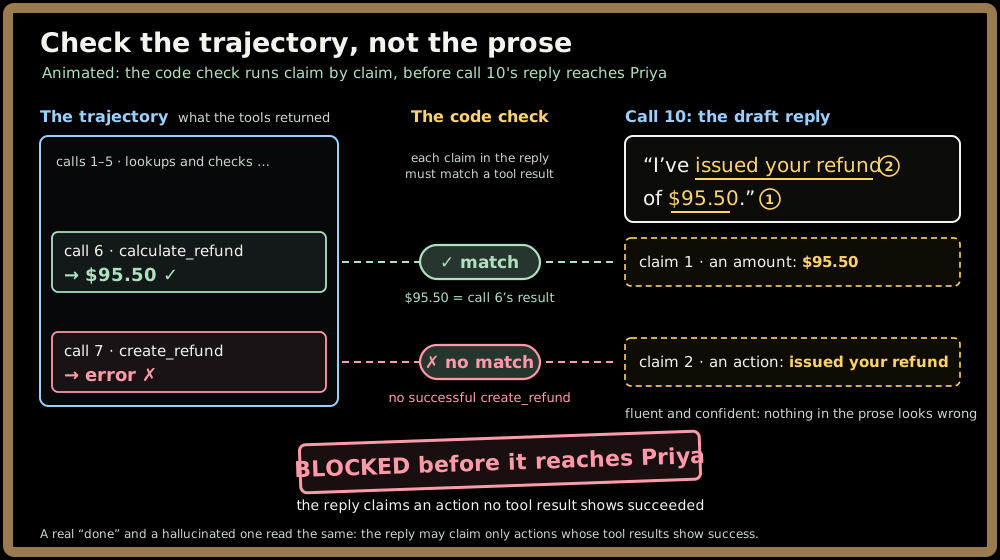
Put a number on it. Suppose an illustrative 3% of Larkspur's replies contain one unsupported claim. At 50,000 tasks a day, that's 1,500 customers a day told something untrue, in writing, by your company. "The model is usually right" is not a safety argument at that volume.
The defences come in layers, and the order matters:
- Ground it. Put the facts in the context, the previous section's rule. Most hallucination in agents is a missing-context problem: the step didn't fetch what it needed, so the model filled the gap.
- Let it abstain. Tell the model what to do when the facts aren't there ("if no tool returned a timeline, say you'll confirm by email"), and count "I don't know" as a correct answer in your evals. A model that's only ever rewarded for answering will answer.
- Constrain the format. Schemas and enums remove invented fields and invented tools: the next section.
- Verify in code. Check the claims that matter against ground truth before anything is sent or executed: amounts, IDs, actions taken. These checks are cheap, deterministic and catch the unfaithful reply every time.
- Cite and measure. For answers drawn from documents, require a citation to the retrieved passage and measure groundedness as an eval: the Citations and groundedness section of Retrieval-Augmented Generation's Agentic RAG lesson. A second model checking the first helps too, within limits covered in Multi-Agent Patterns' Critics, Verifiers & Consensus lesson.
💡 Subtle point: a bigger model hallucinates less, not never. Rates fall with capability and with good grounding, but none reach zero. So the design question is never "which model doesn't hallucinate?" It's "what stands between a hallucination and the customer, or the database?"
Quick check before moving on:
Structured output: the first defence against non-determinism
Nine of Larkspur's ten calls don't produce prose for Priya. They produce a decision your code has to execute. On call 1 the model must emit something like:
{"tool": "lookup_order", "arguments": {"order_id": 4417}}
Your application parses that, runs the tool, appends the result and makes call 2. Here the probabilistic quirk stops being about wording and starts breaking things. A missing brace, a stray sentence before the JSON ("Sure! Here's the call:"), or order_id spelled orderId, and your parser throws.
Suppose free-form JSON fails to parse 2% of the time. That sounds rare, but every one of ten calls has to parse: 0.98¹⁰ ≈ 0.82, so about 18% of tasks hit at least one malformed step. Nearly one customer in five gets a retry, a delay or a failure, from a 2% problem.
Here's that 2% playing out across 100 tasks like Priya's, one call at a time:
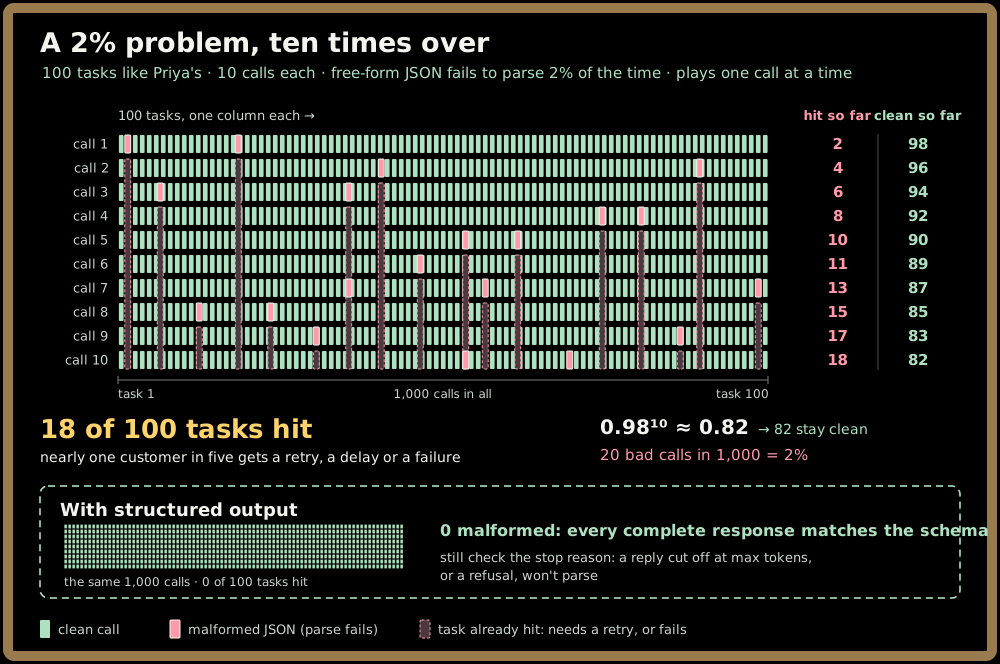
So instead of a blank page, you hand the consultant a form to fill in: a schema with named fields and types. With structured output (schema-constrained generation), the provider restricts what the model can generate so the result always conforms to the schema you supplied. Every complete response matches the schema, so the 18% malformed-JSON rate goes away. You still check the stop reason, because a reply cut off at max tokens, or a refusal, won't parse.
What it does not do matters just as much:
| Failure | Example | Does structured output catch it? | What does |
|---|---|---|---|
| Format | Broken JSON, missing field, wrong type | Yes, by construction | — |
| Content | Valid JSON with order_id: 4471 instead of 4417 |
No | Validation against your data: does this order exist and belong to Priya? |
| Judgment | Valid call to create_refund with an amount the policy doesn't allow |
No | Business-rule checks in the tool, approval for risky writes, evals |
Structured output removes format failures, not content failures. A perfectly valid JSON object with the wrong order ID is still wrong, and your code will execute it faithfully. So it's the first layer, not the only one: constrain the format, validate the values against your own systems before acting, and take most care around writes. Call 7, create_refund, moves real money. Making it safe to retry and deciding when it needs human approval belong to the Tool Use topic, and how constrained decoding actually works is its Tool Schemas & Structured Output lesson.
💡 The general pattern: wherever the model's output feeds code rather than a human, narrow what it's allowed to say (schemas, enums, required fields), then check what it said against ground truth. Free text is for people; contracts are for programs.
Quick check before moving on:
Good practices and don'ts
✅ Good practices
- Count tokens on the real assembled prompt. Priya's 79-character message runs about 4 characters per token (20 tokens), but call 1's tool call JSON runs about 3.2. A characters ÷ 4 estimate undercounts exactly the tool results and non-English messages that fill the window.
- Reserve room for the answer, and check the stop reason on every call. Larkspur reserves 1,000 tokens for a 300-token reply. A reply that stopped at max tokens is cut off, even when it looks finished.
- Cap every tool result at a size you chose. One unbounded
get_customer_emailsresult is 150,000 tokens, past a 128,000-token window on its own, and anything that does fit gets resent on every later call. Return a page or a summary, not the archive. - Pick the temperature per step. Use a low temperature for the nine tool-selection calls your code parses, and a moderate one for Priya's reply, where varied wording is harmless because the facts come from tools.
- Constrain the format, then validate the values. Structured output removes the 18% of tasks that a 2% parse-failure rate breaks, but
order_id: 4471is still valid JSON. Check it against your own orders before any tool runs. - Check every claim in the reply against the trajectory before it's sent. $95.50 must match what
calculate_refundreturned, and "I've issued your refund" needs a successfulcreate_refund.
🚫 Don'ts
- Don't let the model supply a fact. The same prompt told Priya 3 days, then 5. If no tool returned the timeline, the reply shouldn't state one.
- Don't test replies by exact string. Two runs give two different paragraphs, both correct. Assert the properties instead: $95.50, reference R-2291, and no promise the policy doesn't make.
- Don't add steps as if they were free. Each step makes every later call longer: 20 steps read 137,000 input tokens, about 3.1× the 10-step task, not 2×.
- Don't try to buy your way out with a bigger window or a bigger model. A bigger window still suffers context rot, and a bigger model hallucinates less, not never. At 50,000 tasks a day, a 3% rate is still 1,500 customers told something untrue.
Tools and references
Open these to see this part's ideas for yourself (links checked November 2026):
- The Tokenizer Playground (free web tool): runs a dozen models' tokenizers in your browser and highlights every token. Paste Priya's message and then call 1's tool call JSON, and watch the JSON spend more tokens per character than the prose.
- tiktoken (open source): OpenAI's BPE tokenizer library, including the o200k_base encoding used in this part's tokenizer diagram. Count Priya's message (20 tokens) and the order number #4417 (3 tokens) yourself.
- Token counting (official docs): Anthropic's API for counting a request's input tokens before you send it, system prompt and tool definitions included; other providers offer similar counters. Use it the way this part recommends: measure Larkspur's 2,000-token fixed prefix as assembled, not by word count.
- JSON Schema (specification): the schema language that structured-output features commonly accept, often as a subset. Write the schema for call 1 (
toolas an enum of the nine tool names,order_idas an integer) and notice thatorder_id: 4471still passes: it constrains format, not content. - The Curious Case of Neural Text Degeneration (paper): the paper that introduced top-p (nucleus) sampling. Read its case for trimming the tail, then redo this part's draw: at top-p 0.8, "3" and "5" survive and "7" is never chosen.
- Lost in the Middle (paper): measures how well models use a fact depending on where it sits in a long context, and finds that a fact in the middle gets used less reliably than one near the start or the end. Look at its accuracy-by-position chart: every input fit the window, yet accuracy still fell. That's evidence that "it fits" is not "it works well", and why Larkspur caps
get_customer_emailsinstead of buying a window bigger than 150,000 tokens.
Key takeaways
📱 The whole lesson in 72 seconds, a YouTube Short to share or revisit:
- An LLM call is a remote dependency, not a function call. It's size-limited, slow, metered and probabilistic: the consultant on a metered line. Design around all four from the start.
- Everything is denominated in tokens. About 4 characters or 0.75 words per English token, more for code, JSON and many languages. Windows, prices, speed and rate limits are all counted in tokens, so measure the real assembled prompt with a tokenizer.
- The model is stateless, so you resend the whole briefing pack every call. Larkspur's input climbs from 2,100 to 6,600 tokens across ten calls, 43,500 per task against 1,200 output: input is 97% of the tokens and grows roughly with the square of the step count.
- The context window is a fixed budget shared by system prompt, tools, history, retrieved content and reserved output. On the happy path Larkspur uses about 6% of an illustrative 128,000-token window. One oversized tool result (150,000 tokens) breaks the call, and "it fits" still isn't "it works well".
- Sampling makes outputs vary, and temperature 0 doesn't make them deterministic. Put facts in the context, test properties instead of strings, and use structured output as the first defence: it removes the 18% malformed-JSON rate (still check the stop reason), but it never catches a valid-looking wrong answer.
- Hallucination is the probabilistic quirk with consequences. Without the fact in the context, the model still writes something fluent and confident. In an agent it invents facts, contradicts tool results, invents tools or arguments, and claims actions it never took. Ground it, let it abstain, constrain the format, verify claims in code and measure groundedness: at 50,000 tasks a day, a 3% rate is 1,500 customers told something untrue.
Test yourself on this part's key ideas:
Next up, Part 2 starts the stopwatch. You know what goes into each of Larkspur's ten calls; now, how long does each one take, why do the consultant's reading and speaking run at such different speeds, and why does Priya wait over twenty seconds for the first word of the reply?