Apache Kafka — Part 1: Foundations & Core Concepts
maang.io System Design Series
What is this?
Picture the pass in a busy restaurant kitchen — the counter between the cooks and the dining room. Above it runs a long metal ticket rail, and the expediter clips each incoming order onto the rail, left to right, in the exact order it arrives. Ticket #1, then #2, then #3. Nobody ever reorders the rail. Nobody rips a ticket down the moment it's cooked. Each cook works down the rail at their own pace, keeping a little magnet on the last ticket they finished — "I'm caught up to here." A ticket stays clipped for the whole dinner service, so if a new cook starts their shift, or one drops a pan and has to redo an order, the history is right there on the rail to re-read.
That rail is Apache Kafka. It is not a queue where a message is handed to one worker and then gone. It is an append-only log — a durable, ordered record of everything that happened — that many independent readers can walk through at their own speed, as many times as they like, for as long as the log is retained.
The one-line idea: Kafka is a distributed, partitioned, replicated commit log. Producers append records to the end of a log; consumers read forward from a position they control. The log is the source of truth, and reading a record doesn't destroy it — that single design choice is what separates Kafka from every traditional message queue.
Hold onto the kitchen-rail picture. We'll return to it in every chapter — when we split one rail into many (partitions), photocopy each rail for safety (replication), and let a whole team of cooks share the load (consumer groups).
1. Why Kafka exists — the problem before it
Before Kafka (born at LinkedIn around 2011), a company with many systems that needed to share data wired them together point to point. The user-signup service called the email service, and the analytics service, and the search-indexer, and the fraud system. Every new consumer meant a new integration, a new failure mode, and tighter coupling. With N producers and M consumers you drift toward N×M brittle connections — the "integration spaghetti" that makes changing anything terrifying.
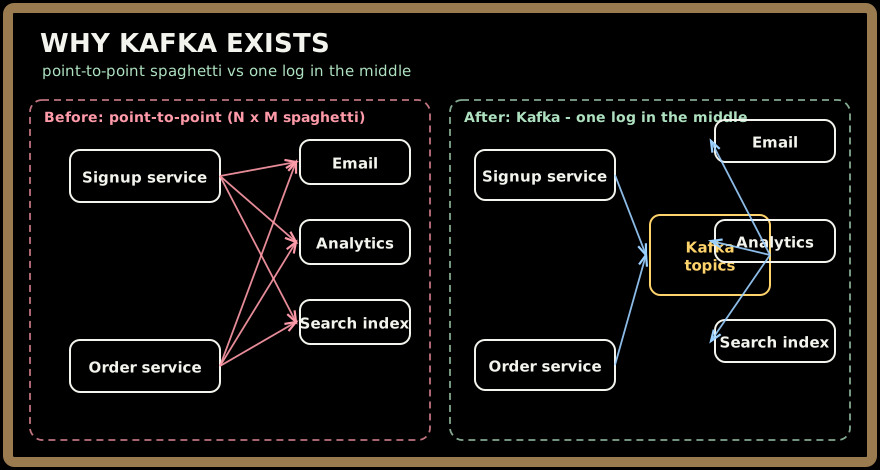
Kafka's answer is to put a durable log in the middle. Producers write events once, to a topic, and stop caring who reads them. Any number of consumers subscribe independently — the email service, the analytics job, a brand-new machine-learning pipeline added next year — each reading the same history at its own pace without the producer ever knowing they exist. This is the Publish–Subscribe Pattern (there's a dedicated sibling topic on it) taken to an industrial scale, and it turns N×M into N+M.
Two properties make Kafka more than "pub/sub with extra steps":
- Durability and replay. Because records are stored on disk and retained (not deleted on read), a consumer can rewind and re-process history — to backfill a new system, recover from a bug, or rebuild a cache. A traditional queue forgets a message the instant it's delivered.
- Throughput. Kafka was built to swallow firehoses — millions of events per second — by doing something databases avoid: only ever appending sequentially to disk and letting the OS do the heavy lifting. We'll see exactly how in Part 2.
💡 The mental unlock: stop thinking "message queue" and start thinking "an ever-growing, replayable ledger that many teams read independently." Kafka is closer to a Write-Ahead Log (the sibling WAL topic — the same append-first-for-durability discipline your database uses internally) exposed as a shared, network-accessible service.
2. Core concepts & vocabulary
Here is the whole mental model. Learn these six words and you can read any Kafka design.
Topic. A named stream of records — user-signups, payments, page-views. It's the logical feed you produce to and subscribe from. Think of it as one category of ticket (all the grill orders).
Partition. A topic is physically split into one or more partitions, and each partition is one ordered, append-only log — one ticket rail. This is the key to scale: partitions let one topic spread across many machines and be read in parallel. Every record in a partition gets a monotonically increasing offset — 0, 1, 2, 3… — its permanent position on the rail.
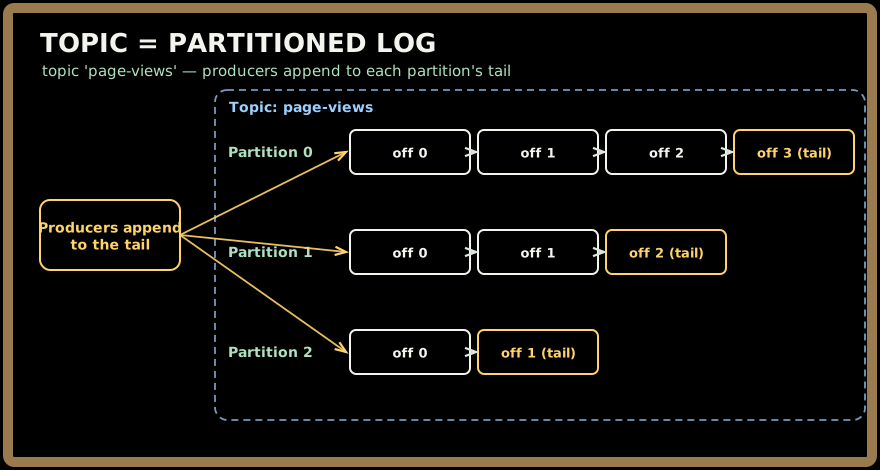
⚠️ Ordering is guaranteed within a partition, never across partitions. All grill tickets on rail 0 are in order relative to each other, but a ticket on rail 0 and one on rail 1 have no defined order. This one fact drives most Kafka data-modeling decisions — remember it.
Record (message). A single entry: an optional key, a value (the payload bytes), a timestamp, and headers. The key matters enormously — it decides which partition the record lands in (Part 2).
Producer. A client that appends records to a topic. It decides the target partition — usually by hashing the record's key, so all records with the same key land on the same partition and stay in order (all of user alice's events on one rail).
Consumer & Consumer Group. A consumer reads records forward from a partition, tracking its offset — its magnet on the rail. Consumers band into a consumer group (a group.id) to share work: Kafka assigns each partition to exactly one consumer in the group, so the group as a whole processes every record once, in parallel.
Here's the subtlety that trips people up, and it's the pass-with-two-teams picture:
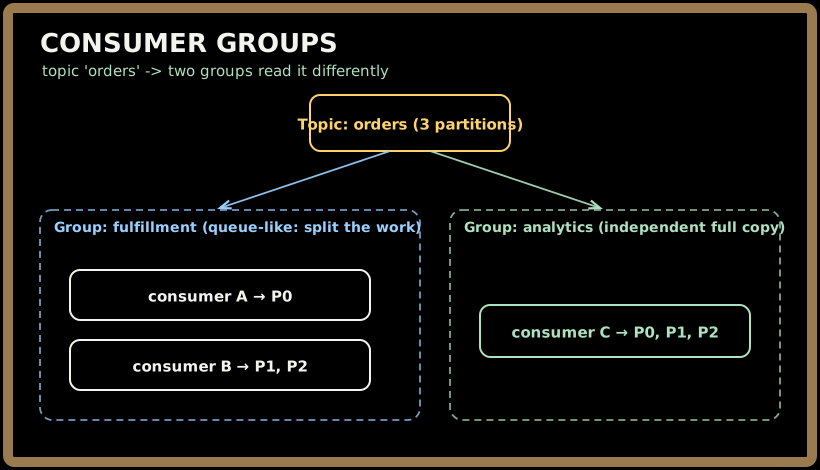
- Within one group, partitions are divided up — that's queue-like load balancing. The grill team splits the rails.
- Across groups, everyone gets everything — that's pub/sub. The salad team reads the same rails as the grill team, with its own separate magnets.
So Kafka is a queue and a pub/sub system at once, and which one you get depends purely on whether readers share a group.id.
Broker. A single Kafka server. A cluster is a set of brokers; partitions (and their replica copies) are spread across them. A broker is where the rails physically hang. We'll go deep on brokers, leaders, followers, and replication in Parts 2 and 3.
Quick check before moving on:
3. How you actually use it
Enough theory — here's the shape of real code. Producing an event is three lines of intent: pick a topic, pick a key, send a value.
// Producer: append a payment event, keyed by account so all of
// one account's events land on the same partition (stay ordered).
var record = new ProducerRecord<>("payments", accountId, paymentJson);
producer.send(record);   // async; batched under the hood (Part 2)
Consuming is a poll loop — you ask for the next batch of records from your assigned partitions, process them, then commit your offset so a restart resumes where you left off:
consumer.subscribe(List.of("payments"));          // group.id set in config
while (running) {
    var records = consumer.poll(Duration.ofMillis(200));
    for (var rec : records) {
        process(rec.key(), rec.value());          // do the work
    }
    consumer.commitSync();                         // "move my magnet forward"
}
And creating the topic is where you make the two decisions that matter most for the life of that stream — partition count (your ceiling on parallelism) and replication factor (your durability):
kafka-topics.sh --create --topic payments \
  --partitions 12 \           # up to 12 consumers in a group can work in parallel
  --replication-factor 3      # 3 copies of every partition → survive 2 broker losses
💡 Partition count is a capacity decision you'll regret getting wrong. A consumer group can have at most as many working consumers as there are partitions — 12 partitions means a 13th consumer sits idle. You can add partitions later, but doing so changes key-to-partition mapping and breaks per-key ordering for existing keys, so teams tend to over-provision partitions up front. We'll do the sizing math in Part 4.
Quick check before moving on:
4. When to reach for Kafka — and when not
Kafka is the right answer to a recognizable shape of problem:
- Event streaming / event-driven architecture: services emit events ("order placed," "user clicked") that many downstream systems react to independently.
- Log & metrics aggregation: funnel logs/telemetry from thousands of hosts into one durable pipeline (compare the sibling Scribe log-aggregation topic).
- Stream processing: feed real-time computation engines like Apache Flink or Apache Storm (sibling topics) that read Kafka, transform, and write results back.
- Decoupling & buffering: absorb a traffic spike so a slow downstream service can catch up at its own pace instead of falling over.
- Event sourcing / the log as source of truth: the ordered log is your system of record; state is a projection you can rebuild by replaying it (see the sibling CQRS topic).
When to reach for something else:
| You need… | Reach for instead | Why |
|---|---|---|
| Request/reply with a per-message reply | A queue (RabbitMQ, SQS) or RPC | Kafka has no built-in reply-to; it's one-way flow |
| Complex per-message routing, priorities, TTL, dead-letter | A traditional broker (RabbitMQ) | Kafka's dumb-log model deliberately omits these |
| Low-latency point-to-point tasks, few messages | Redis Pub/Sub or a simple queue | Kafka's throughput machinery is overkill |
| Store & query current state by key | A database (Cassandra, DynamoDB, Redis) | Kafka is a log, not a random-access store |
💡 The tell: if you find yourself wanting to query the data by key, update a record in place, or delete one message, you want a database, not Kafka. Kafka's superpower is the ordered, append-only, replayable stream — the moment you fight that grain, you've picked the wrong tool.
Key takeaways
- Kafka is a distributed commit log, not a queue. Producers append; consumers read forward from an offset they control; reading doesn't consume. Durability + replay is the whole point.
- The hierarchy is topic → partitions → ordered offsets. Ordering holds within a partition only. Partitions are the unit of parallelism and the unit of scale.
- Keys decide partitions. Same key → same partition → preserved order for that key. This is the single most important modeling lever.
- Consumer groups give you both models at once: split work within a group (queue), and every group gets a full independent copy (pub/sub) — determined entirely by
group.id. - Reach for Kafka for high-throughput event streaming, log aggregation, and decoupling; reach elsewhere for request/reply, rich routing, or keyed queries.
Test yourself on this part's key ideas:
Next, Part 2 zooms into a single broker to answer the question that makes Kafka fast: how does it append millions of records a second to disk without breaking a sweat? We'll follow the write path, dissect the on-disk log segments, and unpack the zero-copy read that lets one broker feed a firehose of consumers.