Object Storage (S3 & Azure Blob) — Part 1: Foundations & Core Concepts
maang.io System Design Series
What is this?
Picture the coat check at a stadium that seats a hundred million people. You walk up, hand the attendant your coat, and get back a small paper ticket with a number on it. You have no idea which rack, which room, or which floor your coat ends up on — and you don't care. When you come back, you hand over the ticket and your exact coat reappears. Behind the counter, the attendant quietly made a few copies of your coat and stashed them in different buildings, so that even if one building burns down, your coat survives. Coats you'll grab tonight stay near the door; coats checked for the winter get carted to a deep basement vault that takes a few hours to retrieve.
That coat check is object storage. You hand it a blob of bytes (your "coat"), it hands you back a key (your "ticket"), and it takes full responsibility for where the bytes physically live, how many copies exist, and how safe they are. You never think in terms of disks, sectors, or folders. You think: "here's a thing, give me a name for it, and don't ever lose it."
Amazon S3 (Simple Storage Service) and Azure Blob Storage are the two coat checks that basically run the internet. They are not two different concepts — they are two implementations of the same concept, with different vocabulary. Learn one and you've learned both. Throughout these three chapters we'll keep coming back to the planetary coat check.
The one-line idea: Object storage is a giant, flat, key-to-bytes dictionary that stores your data as self-describing objects (bytes + rich metadata + a unique key), replicates them across failure domains for near-perfect durability, and hands them back over a simple HTTP API — trading the features of a filesystem (partial edits, rename, directories) for essentially infinite scale and eleven-nines durability.
1. Why object storage exists — what was painful before
Before object storage, if you wanted to keep a few petabytes of user photos, you had two families of storage, and both hurt at scale.
Block storage — the raw disks and SANs underneath your databases and VMs (Amazon EBS, Azure Managed Disks). The system hands you a blank block device; you put a filesystem on it, you manage capacity, you handle the RAID and the backups. It's fast and it supports in-place writes, but a single volume has a hard size ceiling, it attaches to one machine at a time, and growing it to "all the photos on earth" is your problem to solve, disk by disk.
File storage — a shared network filesystem (NFS, SMB, Amazon EFS, Azure Files). Nicer to use — real directories, real paths, many clients mount it at once — but the directory tree itself becomes the bottleneck. Every open("/a/b/c/photo.jpg") walks a hierarchy; a folder with ten million entries crawls; and the metadata server that owns the tree is a scaling chokepoint. Filesystems were designed for thousands of files, not tens of billions.
Both share a deeper problem: they make you responsible for durability and scale. If a disk dies at 3 a.m., that's your pager.
Object storage was born (S3 launched in 2006) from a simple, radical trade: throw away the directory tree and the in-place editing, and in exchange get a system that scales to trillions of objects and guarantees it won't lose your data. Instead of a hierarchy of folders, you get one enormous flat namespace — a single dictionary from key → object. Instead of managing disks, you make an HTTP request. Instead of hoping your backups work, you get eleven nines of durability as a contractual number. That trade is why nearly every large system today parks its bulk data — images, video, backups, logs, data-lake tables — in an object store.
2. Core concepts & vocabulary — the mental model
Here's the whole model. It's small on purpose.
The object
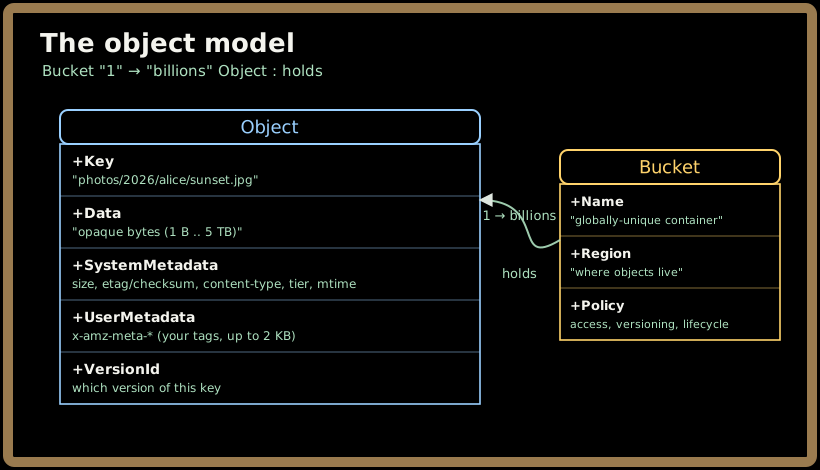
An object is three things bundled together:
- The data — an opaque blob of bytes. The store doesn't parse it or care what it is; a JPEG, a 2 TB video, a Parquet file, a database backup — all just bytes.
- Metadata — a set of key-value tags describing the object. Some is system metadata (size, last-modified time, content-type, checksum, storage tier); some is user-defined metadata you attach yourself (
x-amz-meta-owner: alice, up to 2 KB on S3). This is the "self-describing" part — the object carries its own description, so you don't need a separate database row just to know what it is. - A key — the globally unique name within its bucket that you use to store and fetch it. This is your coat-check ticket.
The bucket (a.k.a. container)
Objects live in a bucket (S3's word) or a container (Azure's word). A bucket is a top-level namespace with a region, an access policy, and settings like versioning and lifecycle rules. Azure adds one level above: a storage account contains containers, which contain blobs. Same shape, one extra tier.
The flat namespace — there are no folders
This is the concept people trip on, so read it twice. Object storage has no directories. The key photos/2026/alice/sunset.jpg looks like a path, but it is just a string — one flat key in one flat dictionary. The slashes are characters, not folder boundaries.
What about the "folders" you see in the S3 console or Azure Storage Explorer? Pure illusion. The console asks the store, "list keys starting with the prefix photos/2026/ and group by the next /," and paints the result as if it were a folder tree. There is no folder object; there's a prefix (a leading substring of the key) and a delimiter (usually /). This matters enormously for how listing scales — we'll see in Part 2 that a LIST is really a range scan over a sorted index of keys, which is why listing a "folder" with a billion objects is a very different beast from ls on your laptop.
💡 A useful reflex: whenever you catch yourself thinking "which folder is this in?", translate it to "what prefix does this key start with?". The store only knows about keys and prefixes. That mental switch is what separates people who use S3 from people who understand it.
The HTTP API
You talk to the coat check over plain HTTPS, and the verbs are tiny:
- PUT
bucket/key— store an object (create or overwrite the whole thing). - GET
bucket/key— fetch it (optionally a byte range). - HEAD
bucket/key— fetch just the metadata, not the bytes. - DELETE
bucket/key— remove it. - LIST
bucket?prefix=…— enumerate keys under a prefix.
That's essentially the whole surface. No seek, no "write 4 KB at offset 900,000", no rename. To "edit" an object you replace the whole thing; to "rename" you copy to a new key and delete the old one. That poverty of operations is exactly what buys the scale.
Durability vs availability — two different promises
Two numbers that people constantly conflate:
- Durability = "will my bytes still be here later?" S3 Standard is designed for 99.999999999% — eleven nines. Store 10 million objects and you'd statistically expect to lose one every 10,000 years. Achieved by keeping many redundant copies (or erasure-coded fragments) across independent failure domains.
- Availability = "can I reach my bytes right now?" S3 Standard targets 99.99% availability — a few nines lower. A network blip or a zone outage can make an object briefly unreachable without it being lost.
You almost never lose data; you occasionally can't reach it for a moment. Keep those separate — interviewers love catching people who say "eleven nines of availability."
The consistency story
For years the famous caveat was "S3 is eventually consistent." As of December 2020, S3 provides strong read-after-write consistency for every operation, automatically and for free: the moment a PUT returns success, any subsequent GET or LIST anywhere sees the new object. Azure Blob has always been strongly consistent within a region. We'll dig into how they pull that off — and where consistency still gets fuzzy (geo-replicated secondaries) — in Part 2. For now: within one region, what you wrote is what you'll read.
3. How you actually use it — a concrete example
Enough theory. Here's the shape of real usage, in the AWS CLI and SDK. (Azure's is analogous — az storage blob upload, etc.)
# Store an object. The key is "photos/2026/alice/sunset.jpg" — just a string.
aws s3api put-object \
  --bucket my-app-media \
  --key "photos/2026/alice/sunset.jpg" \
  --body ./sunset.jpg \
  --content-type image/jpeg \
  --metadata owner=alice,album=summer   # user-defined metadata

# Fetch just the metadata (a HEAD) — cheap, no bytes transferred.
aws s3api head-object --bucket my-app-media \
  --key "photos/2026/alice/sunset.jpg"

# "List the folder" — really: scan keys under a prefix, grouped by "/".
aws s3api list-objects-v2 --bucket my-app-media \
  --prefix "photos/2026/alice/" --delimiter "/"
The single most important pattern in real systems is the presigned URL. Your application servers should almost never have gigabytes of user uploads flowing through them — that's a waste of bandwidth and a scaling nightmare. Instead:
# Your backend generates a short-lived, signed URL granting ONE operation.
url = s3.generate_presigned_url(
    "put_object",
    Params={"Bucket": "my-app-media", "Key": "photos/2026/alice/sunset.jpg"},
    ExpiresIn=300,   # valid for 5 minutes
)
# You hand `url` to the browser. The browser uploads the file DIRECTLY to S3.
# Your server never touches the bytes — it just minted a time-limited ticket.
A presigned URL is a coat-check ticket you can hand to a friend: it carries a cryptographic signature that says "the bearer may PUT this one key until 5 minutes from now," and nothing else. Azure's equivalent is a SAS (Shared Access Signature) token. This one pattern — offload the byte transfer to the object store, keep only the metadata in your database — is the backbone of every "design Instagram / YouTube / Dropbox" answer, and we'll build it fully in Part 3.
4. When to reach for it — and when not
Reach for object storage when the data is:
- Large and blobby — images, video, audio, PDFs, ML model artifacts, database backups, big log files.
- Written once, read many (or rarely mutated) — you replace whole objects, you don't edit them in place.
- Bulk / unbounded in volume — you want to stop thinking about capacity forever.
- The substrate for other systems — the data lake that Spark, Athena, or Azure Synapse Analytics query; the backing store for a CDN; the durable landing zone for a Kafka-fed pipeline.
Reach for something else when:
| You need… | Use instead | Why object storage is wrong |
|---|---|---|
| In-place edits, low-latency random writes, a boot volume | Block storage (EBS, Azure Disks) | Objects are replace-whole; no partial writes, higher per-op latency |
| A POSIX filesystem many hosts mount, real directories, rename | File storage (EFS, Azure Files) | No true directories, no atomic rename, no file locks |
| Rich queries, indexes, joins, transactions | A database (SQL, DynamoDB, MongoDB) | An object store can only look up by exact key + prefix scan |
| Full-text search over content | Elasticsearch / Apache Lucene | The store never parses your bytes |
| Millions of tiny records with sub-ms access | A database or Redis | Per-object overhead + request cost make tiny objects painful |
🚫 The classic misuse is treating an object store like a filesystem or a database: millions of 2 KB objects you constantly rename and re-list, or using
LISTas a query engine. It'll technically work and then fall over on cost and latency. If you're renaming and editing, you want a filesystem; if you're querying, you want a database. Object storage is for big, immutable-ish blobs you fetch by name.
5. Key takeaways
- An object = bytes + rich metadata + a unique key, living in a flat namespace (a bucket/container). There are no real folders — "paths" are just key strings, and "folders" are a console illusion over key prefixes.
- It exists to escape the pain of managing disks and directory trees at scale: you trade a filesystem's features (partial writes, rename, hierarchy) for essentially infinite capacity and eleven-nines durability delivered over a tiny HTTP API (
PUT/GET/HEAD/DELETE/LIST). - Durability ≠ availability. Eleven nines means you virtually never lose data; ~four nines availability means you occasionally can't reach it for a moment. Keep the two promises separate.
- S3 and Azure Blob are the same idea in two dialects (bucket/container, presigned URL/SAS). Modern S3 and Azure Blob are both strongly consistent within a region — what you PUT is immediately what you GET.
- Reach for it for big, blobby, write-once-read-many data; reach elsewhere for in-place edits (block), POSIX semantics (file), or querying (a database). The killer pattern is presigned URLs — let clients talk to the store directly and keep only metadata in your DB.
Next, Part 2 goes behind the counter: how the coat check actually stores your bytes across failure domains (replication vs erasure coding), how a PUT and a GET flow through the front-end, index, and storage layers, how it delivers strong consistency, and the tuning knobs and failure modes a Staff engineer must know.