MongoDB — Part 1: Foundations & Core Concepts
maang.io System Design Series
What is this?
Imagine you run the records office for a busy hospital. A patient walks in and you need everything about them: their contact details, insurance, every past visit, the prescriptions from each visit, the notes the doctor scribbled. There are two ways to organize that.
The relational way is a room full of filing cabinets, one cabinet per kind of thing: a "patients" cabinet, a "visits" cabinet, a "prescriptions" cabinet, an "addresses" cabinet. To assemble one patient's full story you open five cabinets and cross-reference IDs by hand. Tidy, no duplication — but every question means a treasure hunt across drawers.
The document way is one manila folder per patient. Open the folder and everything is right there — profile on top, visits clipped behind it, each visit's prescriptions stapled to that visit, addresses tucked in a pocket. One reach, one folder, the whole story. That folder is a MongoDB document, and that drawer of similar folders is a collection.
MongoDB is a document database: instead of rows spread across rigid tables, it stores rich, self-contained, JSON-like documents that keep related data together. We'll return to this records-office image again and again — it's the mental model that makes every internal decision (in Parts 2 and 3) click.
The one-line idea: MongoDB stores data as documents — flexible, nested, JSON-shaped folders that hold everything about one entity in one place — so the data on disk matches the shape your application actually reads, and the "join five tables" treasure hunt mostly disappears.
Let's unpack what a document really is, why anyone wanted this, and how you'd use it in anger.
1. Why MongoDB exists — the pain it removed
For decades the default was a relational database (Postgres, MySQL — see the SQL & Data Modeling topic). Relational databases are magnificent, but two frictions drove a whole generation of "NoSQL" stores, MongoDB among them:
- The object-relational impedance mismatch. Your application code thinks in objects: a
Userwith a list ofAddressobjects and a list ofOrderobjects. A relational database thinks in flat tables. So you spend real effort — and an ORM — shredding one object into four tables on write and gluing four tables back into one object (viaJOINs) on read. It works, but it's a tax you pay on every read and every write. - Rigid schemas fight fast-moving products. Adding one field to a big relational table can mean a migration and a locked table. Early-stage products change their data shape weekly. Teams wanted to add a field to some records without a ceremony.
MongoDB's bet: store the object roughly as the object — a nested document — so there's little shredding and gluing, and let the schema be flexible so the shape can evolve per-document. That's the "what was painful before" in one breath: assembling and evolving richly-nested data on top of flat tables was expensive; documents make the common case cheap.
💡 This does not make MongoDB "better than SQL." It makes a different trade. You'll see the cost in Part 4 — you give up cheap ad-hoc joins and some relational guarantees. The skill is knowing which trade fits your workload. (The SQL vs NoSQL topic frames this head-to-head.)
2. The core vocabulary — the mental model
Map the relational words you know onto MongoDB's, then learn the two words that are genuinely new.
| Relational | MongoDB | In the records office |
|---|---|---|
| Database | Database | The building |
| Table | Collection | A drawer of similar folders |
| Row | Document | One folder |
| Column | Field | A labeled item inside the folder |
| Primary key | _id (always present, always indexed) |
The tab/serial number on the folder |
JOIN |
Embedding, or $lookup |
Staple pages in, or a sticky note to another folder |
A document is a set of field/value pairs, and — this is the crucial part — a value can itself be a document or an array of documents. Documents nest. That's what lets one folder hold a whole story.
A collection is just a bag of documents. Unlike a table, it does not enforce that every document has the same fields. Two documents in the same collection can have different shapes. (You can opt into schema validation rules — and mature teams usually do — but the engine doesn't require it.)
2.1 BSON — the folder format
Documents look like JSON, but on the wire and on disk MongoDB stores BSON — Binary JSON. BSON matters for three concrete reasons a Staff engineer should be able to name:
- Richer types than JSON. JSON only has strings, numbers, booleans, arrays, objects, null. BSON adds the types you actually need in a database: a proper 64-bit integer, a
Decimal128for money (no float rounding), a nativeDate, binary blobs, and theObjectId. - Traversable and length-prefixed. Each document and sub-field is length-prefixed, so the engine can skip fields it doesn't need without parsing the whole thing — important for the read path in Part 2.
- The 16 MB document limit. A single BSON document is capped at 16 MB. This isn't arbitrary bureaucracy — it's the guardrail that stops you embedding an unbounded, ever-growing array into one folder until it becomes a monster. Remember this number; it drives the embed-vs-reference decision below.
The _id field deserves a special mention. Every document has one, it's unique within the collection, and it's automatically indexed. If you don't supply one, MongoDB generates an ObjectId: a 12-byte value made of a 4-byte timestamp, a 5-byte random value, and a 3-byte incrementing counter. Two useful consequences: _ids are globally unique without coordination (great for distributed inserts), and because the leading bytes are a timestamp, an ObjectId is roughly time-ordered.
Quick check before moving on:
3. The one decision that defines your schema: embed vs reference
This is the heart of data modeling in MongoDB, and it's where the records-office analogy pays off. For any related pieces of data you have two choices:
- Embed — staple the related data inside the folder (a sub-document or array). One read gets everything.
- Reference — keep the related data in its own folder in another drawer, and store its
_idas a pointer (a sticky note). You "follow the note" with a second read or a$lookup.
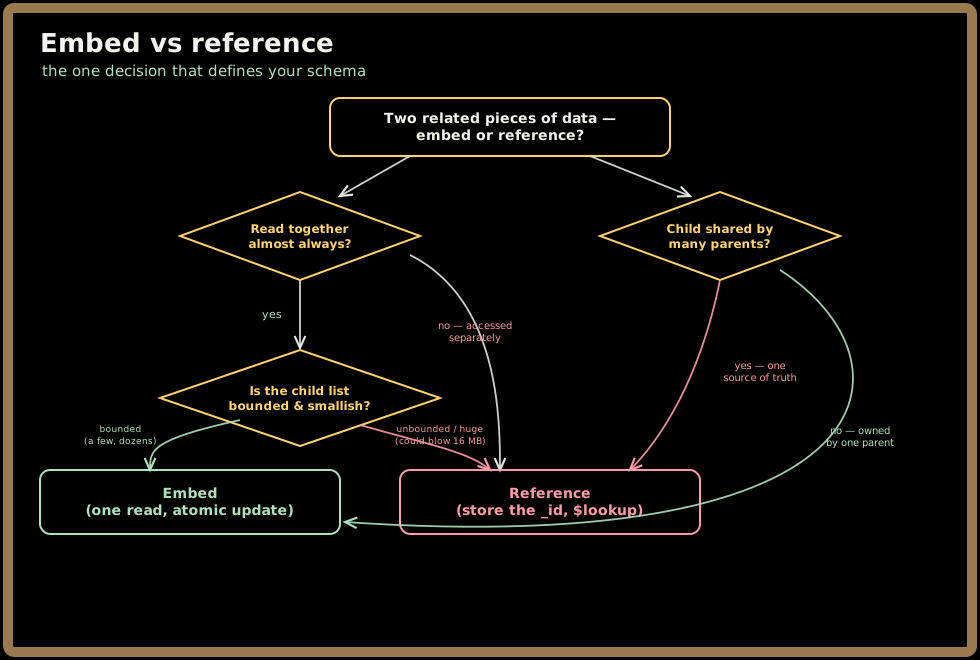
The rules of thumb that fall out of this:
- Embed when the data is read together, "belongs to" one parent, and is bounded — a patient's addresses, an order's line items, a blog post's comments if you don't expect millions of them. Embedding gives you one-read locality and atomic single-document updates (a write to one document is always all-or-nothing — more on that in Part 2).
- Reference when the child is large, unbounded, or shared. A patient's entire lifetime of visits will eventually exceed 16 MB and should be its own collection. A
productreferenced by a millionordersshould live once and be pointed at, not copied a million times.
⚠️ The classic beginner footgun is unbounded embedding: modeling
commentsas an array inside apostdocument. It's lovely for the first 50 comments and a disaster at 50,000 — the document balloons toward 16 MB, every tiny update rewrites the whole growing document, and reads drag the whole thing over the wire. When a child list can grow without limit, reference it. (This is the document-model cousin of Cassandra's "huge partition" trap from the Apache Cassandra topic.)
Quick check before moving on:
4. How you actually use it
Enough theory — here's the shape of real usage. A single patient folder, embedded model:
// One document in the "patients" collection.
db.patients.insertOne({
  _id: ObjectId("..."),
  name: "Ada Lovelace",
  dob: ISODate("1990-12-10"),
  insurance: { provider: "BlueCross", memberId: "BC-8891" }, // embedded sub-doc
  addresses: [                                               // embedded array
    { type: "home", city: "London", zip: "SW1" }
  ],
  recentVisits: [                                            // bounded: last few only
    { date: ISODate("2026-06-01"), reason: "checkup", bp: "120/80" }
  ]
})
Reading it back is a query by example — you describe the shape you want:
// Find one patient by id — one folder, everything in it, no joins.
db.patients.findOne({ _id: ObjectId("...") })

// Find everyone in London who saw us since June, newest first.
db.patients.find(
  { "addresses.city": "London", "recentVisits.date": { $gte: ISODate("2026-06-01") } }
).sort({ name: 1 })
Notice "addresses.city" — dot notation reaches into nested documents and arrays, and you can index those nested paths too (Part 3). Updates target fields surgically without rewriting your own copy of the document:
// Push a new visit onto the array atomically; no read-modify-write in your app.
db.patients.updateOne(
  { _id: ObjectId("...") },
  { $push: { recentVisits: { date: ISODate("2026-07-05"), reason: "flu" } } }
)
That $push is a single-document write, so it's atomic — no other reader ever sees a half-updated folder. Hold onto that; it's a load-bearing guarantee we'll lean on in Part 2, and the reason "keep what changes together in one document" is such good MongoDB advice.
For anything beyond a simple find — grouping, joining, reshaping — you reach for the aggregation pipeline, a sequence of stages that each transform a stream of documents. We'll dig into it in Part 3, but here's the flavor:
// How many visits per city this year? (grouping = the SQL GROUP BY analogue)
db.patients.aggregate([
  { $unwind: "$recentVisits" },
  { $group: { _id: "$addresses.city", visits: { $sum: 1 } } },
  { $sort: { visits: -1 } }
])
5. When to reach for it — and when not
MongoDB fits a recognizable shape of problem:
- Your data is naturally a document — hierarchical, self-contained entities you read as a whole: user profiles, product catalogs, content/CMS, IoT device state, order records, game state.
- The schema evolves fast or varies across records (a catalog where a book and a fridge have wildly different attributes).
- You want to scale out horizontally across commodity nodes with built-in sharding and replication (Part 3), rather than scaling one big box up.
- Read patterns are key- or document-centric — "give me this thing and everything about it."
Reach for something else when:
| If you need… | Prefer… | Why |
|---|---|---|
| Rich ad-hoc queries, many-way joins, reporting | Relational (SQL & Data Modeling) / OLAP | Documents optimize the known read, not arbitrary joins |
| A pure key→value cache or ephemeral store | Redis | Simpler, in-memory, lower latency |
| Extreme write-volume, wide-column, time-series at massive scale | Apache Cassandra / Amazon DynamoDB | LSM write path, masterless writes |
| Deeply connected, relationship-first data (social graphs, recommendations) | Neo4j (Graph Database) | Traversals are the native operation |
| Full-text search and relevance ranking | Elasticsearch / Apache Lucene | Inverted indexes and scoring |
💡 The honest one-liner: MongoDB is a superb general-purpose operational database for document-shaped data with a flexible, evolving schema — and modern MongoDB even does multi-document ACID transactions (Part 3). It is not a drop-in replacement for a data warehouse, a graph engine, a search cluster, or a cache. Picking it for the right shape is the senior signal.
6. Key takeaways
- MongoDB stores documents, not rows — flexible, nested, BSON-encoded folders that keep an entity's data together, so what's on disk matches what your app reads and the join treasure-hunt mostly vanishes.
- The vocabulary maps cleanly: database → collection (drawer) → document (folder) → field, with a mandatory, indexed
_idon every document and a hard 16 MB per-document limit. - Embed vs reference is the modeling decision: embed bounded, read-together, owned data for one-read locality and atomic updates; reference large, unbounded, or shared data. Unbounded embedding is the classic footgun.
- Single-document writes are atomic — a fact you design toward by co-locating what changes together; it's the guarantee much of MongoDB's ergonomics rests on.
- Reach for MongoDB on document-shaped, schema-evolving, horizontally-scaled operational workloads — and reach elsewhere for heavy joins/analytics, graphs, search, or caching.
Test yourself on this part's key ideas:
Next, Part 2 opens up a single node and follows a write down into the WiredTiger storage engine — the B-tree, document-level MVCC, the journal (a write-ahead log), compression, and checkpoints — to explain why those atomicity and durability promises actually hold.