OAuth — Part 1: Foundations, Motivation & Core Concepts
OAuth represents one of the most critical components of modern authentication and authorization architectures, underpinning the security of platforms including Google, Facebook, AWS Cognito, Microsoft Identity, GitHub, and virtually every major API provider. It establishes a framework for secure delegated access, enabling applications to act on behalf of users without requiring access to their passwords.
This chapter examines OAuth from foundational concepts, providing intuitive explanations tailored for backend engineers and distributed systems architects.
What Is OAuth?
OAuth (Open Authorization) represents a standardized authorization framework that enables users to delegate limited access to their protected resources residing with third-party applications, without disclosing their password credentials.
Real-World Analogy
Imagine a valet parking service: you provide your car key (limited access token) rather than your house key (full password access). The valet can operate your car within defined boundaries but cannot access your home or other personal assets.
OAuth fundamentally provides:
- Scoped permissions with precise boundaries
- Temporal access restrictions with expiration mechanisms
- Revocable authorization that can be withdrawn at any time
- Granular permission levels beyond binary access control
Quick check before moving on:
Why OAuth Was Needed
Prior to OAuth's emergence, third-party applications typically required users to provide their complete username and password credentials for API access.
This approach introduced significant security and trust compromises:
- Applications permanently stored user credentials (creating permanent breach risks)
- Applications received unrestricted access to all user resources
- Password reuse across services created cascading compromise scenarios
- Selective access revocation proved technically infeasible
- Permission granularity was limited to all-or-nothing access patterns
OAuth resolves these architectural deficiencies through cryptographic token-based delegation rather than direct credential sharing.
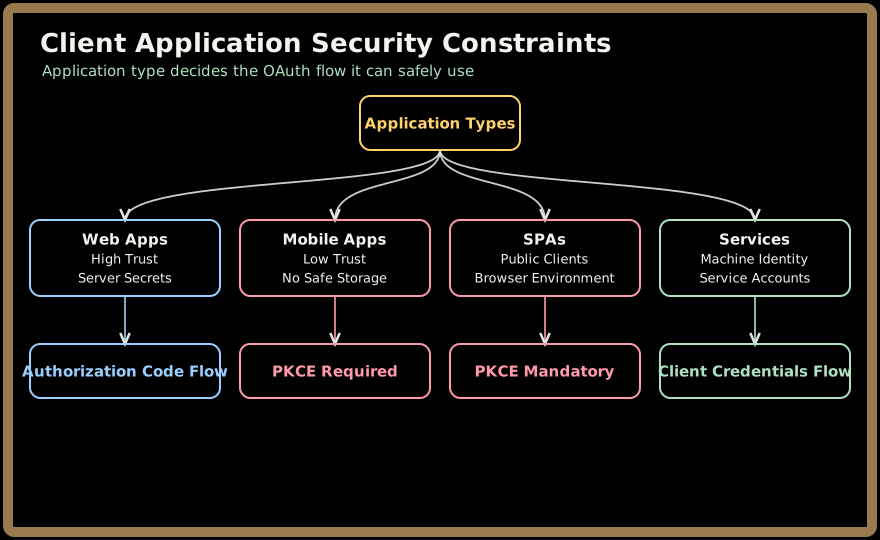
Client Application Security Constraints
Different application types present varying security challenges that influence flow selection:
| Application Type | Security Constraints | Trust Level | Example |
|---|---|---|---|
| Web Applications | Can store secrets securely server-side | High | Traditional websites |
| Mobile Apps | Reverse-engineerable, no secure storage | Low | iOS/Android apps |
| Single-Page Apps (SPAs) | Entirely public, browser-based | None | React/Vue applications |
| Backend Services | Machine identities, programmatic access | Medium | API services |
OAuth vs Authentication: A Critical Architectural Distinction
There's a fundamental misconception among many software engineers that OAuth provides user authentication. This confusion arises from OAuth's role in identity providers, but it's essential to understand the precise separation of concerns.
| Security Domain | Role | Example |
|---|---|---|
| Authentication | Identity verification and user session establishment | "Confirming you are John Doe via password/TOTP verification" |
| Authorization (OAuth) | Delegating granular permissions after authentication | "Allowing Spotify to read your Gmail contacts, but not send emails" |
Why This Matters Architecturally
- OAuth provides NO identity verification by itself - users could be anonymous attackers
- Authentication requires OAuth for modern delegated access patterns
- OAuth becomes an authentication protocol only when combined with OpenID Connect (OIDC), which adds standardized identity claims to the authorization flow
This distinction is crucial for designing secure distributed systems where authentication and authorization must scale independently.
Quick check before moving on:
Core Architectural Roles in OAuth Systems
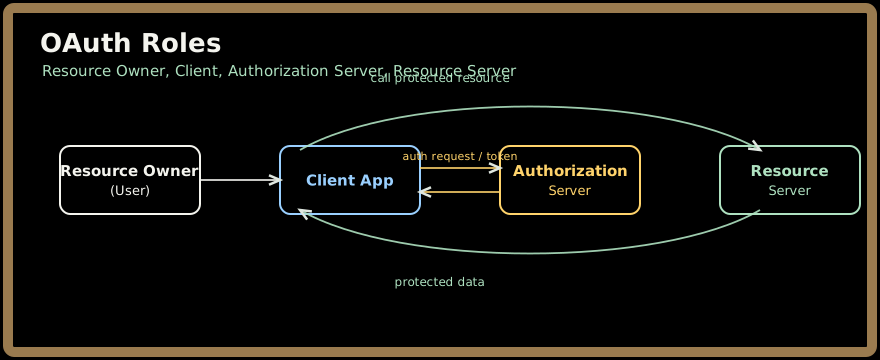
OAuth 2.0 (RFC 6749) formally defines four fundamental actors that participate in every authorization transaction. Understanding these roles is essential for implementing secure delegated access patterns.
1. Resource Owner
The entity capable of granting access to a protected resource, typically an end user.
Responsibilities: Provides explicit consent for resource access delegation.
Security Context: May be anonymous or authenticated; OAuth itself doesn't verify identity.
2. Resource Server
The server hosting the protected resources requiring access control.
Responsibilities: Validates access tokens and enforces authorization policies.
Examples: Gmail API, GitHub REST API, AWS S3 service endpoints.
3. Client Application
The application making resource requests on behalf of the resource owner.
Responsibilities: Obtains authorization and securely manages token lifecycles.
Security Classifications: Public clients (mobile/SPAs) vs confidential clients (web servers).
4. Authorization Server
The centralized authority responsible for authenticating resource owners and issuing authorization tokens.
Responsibilities: Handles login flows, consent management, and cryptographic token generation.
Examples: Google Identity Platform, Microsoft Azure AD, AWS Cognito.
Diagram: OAuth Roles
Quick check before moving on:
5. What OAuth Provides
OAuth enables:
Password-less delegated access
Users don't share credentials.
Secure token-based access
Temporary and revocable.
Scoped permissions
Examples include "read inbox", "no delete", "email only".
Token expiration
Limits the blast radius of compromise.
Revocation
Users can revoke one app without affecting others.
Delegation
Allows apps to act on behalf of users.
6. OAuth Tokens (High-Level Intro)
OAuth primarily uses:
Access Token
- Short-lived
- Included in API requests
- A "bearer token" → anyone who has it can use it
- Must be protected
Refresh Token
- Long-lived
- Used only to get new access tokens
- Never exposed publicly
- Must be stored securely
We will go deeper in Part 2.
Quick check before moving on:
7. OAuth Grant Types (Overview)
OAuth supports several "flows" depending on the type of application:
- Authorization Code Flow (Most secure, used by web & mobile)
- Authorization Code + PKCE (Required for mobile/SPAs)
- Client Credentials Flow (Service-to-service auth)
- Device Code Flow (TV devices, CLI apps)
- Refresh Token Flow (Token renewal)
- Implicit Flow (Deprecated)
- Resource Owner Password Credentials (Deprecated)
Details in Part 2.
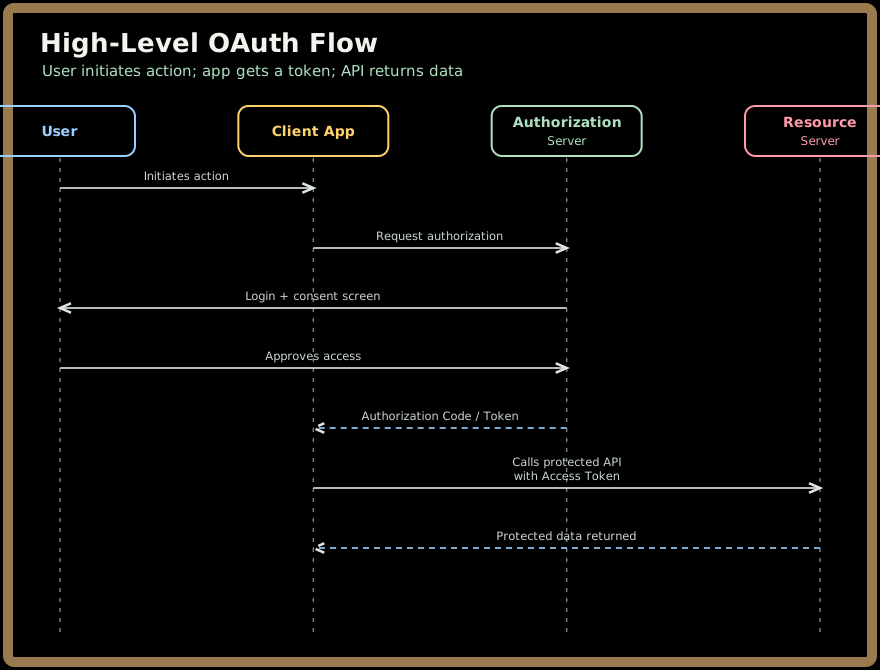
8. High-Level OAuth Flow Visualization
⭐ 9. Why OAuth Is Critical in System Design
Senior engineers must understand OAuth because it underpins:
- API security
- multi‑tenant systems
- third‑party integrations
- zero‑trust architectures
- microservice identity propagation
- token validation across distributed systems
- API Gateway auth policies
- mTLS and token binding
OAuth is a core building block for:
- Google Cloud IAM
- AWS Cognito
- Azure AD
- Auth0
- Okta
- GitHub Apps
⭐ 10. What a Staff/Principal Engineer Should Understand
A senior engineer should be able to explain:
- OAuth vs OIDC vs SAML
- Why OAuth does not provide identity by itself
- Access token vs ID token
- Why PKCE is mandatory for modern apps
- How refresh tokens work and where to store them
- Token validation using JWKS public keys
- Designing a scalable OAuth server / Identity Provider
- How API Gateways enforce OAuth policies
- Risks: token leakage, replay attacks, CSRF, XSS
- How microservices validate tokens efficiently
These will be fully covered in Parts 2–4.
Test yourself on this part's key ideas:
⭐ Summary — Part 1
You now understand:
- What OAuth is
- Why OAuth was created
- OAuth vs Authentication
- OAuth roles
- High-level token concepts
- Core flows (overview)
- System-design relevance
Next → OAuth Part 2: Grant Types, PKCE, Tokens & Internals